Two Sweetwater buyers own an AG06 MK2. One calls the preamps as good as gear that costs way more. The other says it disconnects mid stream and nobody could ever figure out why 🎛️
Affiliate links below. As an Amazon Associate I earn from qualifying purchases.
Direct answer first. The Yamaha AG06MK2 is a 6-channel USB-C streaming mixer with two phantom powered mic inputs, onboard DSP effects, and a LOOPBACK mode that mixes your computer audio back into your stream.
Buy it if you stream or podcast with one guest and want hardware knobs instead of software sliders. Skip it if you need more than two mic inputs or a fully bulletproof USB connection.
Here is the stat that hooked me. Yamaha lists the AG06MK2 at just 900 mA of power draw, so it runs off a phone charger’s worth of USB power while driving two condenser mics at once.
By the end of this Yamaha AG06MK2 review, you will know what the DSP effects actually do, why some owners report dropouts, and whether this beats a plain audio interface for your setup.
This guide draws on Yamaha’s official documentation, independent reviews, retailer owner reviews, and forum comments. It does not rest on bench testing, so I name the source whenever I share someone’s experience.
What Is the Yamaha AG06MK2?
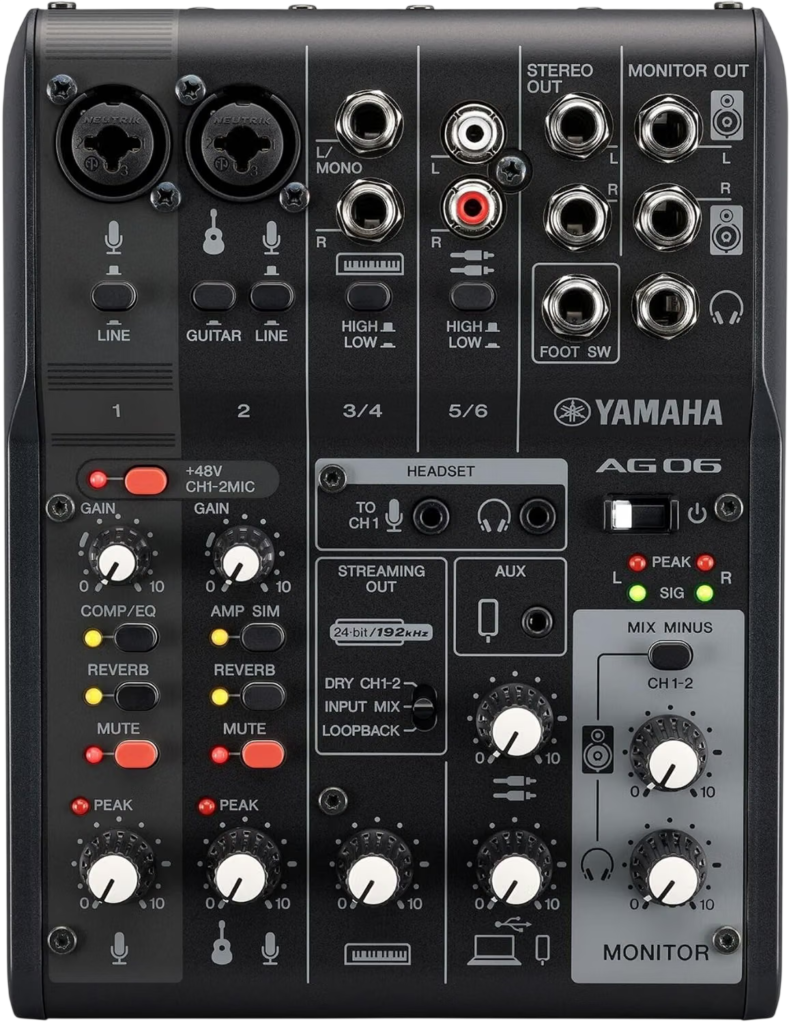
The Yamaha AG06MK2 is a desktop mixer built specifically for streaming, with a USB audio interface built in.
Yamaha designed it around a real mixing console layout, with physical knobs for level, tone, and effects rather than a software panel you have to open every time.
| Feature | Yamaha AG06MK2 |
|---|---|
| Mic inputs | 2 combo XLR/TRS (CH1, CH2), both with +48V phantom power |
| Hi-Z input | CH2 only, for guitar or bass |
| Line inputs | Stereo 1/4 inch pair, stereo RCA pair |
| Smartphone I/O | 4-pole TRRS mini jack, plus a 3.5mm headset mic input on CH1 |
| Onboard DSP | COMP/EQ, SPX Reverb, AMP SIM |
| Functions | Mute button, 2 PAD buttons, HI-Z button, STREAMING OUT select, MIX MINUS MIC on or off |
| USB audio | 2 in, 2 out, USB Audio Class 2.0, up to 192 kHz, 24 bit, USB-C |
| Power | USB bus power, 5V DC at 900 mA, 4.5 W max consumption |
| Size and weight | 152 x 63 x 201 mm, 0.9 kg (2.0 lb) |
| Bundled software | Cubase AI, WaveLab Cast, Rec’n’Share, Cubasis LE compatible |
Specs come from Yamaha’s official AG06MK2 specifications page.
What changed from the original AG06?
Three real upgrades. B&H’s listing spells them out clearly.
- A dedicated mute button, which the original AG06 did not have
- USB-C instead of USB-B, plus updated internal circuitry Yamaha says improves sound quality
- An upgraded 4-pole TRRS jack for more flexible phone connections
The core layout, the two mic inputs, and the DSP effects carried over from the original design.
How Does the Yamaha AG06MK2 Sound?
Clean for the price, with a bit of character.
A Sweetwater buyer with an Audient EVO 8 for comparison called the Mk2 preamps as good as his Mackie ProFX6v3 Onyx preamps. Another Sweetwater reviewer went further, saying the preamps are better than most and would suit a professional voiceover setup.
Not every review is glowing. A tester writing for musicngear.com called the preamps slightly colored but usable, clean enough for demos, podcasting, and basic vocal or acoustic guitar tracking, while noting they show budget class limits when pushed hard.
My take is simple. This is not a transparent studio preamp, and it does not need to be. For streaming and podcasting at normal levels, owners across multiple reviews say it holds up 🎤
What do the onboard DSP effects do?
Three effects, each with a dedicated knob. Yamaha lists COMP/EQ, SPX Reverb, and an AMP SIM for guitar.
You control the details through the free AG Controller app, in Simple or Detail mode. A Sweetwater reviewer who uses the AG06 Mk2 as his main office interface calls the DSP control software pretty useful.
One heads up. A different Sweetwater buyer ran the mixer into a Bose S1 Pro and hit feedback until they turned the reverb off, then had little trouble.
This walkthrough covers the full control layout and shows the AG Controller software in action 👇
How Does LOOPBACK Work?
LOOPBACK sends audio from apps on your computer back into the mix that goes out to your stream.
Yamaha’s manual describes it as mixing all input signals with audio from your computer and sending the combined signal back out, ideal for streaming with background music or sound effects layered under your voice.
A dedicated STREAMING OUT selector lets you choose exactly what goes to your viewers. Yamaha’s spec sheet lists three options, your dry mic only, the full input mix, or the loopback blend.
What is Mix Minus?
It stops your own voice from echoing back to a remote caller.
Yamaha lists a dedicated MIX MINUS MIC function you switch on or off. Turn it on when a guest calls in over the phone jack or USB, so they hear everyone but themselves.
Why Do Some Owners Report USB Dropouts?
This is the real complaint pattern across owner reviews, and it deserves a straight answer.
One Sweetwater buyer reported the mixer constantly disconnecting from the internet while streaming, with a brief cutoff even during normal listening. Sweetwater’s own support team witnessed the issue directly and still could not pin down the cause.
A different reviewer, on the original AG06, had a more specific fix. They found the mixer worked without official drivers, but not correctly, and installing them cleared up the trouble.
A tester on musicngear.com hit short pops and momentary stuck audio during a couple of sessions, and solved it by switching USB ports and adjusting the buffer size in their recording software.
My honest read. This is not universal, since plenty of owners report zero issues, but if you hit dropouts, install Yamaha’s drivers first, then try a different USB port and cable before assuming the unit is faulty ⚡
Can You Use a Phone With the AG06MK2?
Yes, through the 4-pole TRRS jack, not through USB.
Yamaha’s own user guide is specific here. When you connect an iPhone or iPad over USB for apps like Zoom, Skype, or FaceTime, the sound from those apps will not come through the mixer. You need the TRRS cable for that.
For streaming apps like Twitch or YouTube Live from a phone, the same rule applies. Connect with the TRRS cable, not USB, or your stream audio stays silent.
The free AG Controller app is available for iOS too, so you can adjust DSP settings from your phone once it’s connected correctly.
How Many Channels Does the USB Send to Your Computer?
Two. Yamaha lists the USB audio spec as 2 in, 2 out.
A Sweetwater reviewer who also owns an Audient EVO 8 points this out directly. Their EVO 8 sends 4 USB channels, while the AG06MK2 sends only 2, meaning both mic inputs get combined into one stereo signal rather than landing on separate tracks in your DAW.
That reviewer’s workaround was simple. Record one source, then overlay a second pass rather than expecting separate simultaneous tracks.
If separate tracks per mic matter for editing a two host podcast, that is worth knowing before you buy. Our best 4 XLR input audio interface guide covers options built around multitrack recording.
Who Should Buy the Yamaha AG06MK2?
Three groups get the most from it.
You stream with one guest or a co-host
Two mic inputs cover a host and a guest, or a streamer and a co-commentator. A reviewer running a DJ setup on YouTube uses the AG06 as the center of a full live streaming rig, mixing music and mic together in real time.
You mix music, mics, and a phone call
Stereo line in, RCA in, and a TRRS phone jack cover most streaming setups without extra adapters. One Sweetwater owner uses an Ax Fx II guitar processor and an Aston Origin mic through it at the same time, plus a DAP for background music through the aux input.
You want hardware over software
Real knobs for gain, EQ, and effects mean less time in a mixer app mid stream. Sweetwater’s own reviewer described the level knobs as tighter than usual, so they will not shift if bumped accidentally on a busy desk.
Buy the Yamaha AG06MK2 if you
- Stream or podcast with one other person
- Want onboard reverb and compression with no plugin
- Need LOOPBACK for background music or game audio
- Prefer physical controls over a software mixer
Skip the Yamaha AG06MK2 if you
- Need more than 2 mic inputs
- Need separate USB tracks per mic
- Want Bluetooth or wireless connectivity built in
- Record demanding studio sources at their limits
What Are the Best Alternatives to the AG06MK2?
Three options cover the main reasons to look elsewhere.
Yamaha AG03MK2
Streamer Magazine describes the AG03MK2 as the compact model for a single microphone plus a stereo input, sharing the same DSP and USB-C design as the AG06MK2 in a smaller footprint.
Pick it if you stream solo and never need a second mic input.
Focusrite Scarlett 2i2
Our full 2i2 review covers a plain audio interface with 2 separate USB channels per mic, Auto Gain, and loopback, if you would rather skip the onboard DSP entirely.
Zoom PodTrak P4next
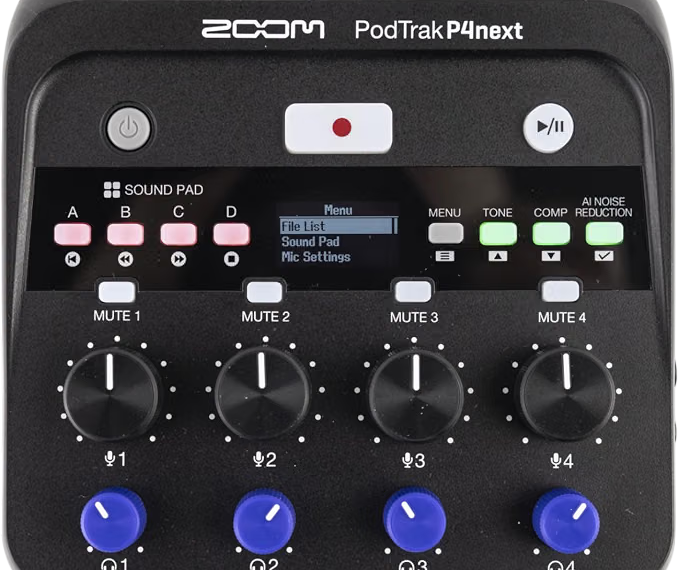
Our PodTrak P4next review covers a battery powered recorder with 4 mic inputs, built for a panel podcast with no laptop needed 👍
What Are the Downsides of the Yamaha AG06MK2?
Here are the honest drawbacks.
- Only 2 mic inputs, both sharing one stereo USB return
- USB dropouts reported by some owners, with no single confirmed cause
- Phone apps need TRRS, not USB, which trips up first time setups
- Preamps show their budget limits when pushed hard, per independent testers
- Reverb can trigger feedback on some PA setups
One Windows user on the YamahaMusicians forum ran into unusually low mic levels even with gain maxed out, and a full DSP reset did not fix it. That thread stayed unresolved, so treat it as a possible edge case tied to specific driver versions rather than a common fault.
Is the Yamaha AG06MK2 Worth It?
Yes, for a two person streaming setup.
The Yamaha AG06MK2 rewards streamers and podcasters who want a real mixer feel with onboard effects, and who record with one other person in the room or on a call. LOOPBACK and Mix Minus solve two real streaming headaches without extra software.
If you need three or more mics on separate tracks, look at a bigger interface instead!
Did You Know 🤯
Yamaha is an official sponsor of OBS Studio, the free streaming software, and the AG06MK2 is certified to work with it out of the box.
Planning a streaming desk with mics, a phone, and monitors? Map the whole chain first, and let the tool flag phantom power, gain headroom, and connector problems before you spend.
Yamaha AG06MK2 FAQ
Does the AG06MK2 have phantom power?
Yes.
Both CH1 and CH2 offer switchable +48V phantom power for condenser mics.
Can you plug a guitar into the AG06MK2?
Yes.
CH2 has a dedicated Hi-Z button for guitar or bass.
Does the AG06MK2 work on iPad?
Yes.
The AG Controller app is available for iOS. Connect apps like Zoom or FaceTime through the TRRS jack, not USB.
What sample rates does the AG06MK2 support?
Up to 192 kHz.
Bit depth is 24 bit, USB Audio Class 2.0 compliant.
Does the AG06MK2 need drivers?
On Windows, yes.
Install the Yamaha Steinberg USB Driver for a reliable connection. One reviewer found it worked without drivers, but not correctly.
Is the AG06MK2 OBS certified?
Yes.
Yamaha is an official OBS Studio sponsor and lists the AG06MK2 as certified for it.
So count your mic inputs first, pick your mixer second, and go live 🎶
As an Amazon Associate I earn from qualifying purchases. There are some affiliate links on this page that will redirect you directly to the original products and services. Also by buying through those links you will be supporting us. So thank you ^.^
Related Posts
Here is a list of mixer and interface posts you can consider as alternatives.