Affiliate links below. As an Amazon Associate I earn from qualifying purchases.
An audio interface connects your microphone, instruments, or other audio sources to your computer.
Choosing the right one is the single biggest upgrade most podcasters can make to their sound quality.
If you’ve ever wondered why some podcasts sound ultra-crisp while others seem muffled or hollow, the difference often comes down to the audio interface.
When I first started podcasting, I made the classic mistake of recording directly into my laptop’s built-in mic. It sounded like I was talking from inside a tin can.
A good interface doesn’t just capture your voice — it enhances clarity, reduces unwanted noise, and keeps listeners engaged.
Below is the full breakdown of the six best options in 2026.
Quick Comparison: Best Audio Interfaces for Podcasting in 2026
| Interface | Price | XLR Inputs | Best For | Our Verdict |
|---|---|---|---|---|
| Focusrite Scarlett 2i2 | $200 | 2 | Solo & co-hosted podcasts | ⭐ Best Overall |
| RØDE RODECaster Pro II | $699 | 4 | Pro multi-host & streaming | ⭐ Best for Pros |
| PreSonus Revelator io24 | $99 | 2 | Budget with built-in DSP | ⭐ Best Budget Pick |
| Universal Audio Apollo Twin X | $1,300 | 2 | Studio-grade quality | ⭐ Best Sound Quality |
| PreSonus AudioBox USB 96 | $99 | 2 | Beginners & students | ⭐ Best for Beginners |
| Zoom PodTrak P4 | $149 | 4 | Portable & on-the-go | ⭐ Best Portable |
Best Audio Interfaces for Podcasting — Full Reviews
Focusrite Scarlett 2i2 — Best Overall
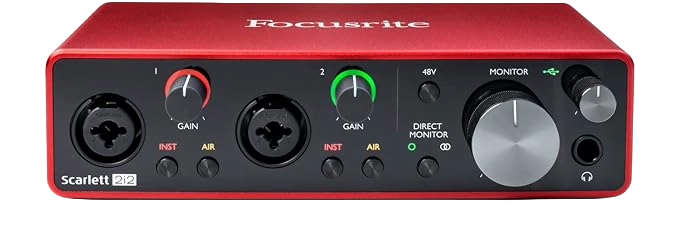
The Focusrite Scarlett 2i2 4th Gen delivers two high-quality preamps, 24-bit/192kHz recording, and 69dB of gain — enough to run an SM7B without a cloud lifter.
Its “Air” mode adds subtle brightness to vocal recordings, making voices sound more present and professional without any post-processing.
Dual XLR inputs make it easy to scale from solo to co-hosted podcast without replacing gear.
Key Specs
- Cost – $200 / £170
- XLR Inputs – 2
- Gain – up to 69dB (4th Gen)
- Sample Rate – 24-bit / 192kHz
- Weight – 640g
Who It’s For
The 2i2 is the right starting point for solo and two-host podcasts.
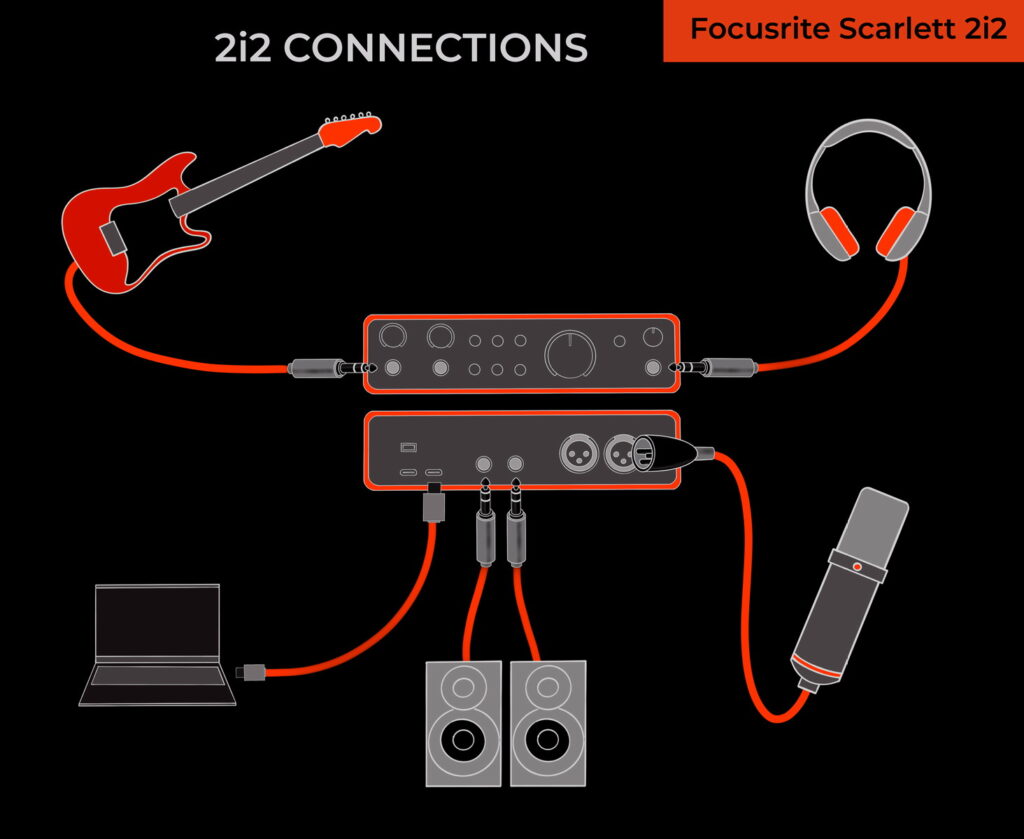
The dual XLR inputs handle balanced audio levels between two speakers cleanly. Direct monitoring lets you hear your voice in real-time without latency.
Known occasional driver issues on Windows can usually be resolved with a manual driver update.
If you use a gain-hungry mic, pairing with a cloud lifter removes the last remaining limitation.
See our full Scarlett Solo vs 2i2 comparison if you’re deciding between the two.
What Users Say
Jesus Vazquez — Easy to use from day one, great with the bundled software, used daily for school, work, and gaming.
Minor complaint: doesn’t come with the required cable.
JT — Tested against the UA Volt 2 and PreSonus Revelator IO24.
Verdict: Scarlett 2i2 wins when paired with the Shure SM7dB and is the only one with both loopback and tuned gain for that mic.
Austin — Replaced a $50 Fifine mixer with the 2i2 and the difference was night and day.
69dB of gain handles an SM7B without a cloud lifter at 75% gain.
Roland — Disappointed with the Scarlett Solo variant specifically — headphone jack dies every few hours requiring a full PC restart.
Recommends exploring alternatives.
RØDE RODECaster Pro II — Best for Pros
The RODECaster Pro II is the most capable all-in-one podcasting console on this list.
Four XLR inputs, Bluetooth, Wi-Fi, USB, eight programmable sound pads with eight banks (64 total sounds), four headphone outputs, and SD card recording — all in one unit.
The learning curve is real. For professionals and multi-host shows, it’s unmatched. For beginners, it’s overwhelming.
See our RODECaster alternatives guide if the price is a barrier.
Key Specs
- Cost – $699
- XLR Inputs – 4
- Headphone Outputs – 4 (individual volume control)
- Headphone Output Power – 250mW
- Connectivity – Wi-Fi 802.11 g/n/ac, Ethernet, Bluetooth

What Users Say
Holly Starks — Loves the unit. Wishes audio routing was deeper (GoXLR level).
Standout pros: records without a PC, 4 headphone inputs, OBS scene control, show preset saving. Cons: plastic feel, routing limitations.
David Walker — “One of those products that just simply works. Beautiful, simple, intuitive. If you can afford it, just get it.”
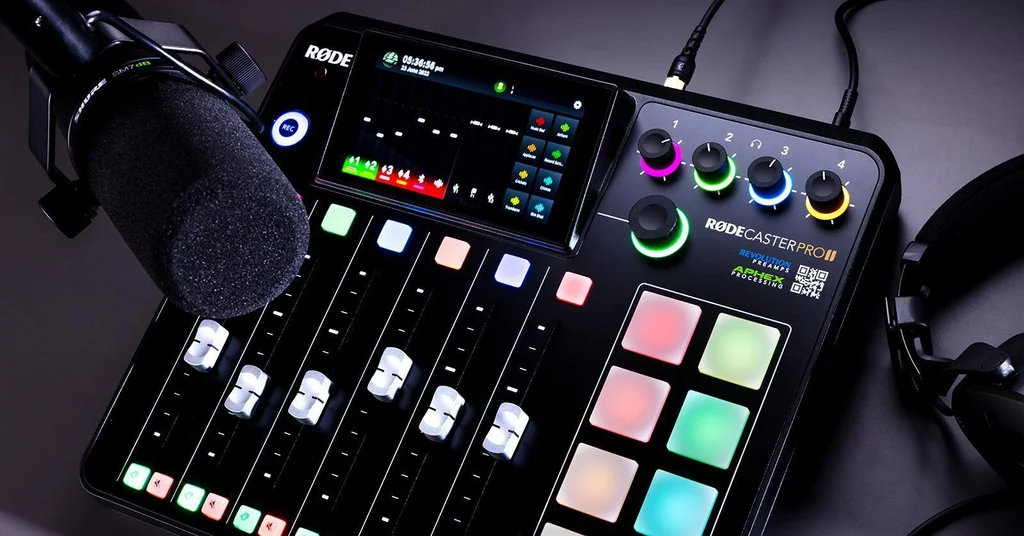
Ricky D White — Six physical faders (bidirectional), eight pads per bank, four XLR inputs, four headphone outputs, two USB-C ports.
Concludes it’s a very impressive home studio mixer that any podcaster will be happy with.
Brian M. — Previously spent $3,000+ on broadcast hardware. The RODECaster Pro II beats it in every way — sound quality, ease of setup, iPhone connectivity.
“JUST BUY IT.”
PreSonus Revelator io24 — Best Budget Pick
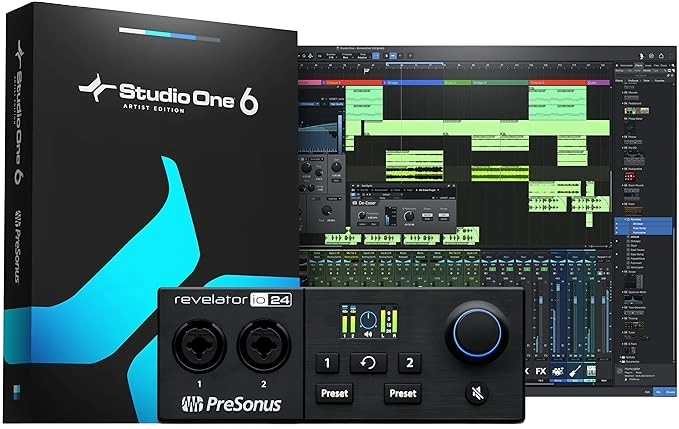
The Revelator io24 is the strongest budget option on this list.
Built-in DSP handles filtering, gating, compression, EQ, and limiting directly on the hardware — no VST plugins or VoiceMeeter required.
Dual headphone outputs with individual volume control are rare at this price. Loopback makes mixing remote guests, call-ins, or music effortless.
Cross-platform (Windows, macOS, likely Linux). At $99 it competes with interfaces costing twice as much.
Key Specs
- Cost – $99
- XLR Inputs – 2
- Built-in DSP – Yes (gate, compressor, EQ, limiter, voice effects)
- Supported Software – Studio One Artist, Ableton Live Lite, Studio Magic Suite
- Connectivity – USB
What Users Say
Rob — A fantastic upgrade from the Scarlett Solo. The on-device DSP is the single best feature — no software dependency.
Cross-platform, virtual routing similar to GoXLR at half the price.
Stephen — Perfect for transferring legacy recordings. Stereo monitoring works well.
Key warning: plug directly into the computer — a low-quality USB hub causes issues.
Dustin G. — Compact and clean-sounding.
One limitation: Windows treats the mic and instrument inputs as a single combined input, which matters for multi-instrument setups.
Will Stowell — Returned it due to power delivery issues. Gain needed to max out with an SM7b, and adding a Cloudlifter introduced buzz that couldn’t be resolved.
Noted the market has better alternatives.
Universal Audio Apollo Twin X QUAD Heritage — Best Sound Quality
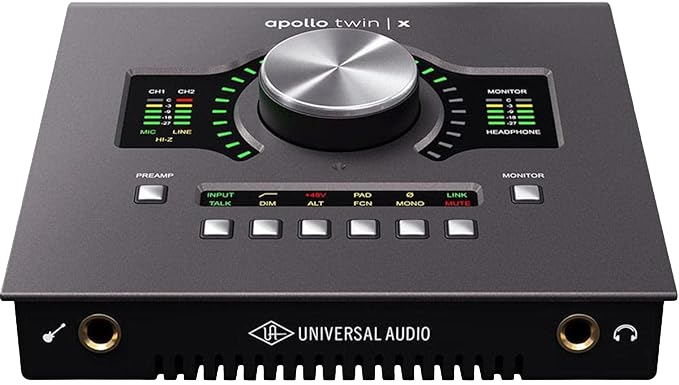
The Apollo Twin X is in a different category entirely.
UAD plugin ecosystem, real-time DSP processing on hardware, and conversion quality that is audibly superior to every other interface on this list.
Built for podcasters who also produce music or work in professional broadcast.
Critical requirement: Thunderbolt 3 or 4 — not just USB-C. Verify your motherboard supports it before buying.
For Windows laptops, this likely won’t work without a dedicated Thunderbolt card.
Key Specs
- Cost – $1,300
- XLR Inputs – 2
- Connectivity – Thunderbolt 3/4 (not USB-C)
- Expansion – ADAT, S/PDIF
What Users Say
Gavin — Works on Windows desktops with a dedicated Thunderbolt card (Asus Thunderboltex 4 confirmed).
Build, software, and sound quality are “insane.” The ability to add compression and de-essers before the recording chain is next-level for anyone without a physical outboard rack.
Roger Lane — Upgrading from a UMC202HD, the difference in conversion, dynamic range, and preamp quality is night and day.
UAD plugins are pricey but among the best available. Highly recommended if you can enter the ecosystem.
Aden — Side-by-side with the Scarlett 4i4: the Apollo wins clearly on sound quality.
Genuine frustrations at $1,300: slippery main knob with sharp edges, non-scalable on-screen interface with tiny text, forced installation of all UAD plugins (~3GB), and a power cord locking mechanism that isn’t documented clearly.
Sound quality justifies the price for serious users despite these.
PreSonus AudioBox USB 96 — Best for Beginners
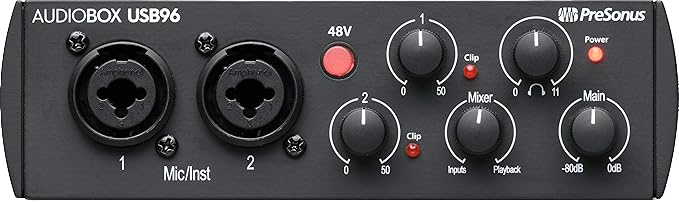
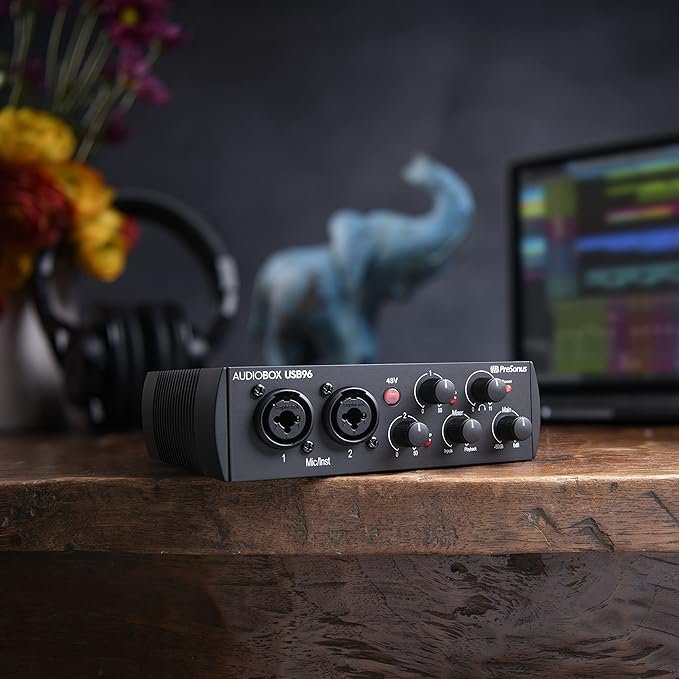
The AudioBox USB 96 is the most straightforward entry-level interface on this list.
24-bit/96kHz recording, two Class-A preamps, phantom power, a dedicated headphone volume control, and clip indicator — all under $100.
The preamps are noisier than the Scarlett 2i2 and gain-hungry mics will need a booster.
The bundled Studio One Artist DAW (normally $99 alone) makes this a genuine value buy for anyone starting from scratch.
See how PreSonus compares to Focusrite overall.
Key Specs
- Cost – $99 / £72
- XLR Inputs – 2
- Gain – up to 35dB
- Sample Rate – 24-bit / 96kHz
- Weight – 912g
What Users Say
Arroyo — Has everything you’ll need now and later: MIDI IN/OUT, iPhone compatible with Camera Connection Kit, two mic inputs for podcast plus video phone simultaneously.
ASIO works perfectly. “I would recommend it to a friend and wouldn’t sell mine — it’s too versatile.”
Kwan — Used for training videos in OBS Studio with dual AT2020 mics. Plug-and-play, no drivers needed, Windows detected immediately.
Also confirmed working on Linux. Minor note: gain needed to go almost all the way up.
John C. — Great buy, but the preamps are among the noisier options in this price range.
The bundled Studio One DAW compensates and makes the value proposition compelling for beginners.
Zoom PodTrak P4 — Best Portable
The Zoom PodTrak P4 was built exclusively for podcasters.
Four XLR inputs, mix-minus for remote interviews without feedback echo, four independent headphone outputs, sound pads, and SD card recording — all in a unit that runs on AA batteries or USB power.
The build quality feels plasticky and the max sample rate is 16-bit/44.1kHz (lower than most interfaces).
For portable recording, nothing on this list beats it at the price.
Key Specs
- Cost – $149 / £150
- XLR Inputs – 4
- Gain – up to 70dB
- Max Resolution – 16-bit / 44.1kHz
- Weight – 290g
- Power – AA batteries or 5V USB

What Users Say
Gotell — Crystal clear audio, plenty of gain, independent +48V phantom power per channel, mix-minus works flawlessly, simultaneous recording to SD card, computer, and phone.
Cons: 44.1kHz max resolution, no XLR output, plastic casing.
Samuel Willburn — “Changed the game for our podcast interviews. Super portable, easy to use, sound quality is a million times better than before.”
AA battery life is poor — use a power brick instead.

Nuff — Professional film sound recordist. “About as intuitive and easy to operate as anything I’ve ever used — no need to read the manual.”
Four XLR inputs, mute buttons with red indicators, sound pads A-D, clean LCD display.
Only quirk: both USB-C ports look identical — label them before use.
Frequently Asked Questions
What is the best audio interface for podcasting?
The Focusrite Scarlett 2i2 is the best audio interface for most podcasters.
It offers two XLR inputs, 69dB of gain, 24-bit/192kHz recording quality, and reliable drivers across Windows and Mac — all for $200.
It works equally well for solo shows and two-host formats without needing any additional gear.
Do I need an audio interface for podcasting?
Yes, if you’re using an XLR microphone.
An audio interface converts the analog signal from your mic into a digital signal your computer can record. Without one, you’d need to use a USB microphone instead.
For serious podcast audio quality, an XLR mic plus an audio interface consistently outperforms a USB mic at the same price point.
What’s the difference between an audio interface and a podcast mixer?
An audio interface converts analog audio to digital and connects to your computer.
A podcast mixer (like the RODECaster Pro II) combines an interface with onboard mixing, sound pads, and processing — but costs more and has a steeper learning curve.
For a solo podcaster, a simple two-input audio interface is usually the better starting point. For multi-host shows with live production needs, a dedicated podcast mixer makes more sense.
Can I use an audio interface for a two-person podcast?
Yes. Any interface with two or more XLR inputs can handle a two-person podcast.
The Focusrite Scarlett 2i2, PreSonus Revelator io24, and PreSonus AudioBox USB 96 all have two XLR inputs, making them ideal for co-hosted formats.
For three or four hosts recording together, the Zoom PodTrak P4 or RODECaster Pro II are better fits with their four XLR inputs.
What audio interface does Joe Rogan use?
Joe Rogan’s studio uses professional broadcast-grade equipment including the Universal Audio Apollo interface series.
For most independent podcasters, the Apollo is overkill — the Focusrite Scarlett 2i2 or RODECaster Pro II delivers professional quality at a fraction of the cost.
Is the Focusrite Scarlett 2i2 good for podcasting?
Yes, the Focusrite Scarlett 2i2 is one of the best audio interfaces for podcasting.
Its 69dB of gain (4th Gen) handles demanding microphones like the Shure SM7B without a preamp booster. Its low noise floor keeps recordings clean, and the Air mode adds presence to vocal recordings.
It’s the most recommended interface for podcasters at the $200 price point.
Conclusion
Here’s the bottom line after reviewing all six:
- Best Overall: Focusrite Scarlett 2i2 — the right balance of quality, price, and reliability for most podcasters
- Best for Pros: RØDE RODECaster Pro II — if you run a multi-host show or stream live regularly
- Best Budget: PreSonus Revelator io24 — built-in DSP at $99 is unmatched at this price
- Best Sound Quality: Universal Audio Apollo Twin X — for those who also produce music or need studio-grade conversion
- Best for Beginners: PreSonus AudioBox USB 96 — simple, reliable, bundled DAW included
- Best Portable: Zoom PodTrak P4 — built for podcasters, runs on batteries, mix-minus built in
If you’re just starting out, the Scarlett 2i2 or AudioBox USB 96 will serve you well.
If you’re ready to invest in your setup, the RODECaster Pro II is the most capable all-in-one on this list.
And if you record on the go, the PodTrak P4 is hard to beat at its price.
Looking for more? See our guides to USB Audio Interfaces, Focusrite Scarlett Solo vs 2i2, and RODECaster Alternatives.
Want an all in one instead? Compare the best mixers for podcasting, and pair your setup with one of the best podcast mic stands.
As an Amazon Associate I earn from qualifying purchases. This post contains affiliate links. If you purchase through our links, we may earn a small commission at no extra cost to you.
Related Posts
Here’s a list of blog posts on various types of audio interfaces you can consider as alternative options.