The SSL 2 has two headphone jacks. They share one mix and one volume knob 🎧
Direct answer first. The SSL 2 audio interface you can buy today is the SSL 2 MKII, a bus powered, 2 in and 2 out USB-C interface with two SSL mic preamps, a Legacy 4K button on each channel, and stereo loopback.
It replaced the original SSL 2, which has now retired.
Buy it if you want very quiet preamps and one press analog color for vocals and guitars. Skip it if you need a separate headphone mix, MIDI, or Auto Gain.
Here is the stat that hooked me. SSL lists an equivalent input noise of -130.5 dBu, which sits below the -127 dBu on the Focusrite Scarlett 2i2 spec sheet.
By the end of this SSL 2 audio interface review, you will know what changed in the MKII, what Legacy 4K really does, and how it stacks up against a Scarlett 2i2.
This guide draws on Solid State Logic’s documentation, independent reviews, retailer owner reviews, and forum comments. It does not rest on bench testing, so I name the source whenever I share someone’s experience.
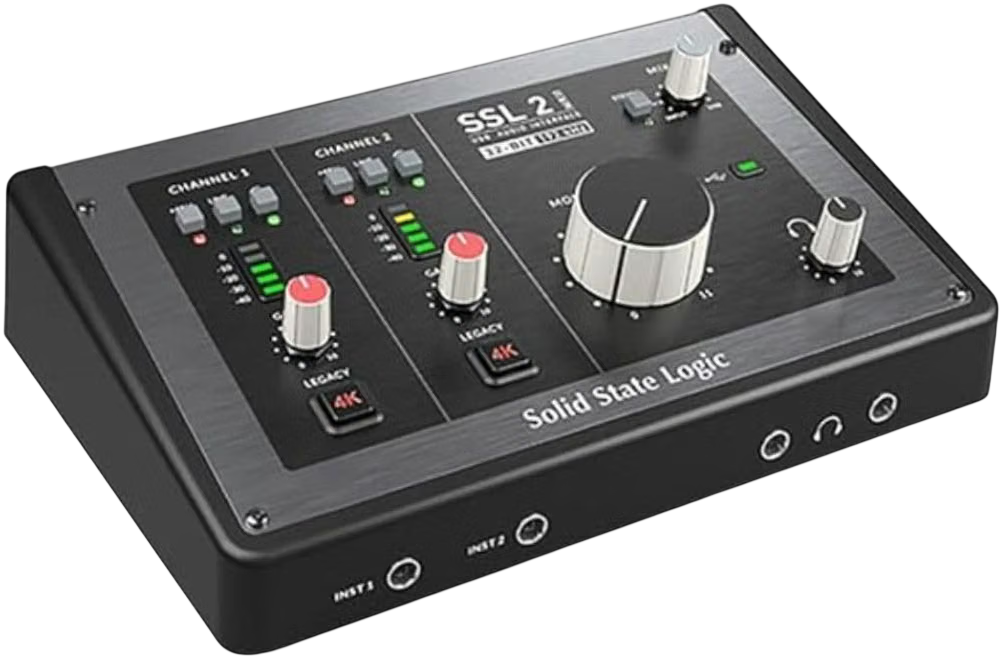
What Is the SSL 2 Audio Interface?
The SSL 2 is a compact, wedge shaped interface from Solid State Logic, the company best known for large mixing consoles.
The current model is the MKII. Sound On Sound says the original SSL 2 and 2+ arrived around 2020 and have now made way for MkII versions.
Reviewer Sam Inglis writes that he could not fault any of the changes SSL made in the MKII.
| Feature | SSL 2 MKII |
|---|---|
| Inputs | 2 rear XLR combo sockets (mic and line), plus 2 front quarter inch instrument jacks |
| Outputs | 2 rear balanced jack outputs, plus 2 front headphone jacks |
| Mic preamp gain range | 64 dB |
| Mic input dynamic range | 116.5 dB |
| Mic input noise | -130.5 dBu EIN (A-weighted) |
| Max mic input level | +9.7 dBu |
| Output dynamic range | 120 dB (headphones 119.5 dB) |
| Converters | 32 bit, up to 192 kHz |
| High pass filter | 18 dB per octave at 75 Hz, on each channel |
| Analog color | Legacy 4K button on each channel |
| Loopback | Stereo loopback pair |
| Monitoring | Hardware Mix knob and Stereo button |
| Power | USB-C bus power only, no mains option |
Specs come from the Sound On Sound review, Solid State Logic’s SSL 2 MKII page, and Amazon’s product listing.
What changed from the original SSL 2?
Five upgrades matter most.
- Front DI jacks take over automatically from the rear combo sockets, so the old Hi-Z button is gone
- A switchable high pass filter replaced that button
- Two headphone jacks now sit on the front panel
- Better numbers include 64 dB of gain (up from 62), +9.7 dBu max input (up from +5.5), and 120 dB output dynamic range (up from 112)
- Momentary buttons with LEDs show each setting at a glance
Sound On Sound doubts most people will hear the spec gains. The layout changes are the real improvement in daily use!
Is the SSL 2 MKII in stock?
Availability varies. Sweetwater’s listing has shown the SSL 2 MKII as backordered, with restock estimates that keep moving.
Check stock with a few sellers and confirm the return policy before you pay.
How Does the SSL 2 Sound?
Clean and quiet, with an optional forward edge.
Sound On Sound calls these preamps some of the cleanest around. A Tape Op tester ran condensers, vintage dynamics, and ribbons through the 2+ MKII and found plenty of gain with no noise floor issues.
What does Legacy 4K actually do?
SSL says Legacy 4K adds a controlled amount of harmonic distortion plus a forward yet musical high frequency boost, inspired by its 4000 series consoles.
Each input channel has its own button, so you can color the mic and keep the guitar clean.
Sound On Sound calls the treble lift quite obvious, great on some sources and a bit much on others. A MusicRadar tester heard extra gain, harmonics, and top end that made a DI guitar sound more forward.
My take is to engage it on dull vocals or DI guitar, and leave it off when you plan to shape the top end yourself. It works in the analog path, so you commit to the sound as you record 🎸
How quiet are the preamps?
Very. SSL lists 64 dB of gain, 116.5 dB of dynamic range, and -130.5 dBu equivalent input noise.
For context, Focusrite lists 69 dB of gain and -127 dBu noise on the Scarlett 2i2.
This video review covers the features and a latency test 👇
Does 32 Bit Recording Matter on the SSL 2?
No. Sound On Sound sees no practical benefit to recording at 32 bit on the SSL 2.
Some USB devices from Zoom, Rode, and Sound Devices use 32 bit float to make their inputs effectively unclippable. The SSL 2 does not work that way.
Its converters fit comfortably inside 24 bit recording. So set your gain carefully and record at 24 bit!
How Do the Two Headphone Jacks Work?
They share one mix. This surprises many new owners.
Sound On Sound explains that the second headphone output on the SSL 2 duplicates the first and shares its volume control. B&H’s listing also describes the two outputs as the same mix.
The 2+ MKII works differently. Its second headphone output can switch to the signal on outputs 3 and 4. Guitar Player says that gives the 2+ the edge if you often record with another musician.
Two jacks still help. One Sweetwater voiceover reviewer keeps a set of headphones in the booth and a second set for edits.
What Should You Know About the Inputs?
The MKII splits its inputs. Mics and line sources use the rear combo sockets, and guitars use quarter inch jacks on the front panel.
Why does my XLR mic go silent?
Because the front jacks sense a plug and take over automatically. Sound On Sound and Tape Op both describe this behavior.
If your mic goes quiet, check for a cable in the front jacks first!
What does the high pass filter do?
Each channel has a switchable filter at 75 Hz with an 18 dB per octave slope.
Sound On Sound says it removes thumps and rumbles and thins out heavy close miked recordings. The new LEDs also show whether it is on.
Does the SSL 2 Need Software?
No. Monitoring switches in hardware, so you need no control panel app.
Mac users need no drivers because the SSL 2 is class compliant. SSL lists an ASIO and WDM driver for Windows.
The Mix knob blends USB playback with your live inputs for zero latency monitoring. A Stereo button decides whether you hear the inputs panned or centered.
SSL also offers its Production Pack software bundle after you register. MusicRadar says it suits beginners but may not excite anyone with a plugin collection already.
Latency matters for tracking, so read our list of the top low latency audio interfaces too.
Can You Use the SSL 2 for Streaming and Podcasting?
Yes! Your software sees a pair of loopback inputs beside the two physical inputs.
Loopback feeds the output of one app into another. Sound On Sound calls it invaluable for streaming, podcasting, and vlogging.
SSL skipped extras like phone inputs and Bluetooth that some streaming interfaces offer. Sound On Sound says that is fine if music is your main goal.
Podcasting first? Read our guide to the best audio interface for podcasting.
What Are DC Coupled Outputs?
They let the SSL 2 send control voltage, or CV, to analog synths and modular gear.
SSL and MusicTech both point out this feature. Most guitarists and podcasters will never touch it, and synth players get a real bonus 🎹
SSL 2 vs Scarlett 2i2, Which One Should You Buy?
Pick the SSL 2 for quieter preamps, a high pass filter, and one press color. Pick the Scarlett 2i2 for Auto Gain, Clip Safe, and more gain.
| Feature | SSL 2 MKII | Scarlett 2i2 4th Gen |
|---|---|---|
| Mic gain range | 64 dB | 69 dB |
| Mic input noise (EIN) | -130.5 dBu | -127 dBu |
| Max mic input level | +9.7 dBu | +16 dBu |
| Mic dynamic range | 116.5 dB | 116 dB |
| Analog color | Legacy 4K on each channel | Two Air modes |
| Auto level tools | None | Auto Gain and Clip Safe |
| Headphone outputs | 2 jacks, same mix, shared volume | 1 jack, shares the monitor feed |
| Zero latency monitoring | Mix knob and Stereo button | Direct button |
| Loopback | Yes | Yes |
| Converters | 32 bit, 192 kHz | 24 bit, 192 kHz |
| Power | USB bus power only | USB bus power or a second USB-C power port |
SSL numbers come from Sound On Sound and Amazon’s listing. Scarlett numbers come from Focusrite’s 2i2 4th Gen specifications page.
Still deciding on size? Read our Focusrite Scarlett Solo vs 2i2 comparison and our best budget audio interface list.
Who Should Buy the SSL 2 Audio Interface?
Three groups get the most from it.
You record vocals and acoustic guitar
MusicTech says Legacy 4K adds definition, presence, and focus that suit vocals and acoustic guitars.
Add the quiet preamps and the high pass filter, and you get a clean starting point for a home vocal booth.
You play guitar or bass
The front DI jacks make plugging in easy. MusicRadar’s tester found the preamps crisp on DI guitar and bass.
Guitar Player found that Legacy 4K added a subtle sheen to electric and acoustic guitars, vocals, and keyboards.
You do voiceover work
A Sweetwater voiceover reviewer calls the SSL 2 MKII quiet, solidly built, and easy to use. They note a bigger footprint than their other interfaces and say it is not a deal breaker.
Buy the SSL 2 audio interface if you
- Want very quiet mic preamps
- Like one press analog color
- Plug a guitar or bass straight in
- Want a filter and monitoring in hardware
Skip the SSL 2 audio interface if you
- Need a separate headphone mix
- Need MIDI in and out
- Want Auto Gain or Clip Safe
- Need more than two inputs
What Are the Best Alternatives to the SSL 2?
Four options cover the main reasons to look elsewhere.
SSL 2+ MKII
The 2+ adds MIDI in and out, four balanced outputs, and a second headphone output that can follow outputs 3 and 4, according to Sound On Sound.
Pick it if you want MIDI or a separate headphone mix.
Focusrite Scarlett 2i2
More gain, Auto Gain, Clip Safe, and two Air modes. It also costs less in many shops, so compare current prices.
Universal Audio Volt 2
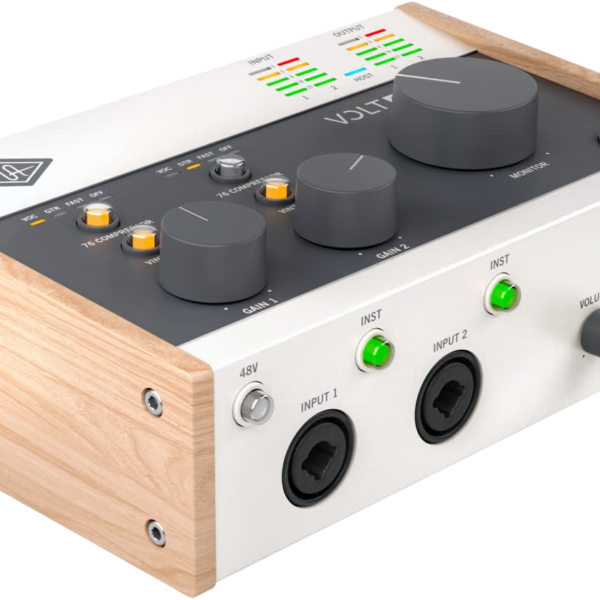
Amazon lists the Volt 2 as a 2×2 USB-C interface with 610 tube emulation and MIDI. Soundref also points to it for anyone who needs MIDI sockets.
Audient EVO 4
Our Audient EVO 4 review covers its two mic inputs, JFET instrument input, loopback, and Smartgain in a tiny USB powered box 👍
What Are the Downsides of the SSL 2?
Here are the honest drawbacks.
- Second headphone jack shares the mix and volume
- No MIDI on the SSL 2 (the 2+ has it)
- Bus power only, with no mains option
- Legacy 4K can feel like a bit much on some sources
- Buttons feel a little lackluster to press, per MusicRadar’s 2+ MKII review
- Stock can run tight
Sweetwater buyers add two real world notes. One needed to adjust the sample rate and buffer size to clear early cracks and pops, and says the unit stays powered when the laptop is off.
Another buyer reported receiving two defective units in a row. That is one report, so test yours right away and keep your receipt.
Is the SSL 2 Audio Interface Worth It?
Yes, for the right buyer.
The SSL 2 audio interface rewards people who record vocals, guitar, or bass and want quiet preamps with one press color. The DI jacks, filter, and hardware monitoring make daily use easy.
If you need a separate headphone mix or MIDI, step up to the 2+ MKII. If you want automatic levels, pick the Scarlett 2i2!
Did You Know 🤯
The MKII lifted output dynamic range from 112 dB to 120 dB and mic input dynamic range by 6 dB to 116.5 dB, according to Sound On Sound.
Planning a desk around the SSL 2? Map the whole chain first, and let the tool flag phantom power, gain headroom, and connector problems before you spend.
SSL 2 Audio Interface FAQ
Is the SSL 2 the same as the SSL 2 MKII?
No.
The MKII replaced the original SSL 2. It adds front DI jacks, a high pass filter, and two headphone jacks.
Does the SSL 2 MKII have MIDI?
No.
The 2+ MKII has 5-pin MIDI in and out.
Does the SSL 2 need drivers?
Only on Windows.
Macs need no drivers. SSL lists an ASIO and WDM driver for Windows.
Does the SSL 2 have loopback?
Yes.
It offers a stereo loopback pair for streaming and podcasting.
Can you plug a guitar straight into the SSL 2?
Yes.
Use the front quarter inch DI jacks. They take over from the rear sockets automatically.
Can two people use separate headphone mixes?
Not on the SSL 2.
Both jacks carry the same mix. The 2+ MKII offers a separate option.
Does Legacy 4K work on both channels?
Yes.
Each input channel has its own Legacy 4K button.
Is the SSL 2 bus powered?
Yes.
It runs over USB-C and has no mains power option.
So think about your headphone needs first, pick your interface second, and get recording 🎶
There are some affiliate links on this page that will redirect you directly to the original products and services. Also by buying through those links you will be supporting us. So thank you ^.^
Related Posts
Here is a list of interface posts you can consider as alternatives.