The Scarlett 4i4 looks like a 2i2 with two extra jacks. It behaves very differently 🎛️
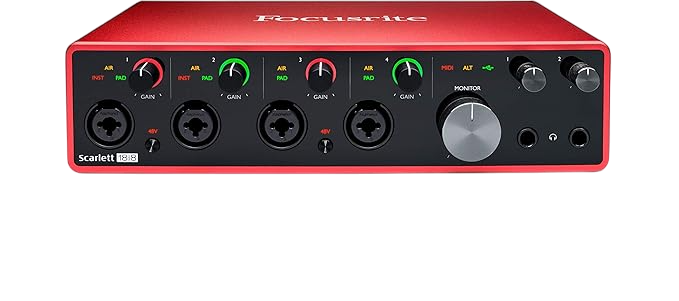
Direct answer first. The Focusrite Scarlett 4i4 (4th Gen) is a bus powered, 4 in and 4 out USB-C interface with two mic preamps, two rear line inputs, four line outputs, and 5-pin MIDI in and out.
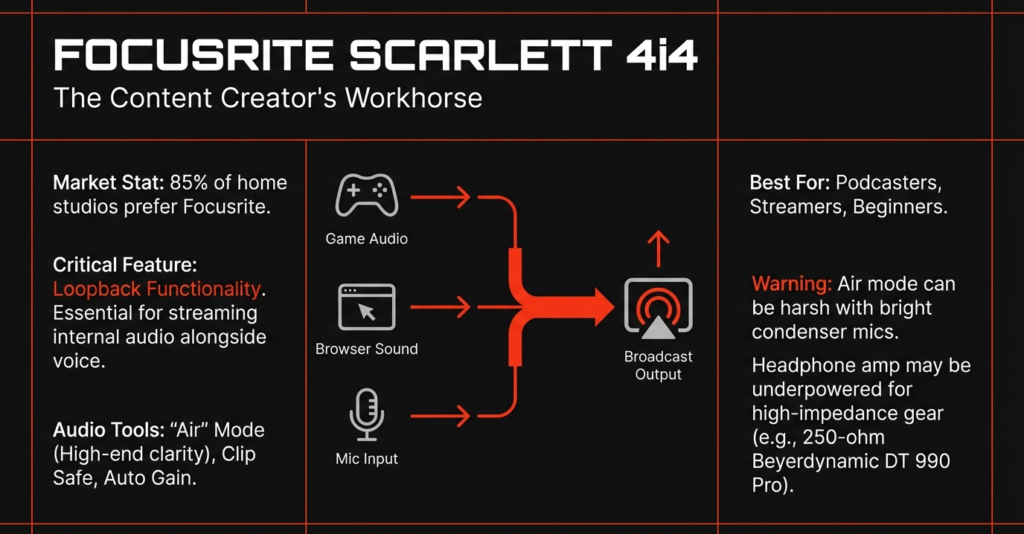
It also adds loopback, Auto Gain, Clip Safe, and a separate headphone mix that the 2i2 cannot offer.
Buy it if you track a mic or guitar plus stereo gear like a synth or drum machine. Skip it if you need four mics at once.
Here is the number that hooked me. Your recording software sees 6 inputs and 6 outputs on a box called the 4i4, because loopback and the headphone output count as channels.
By the end of this Focusrite Scarlett 4i4 review, you will know what the extra inputs really do, which features hide behind software, and whether a cheaper 2i2 covers your needs.
This guide draws on Focusrite’s official documentation, independent reviews, retailer owner reviews, and forum comments. It does not rest on bench testing, so I name the source whenever I share someone’s experience.
What Is the Focusrite Scarlett 4i4?
The Focusrite Scarlett 4i4 is a desktop audio interface for people who record more than a mic and a guitar.
The 4th Gen arrived in 2023 next to the Solo and 2i2, according to SonicScoop. MusicTech says the core 4i4 layout stayed the same as the 3rd Gen.
Sound On Sound calls the digitally controlled preamps the biggest improvement of the 4th generation. Earlier models used regular gain knobs.
| Feature | Focusrite Scarlett 4i4 4th Gen |
|---|---|
| Inputs | 2 front XLR combo inputs (mic, line, instrument) and 2 rear quarter inch line inputs |
| Outputs | 4 balanced TRS line outputs and 1 stereo headphone output |
| Channels in your DAW | 6 inputs (4 analog plus 2 loopback) and 6 outputs (4 line plus 2 headphone) |
| MIDI | 5-pin DIN in and out |
| Mic preamp gain range | 69 dB |
| Mic input dynamic range | 116 dB (A-weighted) |
| Mic input noise | -127 dBu EIN (A-weighted) |
| Rear line inputs | Fixed level, balanced TRS |
| Line output dynamic range | 120 dB (A-weighted) |
| Converters | 24 bit, up to 192 kHz |
| Headphone power | 57 mW into 33 Ω, 27 mW into 300 Ω |
| USB power | USB 2.0 Type-C at 1.5 A, plus a second USB-C power port (5V, 7.5 W) |
| Size and weight | 180 x 130 x 60 mm, 798 g (1.76 lb) |
Specs come from Focusrite’s official Scarlett 4i4 specifications page.
What software and accessories come with it?
Amazon’s listing names Pro Tools Intro+, Ableton Live Lite, Cubase LE, and the Hitmaker Expansion bundle.
SoundGuys reports that Focusrite supplies a USB-C power adapter for computers short on ports. Bundles vary by retailer, so confirm the box contents before you buy.
Why Does the Scarlett 4i4 Have Only Two Mic Preamps?
Because inputs 3 and 4 accept line level only.
The name says four inputs, and only inputs 1 and 2 have mic preamps. MusicTech describes the rear pair as line level only, ideal for hardware synths, effects units, and DJ mixers.
What can you plug into inputs 3 and 4?
Line level gear. Think synths, keyboards, drum machines, and effects units.
Focusrite lists them as fixed level balanced inputs. Its guide says you cannot connect guitars or microphones directly to inputs 3 and 4.
Need gain control on a line source? Plug it into input 1 or 2 instead, and turn Inst off first.
What can you record at the same time?
Focusrite’s own diagram shows a guitar on input 1, a mic on input 2, and a stereo synth on inputs 3 and 4.
That makes four sources at once! SoundGuys agrees that the 4i4 records up to four instruments, synths, or pieces of outboard gear together.
Tracking a full band or drum kit needs more preamps. Our guides to the best 4 XLR input interfaces and the 16 channel audio interface cover bigger options.
How Does the Focusrite Scarlett 4i4 Sound?
Clean and detailed. On paper, it matches the 2i2.
Focusrite lists 116 dB of dynamic range and -127 dBu noise on the mic inputs, plus 120 dB of dynamic range on the line outputs.
SoundGuys says the 69 dB of gain on each preamp means you should not struggle to reach a good level with any mic.
This video review walks through the four inputs and the MIDI ports 👇
Are the preamps different from the 2i2?
No. Focusrite’s spec pages list the same mic numbers for both.
Each offers 69 dB of gain, 116 dB of dynamic range, and -127 dBu of noise. The extra money buys I/O and routing, and the preamps stay the same.
What do the two Air modes do?
MusicRadar describes two stages, presence, or presence with added harmonic saturation.
Its testers found the second stage ideal for livening up plain DI electric guitar and bass. Air works on the front inputs, channels 1 and 2.
Soundref adds that Air colors the signal as you record, so it stays in the file 🎸
How Does the 4i4 Handle Monitoring and Headphone Mixes?
Through software.
The 4i4 has no hardware Direct Monitor button. MusicRadar says it offers 3 software cue mixes in Focusrite Control 2 instead.
Soundref describes them as one mix for your monitors, one for your headphones, and one for loopback. Focusrite says headphones, monitors, and line outs each get their own mix.
Why is there no Direct Monitor button?
Focusrite moved monitoring into the software mixer. That is what makes separate mixes possible.
The trade-off is simple. Focusrite Control 2 manages your routing, monitoring, and mixer settings, so you need it on a computer to build those mixes.
How much headphone power do you get?
Focusrite lists 57 mW into 33 Ω and 27 mW into 300 Ω on the 4i4. The 2i2 lists 32 mW and 22 mW.
By the numbers, that gives the 4i4 more headroom for high impedance headphones 🎧
How Does MIDI Work on the Scarlett 4i4?
The 4i4 has standard 5-pin DIN MIDI in and out. It works as a USB MIDI interface between your computer and your gear.
MIDI In receives from keyboards and controllers. MIDI Out sends to synths and drum machines.
A new 4i4 ships with MIDI switched off. Focusrite says it starts in Easy Start mode, which disables MIDI until you finish setup.
- Install Focusrite Control 2
- Open it
- Find the 4i4 MIDI ports in your MIDI enabled software
Expect silence from your keyboard until you do. After that, Focusrite says the MIDI I/O needs no further setup!
Can You Use the 4i4 With Outboard Gear and Two Speaker Sets?
Yes! Four line outputs feed two pairs of speakers or an outboard processor.
Sweetwater says the 4i4 has enough outputs for two sets of studio monitors. SoundGuys likes the option to check a mix on several speaker sets.
Focusrite reserves outputs 1 and 2 for your main monitors, and it points you to the spare outputs for outboard gear.
How do you set up an outboard effect?
Here are the hardware steps from Focusrite’s official guide.
- Run a balanced TRS cable from a spare line output (not outputs 1 and 2) to the effect’s input
- Run the effect’s output into a spare jack input on the 4i4
- Add an insert or send to the track in your DAW
- Route that software output to the matching hardware output in the Focusrite Control 2 mixer
Focusrite adds a bonus tip. Use the same steps to reamp a DI guitar signal with a reamp box and an amp 🎶
Does the Scarlett 4i4 Have Loopback and Standalone Mode?
Yes to both.
How does loopback work?
Loopback shows up as channels 5 and 6 in your recording software. It sends your computer’s audio back into the interface so you can record it.
- Open your DAW or recording software
- Create a new track and mute it, or set its output to none
- Set that track’s input to loopback channels 5 and 6
- Start recording
Do not skip the mute! Focusrite warns that it prevents a feedback loop.
Podcasters use loopback to capture remote guests. Read our guide to the best audio interface for podcasting for more.
How does standalone mode work?
Standalone mode lets the 4i4 pass audio with no computer attached.
You set it up first. Power the unit from the mains, route inputs to outputs in the Focusrite Control 2 mixer, then unplug the computer.
Focusrite’s example routes mic inputs 1 and 2 to line outputs 3 and 4. That turns the 4i4 into a mic preamp feeding another preamp’s line inputs.
What Power Does the Scarlett 4i4 Need?
More than the 2i2. Focusrite lists 1.5 A over USB-C, while the 2i2 lists 900 mA.
The 4i4 has a second USB-C port for 5V power. Focusrite says to use it if your computer cannot supply 1.5 A.
If the connection misbehaves, Focusrite’s advice is to plug straight into the computer instead of a USB hub, and to use the original power supply 🔌
Scarlett 4i4 vs 2i2, Which One Should You Buy?
Pick the 4i4 if you want stereo line inputs, MIDI, four outputs, or a separate headphone mix. Pick the 2i2 if you record one or two sources.
| Feature | Scarlett 4i4 4th Gen | Scarlett 2i2 4th Gen |
|---|---|---|
| Mic preamps | 2 | 2 |
| Inputs beyond the two preamp channels | 2 rear line inputs | None |
| Line outputs | 4 | 2 |
| Headphone mix | Separate, set in software | Shares the monitor feed |
| MIDI in and out | Yes | No |
| Hardware Direct Monitor button | No, software mixes | Yes |
| Channels in your DAW | 6 in, 6 out | 4 in, 2 out |
| Headphone power | 57 mW and 27 mW | 32 mW and 22 mW |
| USB power draw | 1.5 A | 900 mA |
| Weight | 798 g | 595 g |
Table data comes from Focusrite’s spec pages for both interfaces, plus MusicRadar for the Direct Monitor button.
Comparing sizes across the range? Read our Focusrite Scarlett Solo vs 2i2 comparison.
Who Should Buy the Focusrite Scarlett 4i4?
Three groups get the most from it.
You play synths and drum machines
Plug a stereo synth into inputs 3 and 4 and keep a mic on input 1 or 2. MIDI lets your software talk to the same synth.
Magnetic Magazine calls the 4i4 a strong fit for producers who mix a mic, guitar, synth, groovebox, DJ mixer, or external effects. It also suits DJs who want cleaner recordings than a laptop’s internal audio gives.
You record vocals and guitar
Sweetwater buyers give real examples. One wanted more than one input for a guitar, a mic, and other devices while moving old music to digital, and says it works fine.
Another Sweetwater reviewer upgraded from a 2i2 and loves the four outputs for looping, plus Auto Gain. A third calls it durable, versatile, and small.
You need a separate headphone mix
A singer can hear a different mix than your speakers play. The 4i4 sends headphones out on their own channels, and the 2i2 cannot do that.
Buy the Focusrite Scarlett 4i4 if you
- Record a mic or guitar plus stereo line gear
- Need MIDI in and out
- Want two speaker sets or outboard gear
- Want a separate headphone mix
Skip the Focusrite Scarlett 4i4 if you
- Need three or four mic preamps
- Want a hardware Direct Monitor button
- Only ever record one or two sources
- Dislike managing settings in software
What Are the Best Alternatives to the Scarlett 4i4?
Four options cover the main reasons to look elsewhere.
Scarlett 2i2
Same preamps, two fewer outputs, no MIDI, and 203 g lighter. It suits anyone who never uses the rear line inputs.
Scarlett 18i16
Amazon lists the 18i16 with 4 mic preamps, 8 line inputs, ADAT, S/PDIF, and MIDI. It arrived in September 2024 with the 16i16 and 18i20, according to SonicScoop.
Behringer UMC1820
Our Behringer UMC1820 review covers a budget interface with 8 preamps that expands to 16 inputs through ADAT.
SSL 2+ and Universal Audio Volt 2
MusicTech says SSL’s Legacy Mode adds subtle harmonic saturation, and that the SSL 2+ is the better pick if you want MIDI.
Soundref points to the Universal Audio Volt 2 as another interface with MIDI sockets 👍
What Are the Downsides of the Focusrite Scarlett 4i4?
Here are the honest drawbacks.
- Only two mic preamps on a four input box
- Fixed level rear inputs that reject mics and guitars
- No hardware Direct Monitor button
- MIDI and mixes need Focusrite Control 2
- One set of 48V, Inst, and Air buttons, so you press Select to choose a channel
- Higher USB power demand at 1.5 A
Sound On Sound describes the shared button layout in its 4th Gen review. Owners who liked the old per input buttons will notice the change.
Is the Focusrite Scarlett 4i4 Worth It?
Yes, if you use the extra jacks.
The Focusrite Scarlett 4i4 rewards people who record a mic or guitar alongside synths, drum machines, or outboard gear. MIDI, four outputs, and a separate headphone mix round out the package.
If you only record one or two sources, save your money and buy the 2i2. If you need three or more mics, step up to an interface with more preamps!
Did You Know 🤯
A brand new 4i4 ships with MIDI switched off. Focusrite says it stays disabled in Easy Start mode until you install and open Focusrite Control 2.
Planning a desk around synths, mics, and monitors? Map the whole chain first, and let the tool flag phantom power, gain headroom, and connector problems before you spend.
Focusrite Scarlett 4i4 FAQ
Does the Scarlett 4i4 have four mic preamps?
No.
It has two mic preamps on inputs 1 and 2. Inputs 3 and 4 are fixed level line inputs.
Can you plug a guitar into inputs 3 and 4?
No.
Use input 1 or 2 for guitars and mics. Focusrite says inputs 3 and 4 cannot take them directly.
Does the Scarlett 4i4 have MIDI ports?
Yes.
It has 5-pin DIN MIDI in and out. Install and open Focusrite Control 2 to switch them on.
Can the 4i4 run two pairs of speakers?
Yes.
Four line outputs feed two speaker sets, according to Sweetwater.
Does the Scarlett 4i4 have a separate headphone mix?
Yes.
Headphones, monitors, and line outs each get their own mix in Focusrite Control 2.
Does the Scarlett 4i4 have loopback?
Yes.
Loopback appears as inputs 5 and 6 in your recording software.
What sample rates does the Scarlett 4i4 support?
44.1 kHz up to 192 kHz.
Bit depth is 24 bit.
Does the Scarlett 4i4 work without a computer?
Yes, after setup.
Route inputs to outputs in Focusrite Control 2, power the unit from the mains, then unplug the computer.
So count your sources first, pick your interface second, and get recording 🎶
There are some affiliate links on this page that will redirect you directly to the original products and services. Also by buying through those links you will be supporting us. So thank you ^.^
Related Posts
Here is a list of interface posts you can consider as alternatives.