I wasted an entire live band recording because I trusted the words “USB mixer” on the box 😅
We recorded drums, guitars, bass, and vocals for nearly three hours.
Then I opened the DAW.
Only 2 tracks showed up.
Everything got crushed into one stereo file.
No isolated drums.
No vocal fixes.
No remixing later.
That painful session taught me something most beginner guides never explain clearly.
Not every USB mixer can actually record multitrack audio properly.
And honestly, that mistake still traps thousands of musicians, podcasters, streamers, churches, and creators every year.
Some mixers record every channel separately.
Some only record the final stereo mix.
Huge difference.
This guide fixes that confusion fast.
You’ll quickly learn:
- Which mixers record every channel separately
- Which mixers work best for bands
- Which ones fit podcasts and livestreams
- Which mixers become frustrating long term
- Which models have the best workflow
- Which mixers genuinely replace audio interfaces
And yes, workflow matters way more than most people realize!
What Exactly Is a Multitrack USB Mixer?
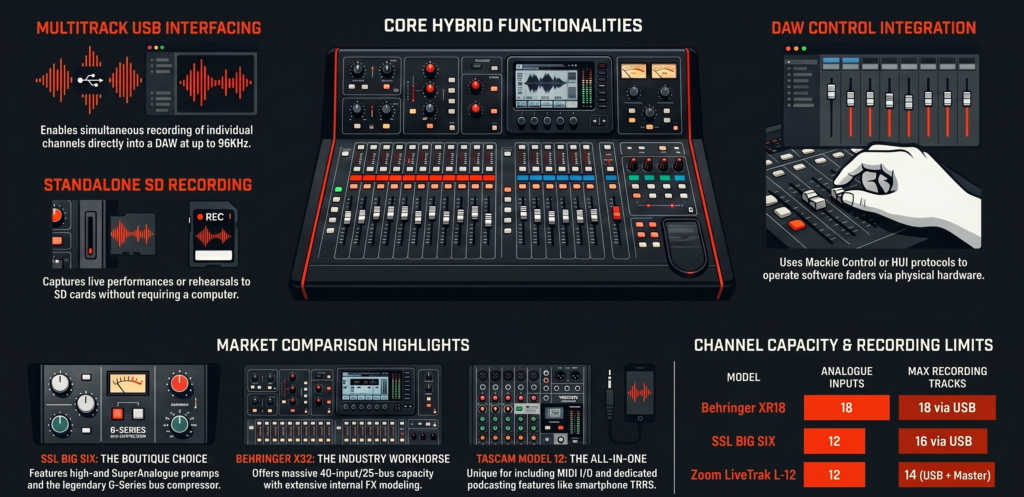
A multitrack USB mixer sends each input channel separately into your recording software.
That means:
- Kick drum gets its own track
- Snare gets its own track
- Vocals get isolated tracks
- Guitars stay independent
- You can edit everything later
This gives you full mixing control after recording.
Without multitrack recording, everything gets merged into one stereo file.
No fixing mistakes later.
No remixing.
No isolated processing.
Quick Comparison Table Which Mixer Is Best for What?
Before diving deep into each mixer, here’s the short version.
If you already know your workflow, this section alone might save you hours!
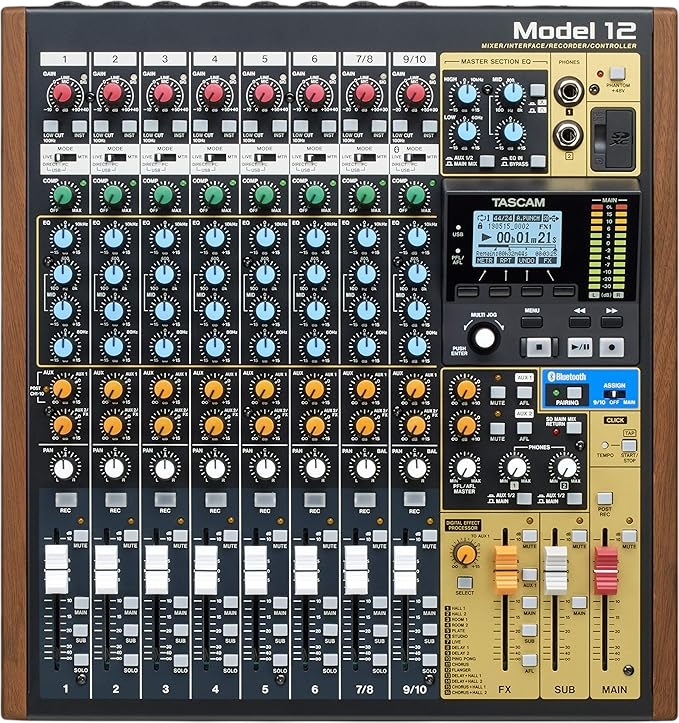
- Best hybrid analog workflow
- Tascam Model 12
- Tascam Model 16
- Tascam Model 24
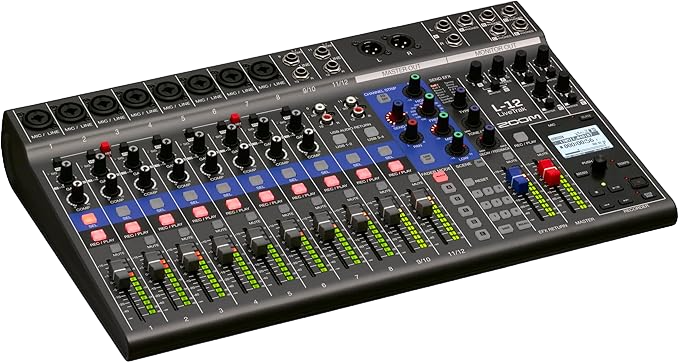
- Best for podcasting
- Zoom LiveTrak L12
- Best for large live bands
- Behringer X32 Compact

- Best analog sounding mixer
- Soundcraft Signature MTK series

- Best for streamers
- Mackie Onyx12

- Best premium studio mixer
- SSL BiG SiX

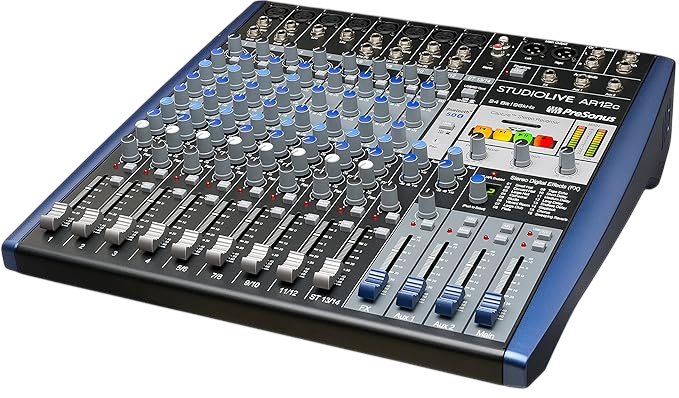
- Best beginner friendly mixer
- Presonus StudioLive AR12c
- Best portable setup
- Allen and Heath ZEDi 10FX
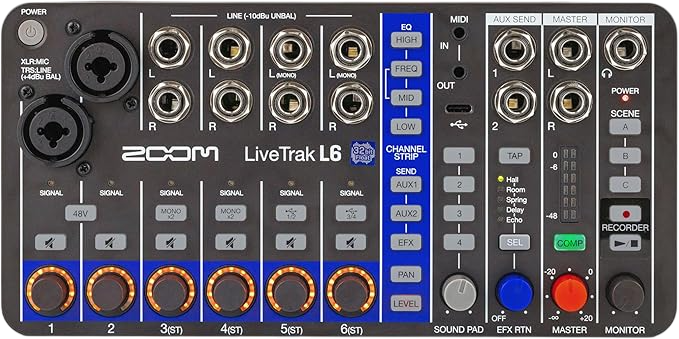
- Zoom LiveTrak L6

Now let’s actually break them down properly.
Because these mixers feel very different once you start using them daily.
| Use case | Best mixer type | Why it wins |
|---|---|---|
| Podcasting | Zoom LiveTrak L12 | Independent headphone mixes + SD recording |
| Live band recording | Behringer X32 Compact | Deep routing + pro live flexibility |
| Hybrid studio | Tascam Model 12 | DAW control + SD card workflow |
| Streaming | Mackie Onyx series | Loopback + simple OBS routing |
| Analog tone lovers | Soundcraft MTK | Warm EQ + analog signal flow |
| Premium studio | SSL BiG SiX | High-end preamps + bus compressor |
| Portable setups | Zoom L6 | Ultra compact recording system |
Which Tascam Model Mixer Should You Buy?
Tascam quietly created one of the smartest hybrid mixer lineups in recent years.
Seriously.
The Model series solved a problem many musicians had for years.
People wanted:
- Real faders
- Real EQ knobs
- DAW recording
- Standalone recording
- Low stress workflow
Without diving through endless digital menus.
That combination made these mixers insanely popular on Reddit and Gearspace.
Especially among musicians who got tired of staring at screens all day.
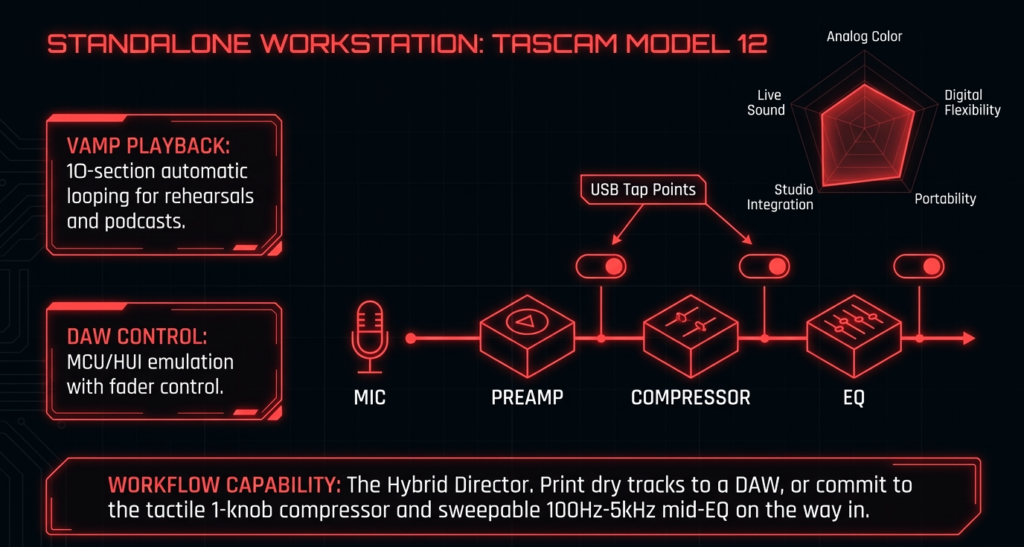
Is the Tascam Model 12 the best hybrid mixer for solo creators?
Honestly, for many creators, yes!
The Tascam Model 12 hits a sweet spot that very few mixers manage.
It feels fast.
That matters.
You sit down, plug things in, and start recording almost immediately.
No complicated boot process.
No giant routing matrix.
No app dependency.
Just physical controls everywhere.
I noticed something interesting after using the Model 12 for a few sessions.
Creativity flowed faster.
That sounds dramatic, but tactile mixers genuinely change behavior.
When recording with mouse clicks, people often overthink.
With physical knobs and faders, sessions feel more instinctive.
The Model 12 particularly shines for:
- Solo musicians
- Podcast creators
- YouTubers
- Livestreamers
- Small hybrid studios
One underrated feature is the DAW control integration.
You can actually control transport functions directly from the mixer.
That sounds minor.
It becomes addictive very quickly 😅
Stopping recordings, punching in, rewinding, and controlling sessions without touching the mouse speeds up workflow massively.
Another thing users constantly praise online is the standalone SD recording.
You can record without a computer.
That creates a very relaxed workflow.
I’ve seen creators completely avoid DAW distractions by recording ideas directly to SD cards first.
Way less friction.
The preamps sound clean and surprisingly solid too.
Not ultra colored.
Not sterile either.
They sit in a nice middle ground that works for podcasts, vocals, guitars, and synths.
What are the biggest weaknesses of the Model 12?
No mixer is perfect.
The biggest limitations are:
- Limited channel count for full bands
- Less advanced routing than X32 systems
- Smaller screen
- No motorized faders
- Internal effects are decent, not amazing
Power users sometimes outgrow it.
Especially users running complex livestreams or advanced monitor routing.
Still, for smaller setups, the balance feels excellent.
When does the Tascam Model 16 make more sense?
The Model 16 feels like the grown up sibling of the Model 12.
Same philosophy.
More room to breathe.
The extra channels matter a lot for bands.
Especially drum recording.
A typical drum setup can easily consume:
- Kick
- Snare
- Hi hat
- Rack tom
- Floor tom
- Overheads
That already eats several inputs instantly.
The Model 16 gives enough flexibility for:
- Full rehearsals
- Live tracking
- Hybrid studio sessions
- Multiple vocalists
And honestly, the physical layout feels better than the Model 12 for many engineers.
Less cramped.
Faders have more space.
Knobs feel easier to grab during fast sessions.
That matters more during real recording than spec sheets suggest.
I remember helping record a rehearsal session with a Model 16 where the drummer kept asking for headphone tweaks mid song.
Having immediate physical access to everything made the session smooth instead of stressful.
That tactile speed becomes addictive.
Why many musicians prefer the Model 16 over digital mixers
Simple answer.
Less mental fatigue.
Digital mixers offer incredible flexibility.
But many musicians genuinely dislike menu diving.
Especially during creative sessions.
The Model 16 feels approachable instantly.
Even non technical musicians understand it quickly.
That makes collaboration easier.
I’ve seen singers comfortably adjust their own monitor levels on Tascam mixers within minutes.
That rarely happens on complex digital systems.
Who actually needs the massive Tascam Model 24?
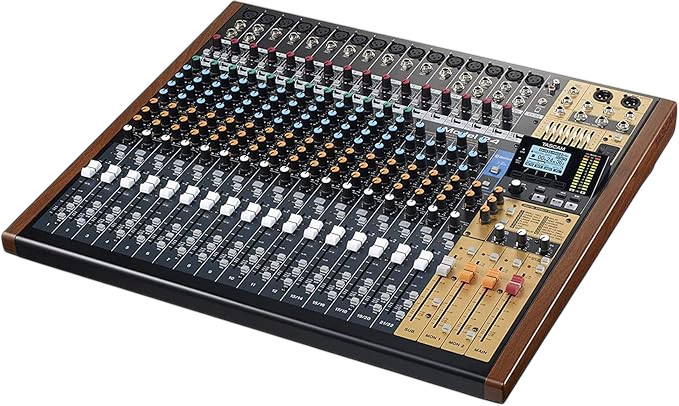
The Tascam Model 24 targets larger recording setups.
And it’s genuinely huge 😅
Desk space becomes a real issue.
But if you regularly record:
- Full bands
- Worship teams
- Live rehearsals
- Multi instrument sessions
the extra inputs become incredibly valuable.
The Model 24 especially shines during live tracking.
You can keep everything permanently connected:
- Drum microphones
- Guitar amps
- Bass DI
- Vocals
- Keyboards
No constant cable swapping.
That saves enormous amounts of time long term.
The workflow feels very “studio console” inspired.
A lot of older engineers love that.
Especially people coming from analog backgrounds.
What are the downsides of the Model 24?
The size.
That’s the biggest one.
This mixer takes serious space.
Transporting it regularly becomes annoying fast.
Another limitation involves routing flexibility.
Compared to mixers like:
- X32
- XR18
- StudioLive digital systems
the routing remains simpler.
That simplicity helps beginners.
Power users may eventually hit walls.
Still, many users intentionally choose the Model 24 because it avoids complexity.
That’s part of the appeal.
Who should skip the Tascam Model series completely?
These mixers are fantastic for many people.
But not everyone.
You should probably skip them if you need:
- Extremely advanced routing
- Complex livestream buses
- Large monitor systems
- Wireless tablet mixing
- Deep digital scene recall
- Large venue live sound workflows
That’s where mixers like the X32 dominate.
Are Zoom LiveTrak Mixers Still Worth It in 2026?
Absolutely.
Especially for podcasters and rehearsal spaces.
Zoom understood something very important early.
Many creators care more about workflow simplicity than deep engineering features.
That philosophy made the LiveTrak series incredibly popular.
Especially the L12.
Why do podcasters still love the Zoom LiveTrak L12?
Because it removes headaches.
Seriously.
The Zoom LiveTrak L12 solves several annoying podcast problems at once.
The independent headphone mixes alone make it special.
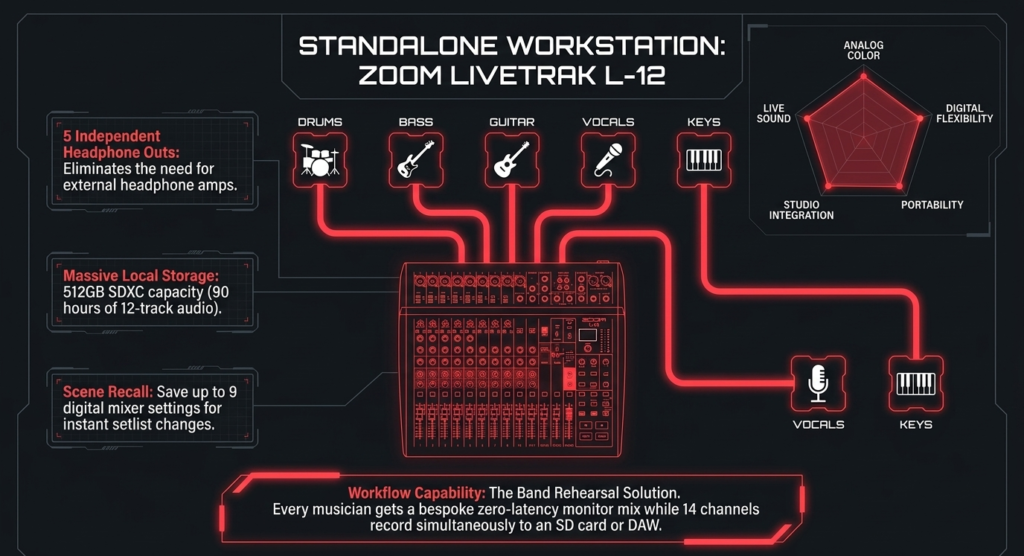
Every participant can control their own headphone volume.
That sounds small.
It changes group sessions completely.
No more:
- “Can you turn me up?”
- “I can’t hear myself!”
- “The guest is too loud!”
Everyone adjusts themselves.
That dramatically reduces interruptions.
I’ve seen small podcast teams move from audio interfaces to the L12 purely because of headphone workflow.
And honestly, I understand why.
The SD card recording system also adds peace of mind.
Computer crashes happen.
OBS glitches happen.
DAWs freeze.
Backup recordings save sessions constantly.
You’ll find endless stories online from podcasters who avoided disasters because the L12 kept recording independently.
Why beginners adapt quickly to the L12
The interface feels approachable.
That matters a lot.
Zoom intentionally avoided intimidating design choices.
Everything feels direct.
Simple.
Fast.
I’ve watched complete beginners learn the basics within one session.
That rarely happens with complicated digital mixers.
The built in effects are surprisingly usable too.
Nothing world class.
Totally fine for podcasts, livestreams, and rehearsal monitoring.
Is the Zoom LiveTrak L20 better for bands than the Tascam Model 24?
For many live bands, yes.
Particularly because of monitor mixing flexibility.
The Zoom L20 allows multiple custom headphone mixes.
That’s huge for rehearsals.
Drummers can hear more click.
Vocalists can boost vocals.
Guitarists can reduce keyboards.
Everyone gets personalized monitoring.
That improves performances immediately.
The iPad control also changes rehearsal workflows dramatically.
Musicians can control monitor mixes directly from phones or tablets.
That reduces constant engineer interruptions.
Church teams especially love this setup.
I’ve seen volunteer sound teams handle surprisingly complex services smoothly because performers adjusted their own mixes remotely.
That reduces chaos massively.
What are the weaknesses of the L20?
The physical build feels lighter than premium touring mixers.
Not fragile.
Just less tank like than something like an X32.
Some users also dislike the menu structure.
It’s functional.
Not elegant.
The preamps sound clean enough for most work though.
Especially live recording.
Is the tiny Zoom LiveTrak L6 secretly underrated?
Honestly, yes!
The Zoom LiveTrak L6 fills a very specific niche beautifully.
Portable content creation.
Tiny recording rigs.
Mobile podcast setups.
Travel production.
Field recording.
That kind of workflow.
It fits setups where larger mixers become inconvenient.
I recently saw a traveling YouTube creator running:
- Wireless mics
- Camera audio
- Smartphone livestream
- Portable battery power
through a tiny LiveTrak setup.
That flexibility impressed me.
Especially for mobile creators.
What are the compromises of the L6?
Input limitations.
Obviously.
You sacrifice expansion room quickly.
This mixer works best for:
- Solo creators
- Duos
- Portable rigs
- Backup setups
Large productions will outgrow it fast.
Still, portability has real value.
Especially for creators constantly moving between locations.
Are Soundcraft MTK Mixers the Best True Analog Option?
For many musicians, yes.
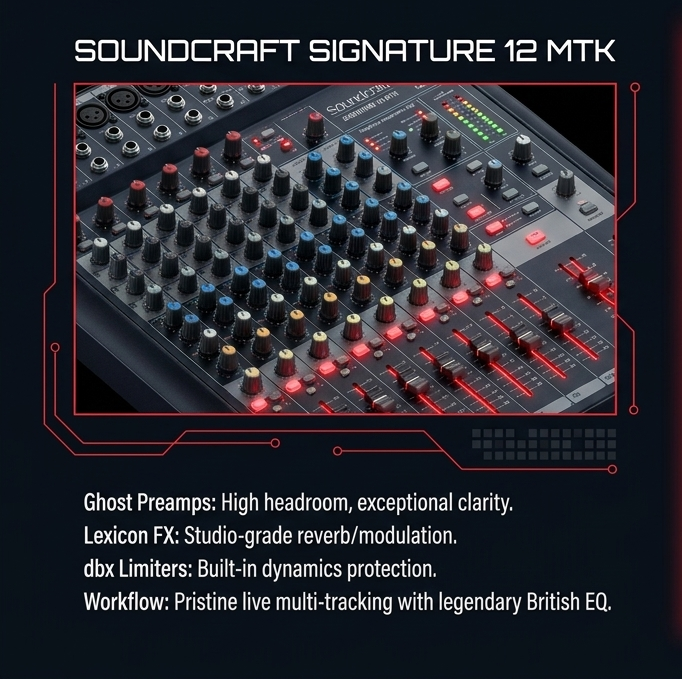
The Soundcraft Signature MTK series feels wonderfully analog.
And people who love analog workflow REALLY love these mixers.
You see that constantly on Gearspace discussions.
There’s a certain emotional response people have to analog style mixing.
Especially musicians who grew up around hardware consoles.
The Soundcraft mixers capture that feeling beautifully.
Why do engineers still love the Soundcraft Signature 12 MTK?
The EQ.
People constantly praise the EQ section online.
And honestly, I get it.
The Soundcraft EQ feels musical.
Small adjustments sound natural quickly.
That makes live mixing easier.
Vocals sit nicely.
Guitars feel smooth.
Harsh frequencies become easier to tame.
Another huge advantage involves simplicity.
No complex operating system.
No deep menus.
No app dependency.
You plug in cables and start working.
That straightforward workflow feels refreshing today.
Especially after spending time inside complicated digital ecosystems.
Why does the MTK series feel different from digital mixers?
Immediate response.
That’s the best way I can describe it.
Every control physically exists in front of you.
No layer switching.
No hidden pages.
No menu hunting.
That tactile speed changes how people mix live audio.
Especially during stressful situations.
Live engineers often prefer fast physical access over deeper digital flexibility.
Because speed matters during real performances!
Should bands buy the Soundcraft Signature 22 MTK instead?
For full bands, the Soundcraft Signature 22 MTK makes much more sense than the 12 MTK.
Drum recording alone explains why.
Once you start miking:
- Kick
- Snare
- Toms
- Overheads
- Room microphones
small mixers run out of channels immediately.
The 22 MTK gives enough breathing room for proper live tracking.
And honestly, this mixer shines during rehearsal recording.
A lot of bands want simple setups.
No laptops controlling monitor mixes.
No WiFi.
No giant digital ecosystem.
Just plug in and record.
The 22 MTK does that beautifully.
Another thing users constantly mention online involves the “feel” of the mixer.
Faders feel smooth.
Knobs feel solid.
The workflow encourages quick decisions instead of endless tweaking.
That becomes surprisingly important during long sessions.
Too many options can slow creativity.
What are the biggest weaknesses of the Soundcraft MTK mixers?
No standalone SD recording.
That hurts.
Especially today.
Backup recording has become incredibly valuable for:
- Podcasts
- Churches
- Livestreams
- Rehearsals
- Events
Another limitation involves routing flexibility.
These mixers prioritize simplicity over advanced control.
That helps some users.
Power users may feel restricted quickly.
The USB implementation also feels older compared to newer hybrid systems.
Still stable.
Still usable.
Just less modern feeling than mixers like:
- Tascam Model series
- Mackie Onyx series
- Zoom LiveTrak mixers
Who should avoid Soundcraft MTK mixers?
These mixers are not ideal for:
- Streamers
- OBS heavy workflows
- Complex routing setups
- Remote tablet mixing
- Advanced livestream production
They work best for musicians wanting direct analog recording workflows.
That’s their lane.
And honestly, they stay excellent there.
Is the Behringer X32 Still the King of Multitrack USB Mixers?
Honestly?
Yes.
Even after all these years.
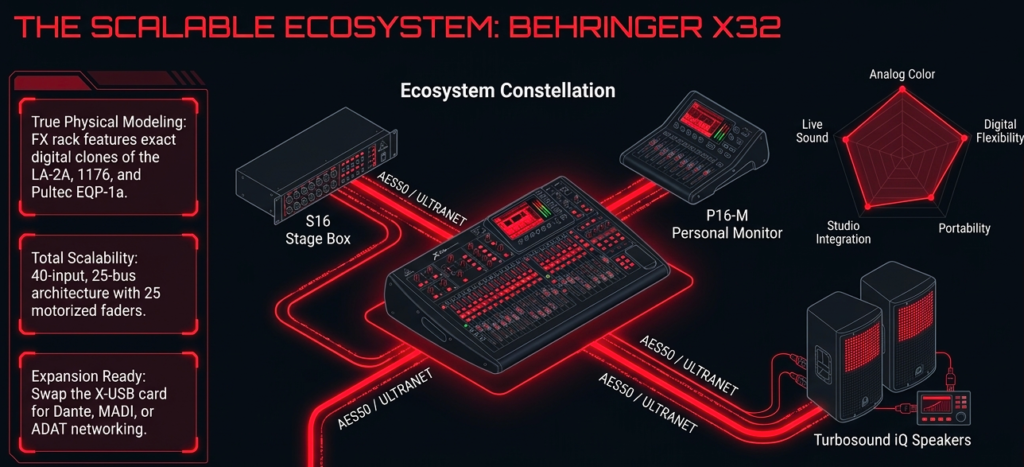
The Behringer X32 ecosystem became so widespread that it almost turned into an industry standard for affordable digital live sound.
Churches use it.
Touring bands use it.
Small venues use it.
Production companies use it.
And the crazy part?
Many newer mixers still struggle to match its balance of:
- Features
- Reliability
- Expandability
- Routing
- Price
That says a lot.
Why is the X32 still everywhere after all these years?
The ecosystem.
That’s the real answer.
The X32 platform grew huge over time.
Users gained access to:
- Massive community support
- Tutorials everywhere
- Third party apps
- Firmware updates
- Digital stage boxes
- Expansion options
- Preset libraries
That community support matters enormously.
Especially for beginners.
If something breaks or routing becomes confusing, someone online has probably already solved it.
I’ve personally fixed several X32 issues within minutes just by searching old forum threads 😅
That kind of long term ecosystem support adds huge value.
Why live engineers trust the X32
Consistency.
Once configured properly, these mixers run reliably for years.
Many churches run weekly services through X32 systems without touching the configuration for months.
That stability builds trust.
The routing flexibility also remains excellent even today.
You can create:
- Livestream mixes
- Broadcast feeds
- Monitor mixes
- Recording buses
- Matrix outputs
- Independent headphone systems
All simultaneously.
That flexibility still crushes many simpler mixers.
X32 Producer vs X32 Compact which one should you actually buy?
This depends heavily on portability needs.
The X32 Compact gives more physical control immediately.
More faders visible.
Less layer switching.
Better for fast live work.
The X32 Producer saves space.
That makes transport easier.
Smaller venues love it.
Portable production rigs love it.
Honestly, both sound very similar.
Workflow differences matter more than audio quality differences here.
Which version feels better during real live events?
The Compact.
Easily.
More physical access reduces mistakes during stressful moments.
Live engineers move fast.
Immediate access matters.
I noticed this during a worship event where fast vocal adjustments became necessary constantly.
Extra visible faders reduced panic significantly.
Layer switching under pressure feels awful sometimes 😅
Is the XR18 the smarter buy for most home studios?
For many people, yes.
The Behringer XR18 quietly became one of the best values in audio.
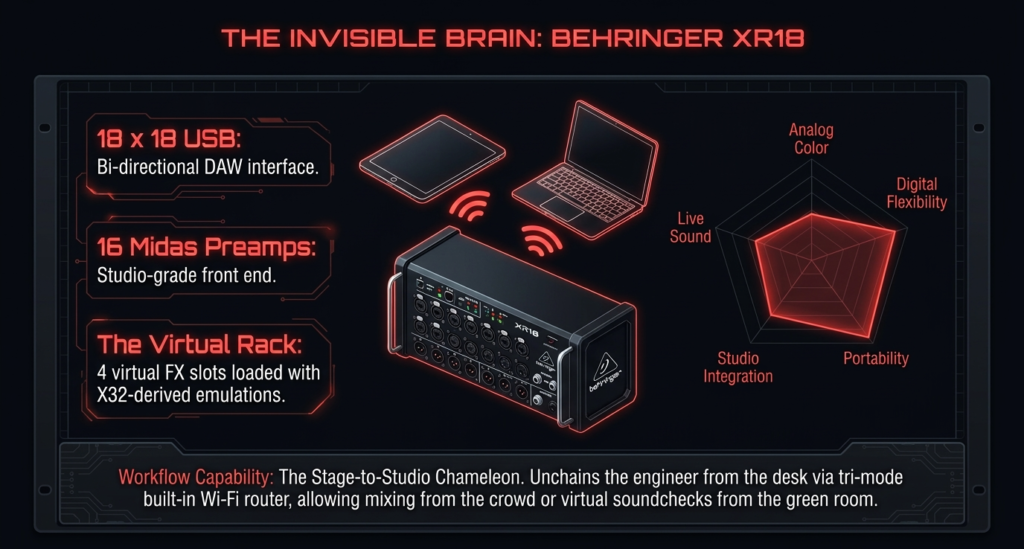
You get:
- 18×18 USB recording
- MIDAS preamps
- Digital routing
- Remote control
- Compact size
- Excellent flexibility
inside a tiny box.
That’s honestly ridiculous value.
Especially for home studios.
Why streamers and creators love the XR18
Space efficiency.
The mixer disappears easily into desks or racks.
No giant console taking over the room.
Tablet control also changes workflows completely.
You can:
- Mix remotely
- Adjust monitor mixes
- Control livestream audio
- Record bands
from almost anywhere.
That flexibility becomes addictive fast.
I remember helping a rehearsal setup where the engineer mixed directly from the middle of the room using a tablet.
The band sounded tighter instantly because adjustments reflected what musicians actually heard in the room.
That’s a huge advantage.
What are the downsides of the XR18?
No physical faders.
That’s the big one.
Some people absolutely hate mixing on touchscreens.
Especially older engineers.
WiFi reliability also matters.
Cheap routers create problems.
Most experienced XR18 users eventually buy dedicated external routers for stability.
That’s practically part of the setup at this point.
Who should avoid the X32 and XR18 entirely?
These mixers can overwhelm beginners.
Especially users wanting:
- Plug and play simplicity
- Fast learning curve
- Traditional analog workflow
The routing depth becomes intimidating fast.
I’ve seen musicians freeze up completely inside X32 menus.
That’s normal.
Digital mixers require a different mindset.
Are Mackie Onyx Mixers Better for Modern Creators?
Honestly, Mackie understood modern creator workflows surprisingly well with the Onyx series.
Especially streaming.
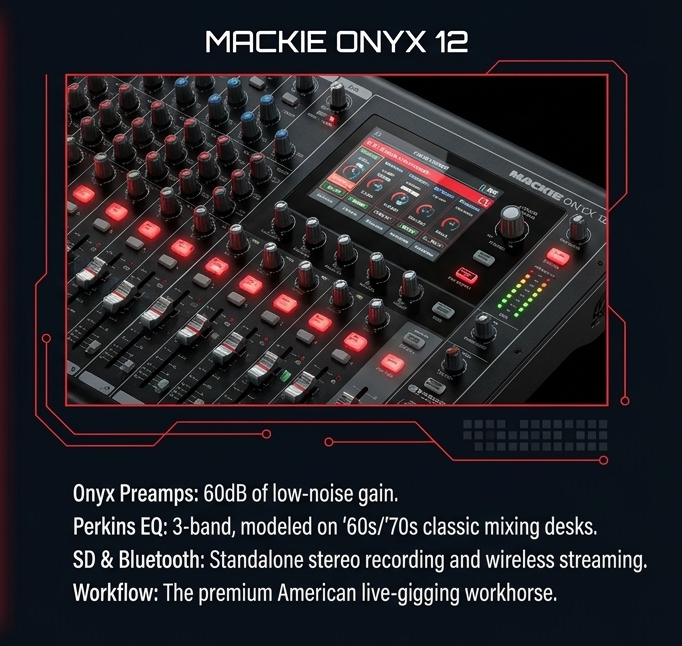
These mixers feel designed for:
- YouTubers
- Twitch creators
- Podcasters
- Hybrid creators
That audience cares heavily about simplicity and speed.
The Onyx mixers deliver that nicely.
Why are streamers suddenly paying attention to the Mackie Onyx12?
Loopback.
That feature alone attracts many creators.
Loopback makes it easier to combine:
- Game audio
- Voice chat
- Music
- Microphones
- Browser audio
inside livestreams.
Without weird software workarounds.
That matters massively for OBS users.
I’ve seen creators abandon complex multi interface setups after moving to Onyx mixers because the workflow became dramatically easier.
Less troubleshooting.
More creating.
What makes the Onyx workflow feel modern?
The interface design.
Everything feels creator focused.
Buttons make sense.
Monitoring feels straightforward.
Recording workflows move quickly.
The SD card recording also adds flexibility.
Quick recordings become incredibly easy.
That encourages spontaneous content creation.
Which honestly matters a lot today.
Is the Mackie Onyx16 worth the extra money?
For growing setups, yes.
The additional channels help quickly once creators expand into:
- Multi guest podcasts
- Music recording
- Hybrid streaming
- Live instruments
The extra flexibility prevents upgrading too soon later.
That matters financially.
A lot of creators buy too small initially and replace gear within a year.
I see this constantly online.
What are the limitations of the Onyx series?
Deep routing.
That’s where mixers like the X32 still dominate heavily.
The Onyx mixers prioritize accessibility over complexity.
That helps most creators.
Power users may eventually want more advanced digital control.
Still, for creators wanting efficient workflows, the balance feels excellent.
Is the SSL BiG SiX the Ultimate Premium Hybrid Mixer?
For hybrid studios?
Honestly, yes.
The SSL BiG SiX sounds fantastic.
And unlike many “premium” products, the difference actually becomes noticeable during serious mixing sessions.
Especially in:
- Headroom
- Stereo imaging
- Bus processing
- Analog summing
- Compressor behavior
The sound feels polished quickly.
That famous SSL character really exists.
I was skeptical initially.
Then I mixed vocals and synths through one during a hybrid session.
The mix glued together incredibly fast.
Way faster than expected.
That experience changed my opinion completely.
Why are studio engineers obsessed with the SSL BiG SiX?
Workflow plus sound.
That combination matters.
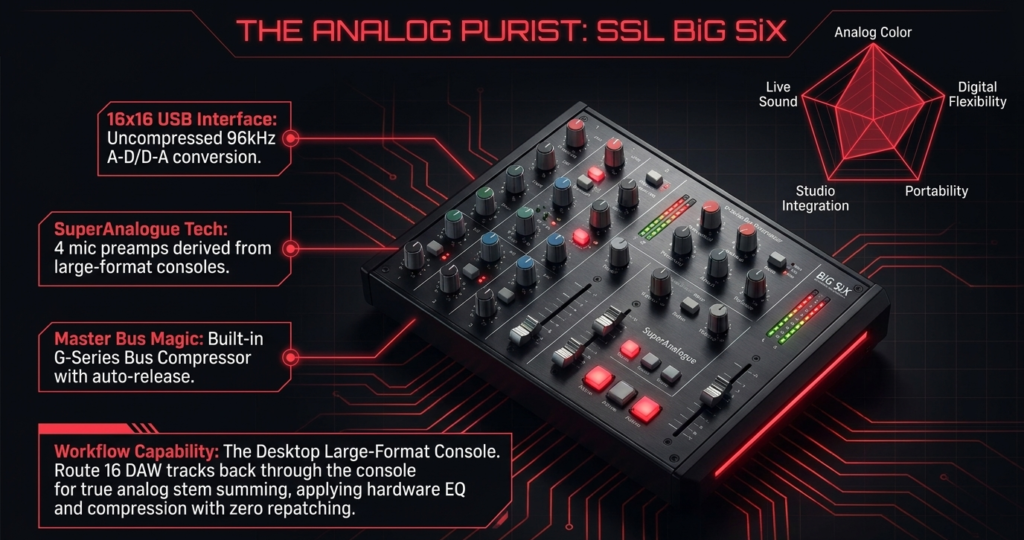
The mixer integrates beautifully into hybrid studios where people combine:
- DAWs
- Analog hardware
- External compressors
- Synths
- Summing workflows
Everything feels intentional.
Nothing feels gimmicky.
The bus compressor especially deserves praise.
SSL style bus compression creates that “finished” feeling many engineers chase.
Subtle compression.
Big emotional impact.
Is the SSL BiG SiX overkill for most creators?
Honestly, yes 😅
Many users will never fully use:
- Analog summing
- Hybrid routing
- External inserts
- Advanced bus processing
And that’s okay.
This mixer targets serious production workflows.
Not casual streaming setups.
Who should absolutely buy the SSL BiG SiX?
- Professional producers
- Mixing engineers
- Hybrid studios
- Analog workflow lovers
- Engineers using external hardware regularly
Those users will appreciate it deeply.
Are PreSonus AR Mixers the Best Beginner Friendly Option?
For many beginners, yes.
The Presonus StudioLive AR series stays refreshingly approachable.
Especially the AR12c.
The learning curve feels gentle.
That matters hugely for new users.
Many beginners get overwhelmed by advanced digital mixers immediately.
The AR series avoids that problem nicely.
Why do small studios love the AR12c?
Simple recording workflow.
That’s the biggest reason.
You plug in microphones, arm tracks, and start recording quickly.
The interface feels intuitive.
Physical controls stay visible.
The SD recording feature also helps beginner creators tremendously.
Computer free recording reduces stress.
That matters more than people think.
When should you step up to the AR16c?
Once your setup grows beyond solo recording.
The AR16c works much better for:
- Drum recording
- Multiple vocalists
- Band rehearsals
- Full sessions
Extra channels disappear quickly during music production.
Especially once stereo instruments enter the setup.
What are the biggest compromises of the AR series?
Routing flexibility again.
That’s the recurring theme with beginner friendly mixers.
Simpler workflow often means fewer advanced options.
That tradeoff helps beginners.
Advanced users may eventually outgrow the system.
Is the Allen and Heath ZEDi 10FX Enough for Serious Recording?
For small setups?
Absolutely.
The ZEDi 10FX sounds surprisingly good for its size.
Allen and Heath preamps consistently earn praise online.
And honestly, deservedly so.
The mixer feels clean.
Quiet.
Professional.
Especially considering the compact footprint.
Why is the ZEDi 10FX still popular?
Portability plus quality.
That combination matters.
Small creators often want:
- Better sound than USB microphones
- Physical controls
- Compact size
- Easy transport
The ZEDi handles that beautifully.
Singer songwriters especially love it.
Who will outgrow the ZEDi quickly?
Anyone recording:
- Full bands
- Large podcasts
- Drum kits
- Multi musician sessions
Input limitations appear fast.
Still, for solo creators and portable rigs, the value remains excellent.
Rode Rodecaster Duo: All-in-One Podcasting Powerhouse
When it comes to podcasting-specific solutions, the Rode Rodecaster Pro will stand out as one of the best soundbaord Mixer for Multitrack recording. I love it. It’s Engineered with podcasters in mind, this all-in-one bud gives a suite of features designed to streamline your work.
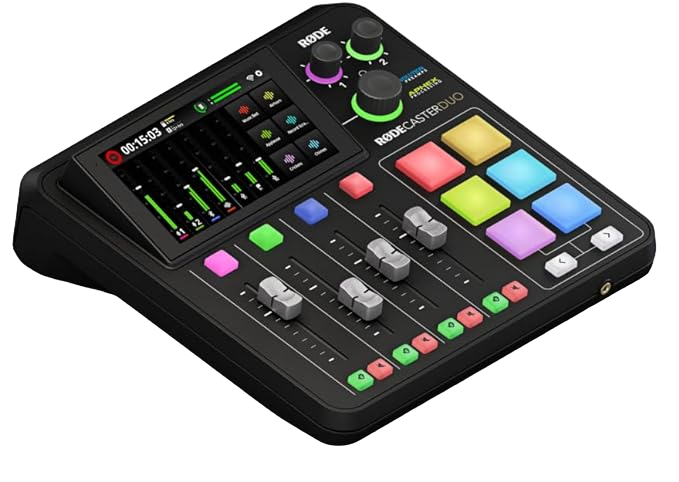
- Features:
- Intuitive touchscreen interface for navigation and control.
- Four high-quality microphone inputs with Class-A preamps for pristine audio capture.
- Built-in sound effects pads for adding jingles, intros, and outros on the fly.
- Multitrack recording capabilities for individual track editing and post-production flexibility.
- Integration with recording platforms and live streaming applications.
Why You Should Buy Rode Rodecaster Duo
The Rode Rodecaster Pro is more than just a mixer—it’s a complete podcasting studio in a single device.
With its user-friendly interface and dedicated podcasting features, such as sound effects pads and multitrack recording, you will create professional-quality podcasts without the need for additional equipment or complex setups.
So, even if you’re recording solo episodes or hosting panel discussions with multiple guests, the Rode Rodecaster Pro has that thing that will captivate your audience.
Invest in the Rode Rodecaster Pro and take your podcasting game above the sky.
Behringer Xenyx Q802USB: Affordable Excellence
When it comes to striking a balance between performance and affordability, the Behringer Xenyx Q802USB reigns supreme. Priced competitively, this mixer offers many features that cater to both beginners and experienced users.
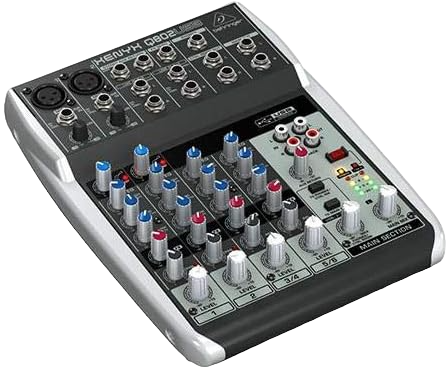
- Features:
- 8-input mixer with high-quality microphone preamps.
- Built-in USB audio interface for seamless connectivity to your computer.
- “British” 3-band EQs for warm and musical sound shaping.
- Compact and portable design, perfect for on-the-go recording.
Why You Should Buy Behringer Xenyx Q802USB
Unlike many entry-level mixers that introduce unwanted hiss or static, the Xenyx Q802USB’s preamps are surprisingly quiet and warm, rivaling those found in pricier models.
Its user-friendly layout makes it a breeze to navigate, even if you’ve never touched a mixer before.
The built-in USB interface eliminates the hassle of external audio interfaces, making it a plug-and-play solution for quick setups.
However, if you’re expecting high-end EQ precision or advanced effects, you might find it a bit limited—it’s great for beginners but not for audiophiles demanding ultra-fine control.
The plastic knobs feel a bit flimsy, and long-term durability is a concern. Some users report issues with USB connectivity on MacOS, requiring driver updates.
If you’re willing to work around these minor setbacks, this mixer can elevate your recordings without emptying your wallet.
Yamaha MG10XU: Superior Sound Control
For those who prioritize precision and control in their audio setups, the Yamaha MG10XU are for them. Renowned for its pristine sound quality and robust build, this mixer with multitrack recording feature is a favorite among the audio enthusiasts.

- Features:
- 10-channel mixer with studio-grade discrete class-A “D-PRE” preamps.
- Built-in SPX digital effects for adding depth and richness to your audio.
- One-knob compressors for effortless dynamic control.
- USB connectivity for seamless integration with your digital workstation
Why You Should Buy Yamaha MG10XU
The Yamaha MG10XU is great at providing transparent and detailed sound reproduction, which is great if you are using it for critical recording applications such as music production and broadcast.
Its features, including onboard effects and compression, will help you sculpt the audio with precision and finesse.
So if you’re a musician, podcaster, or content creator, investing in the Yamaha MG10XU will ensure that your productions sound professional and polished.
Mackie ProFX12v3: Versatility Redefined
Versatility is the name of the game with the Mackie ProFX12v3. Designed to adapt to a wide range of audio environments and applications, this Mixer Multitrack recording gives flexibility without compromising on performance or quality.
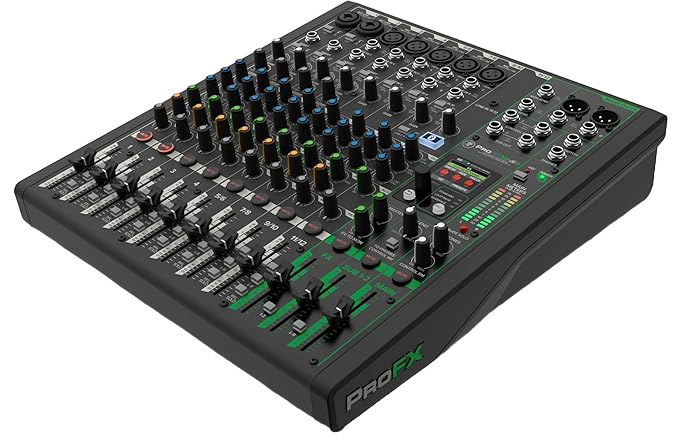
- Features:
- 12-channel mixer with Mackie’s renowned Vita preamps for pristine sound capture.
- GigFX effects engine with 24 built-in FX options for creative audio enhancement.
- “ReadyFX” effects engine offers intuitive control and customization.
- Built-in USB interface for seamless recording and playback.
Why You Should Buy Mackie ProFX12v3
The Onyx mic preamps provide immaculate, ultra-low noise performance with up to 60dB of gain.
The GigFX effects engine boasts 24 built-in effects, including reverb, delay, and chorus, though some can sound a bit too artificial-sounding when used heavily in a live setting.
Still, for home studios and podcasting, they add just the right amount of polish to your sound without needing expensive outboard gear.
One of the biggest advantages is its USB audio interface. Mackie optimized the 24-bit/192kHz recording so well that even during live recordings, there’s virtually no delay—a lifesaver for musicians who demand precision.
Which Multitrack USB Mixer Is Best for Specific Use Cases?
Here’s the short answer most people actually need.
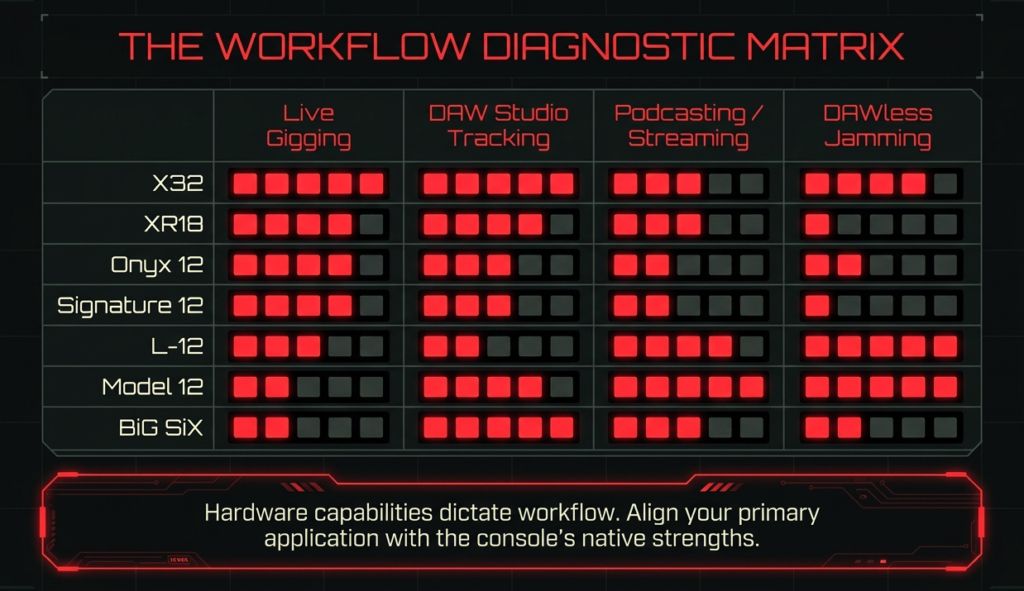
Best mixer for recording full bands live
- Behringer X32 Compact
- Zoom LiveTrak L20
- Tascam Model 24
Best mixer for podcasting
- Zoom LiveTrak L12
- Mackie Onyx12
- Tascam Model 12
Best mixer for churches and worship teams
- Behringer X32 ecosystem
- Zoom L20
Best mixer for streamers and YouTubers
- Mackie Onyx series
- XR18
Best compact mixer for solo creators
- Allen and Heath ZEDi 10FX
- Zoom LiveTrak L6
Best premium studio mixer
- SSL BiG SiX
What Problems Do People Run Into With Multitrack USB Mixers?
A few problems appear repeatedly online.
And honestly, most buyers never hear about them before purchasing.
Why does your DAW only see 2 channels?
Usually because the mixer only supports stereo USB recording.
Or the driver settings are wrong.
This problem frustrates beginners constantly.
Always verify:
- Actual USB routing
- Driver installation
- DAW input settings
- USB mode configuration
before blaming the mixer.
Why is latency sometimes terrible?
Usually buffer settings.
Sometimes poor drivers.
Sometimes weak computers.
Low latency recording depends on:
- Driver quality
- CPU performance
- Sample rate
- Buffer size
- Monitoring configuration
Mixers with strong direct monitoring workflows usually feel much smoother during recording.
Why do some mixers feel complicated to use?
Routing.
Almost always routing 😅
Modern digital mixers can become extremely deep.
That flexibility creates power.
And confusion.
That’s why workflow matters so much during purchasing decisions.
What Most Reviews Never Tell You About Multitrack Mixers
Here’s the biggest thing I learned after years around recording setups.
People keep chasing features.
But long term happiness usually comes from workflow simplicity.
Seriously.
A mixer that encourages creativity gets used more often.
That matters more than giant spec lists.
Why standalone SD recording is massively underrated
Reliability.
Backup recordings save sessions constantly.
Especially during:
- Podcasts
- Livestreams
- Church events
- Rehearsals
Computer crashes happen.
Standalone recording reduces stress massively.
Why remote control apps change everything for bands
Monitor mixing.
That’s the real killer feature.
Musicians hearing proper mixes perform better.
Immediately.
Tablet control changed live rehearsal workflows permanently.
Why physical faders still matter in 2026
Speed.
Muscle memory.
Tactile response.
Physical interaction still feels better during many recording situations.
Especially creative sessions.
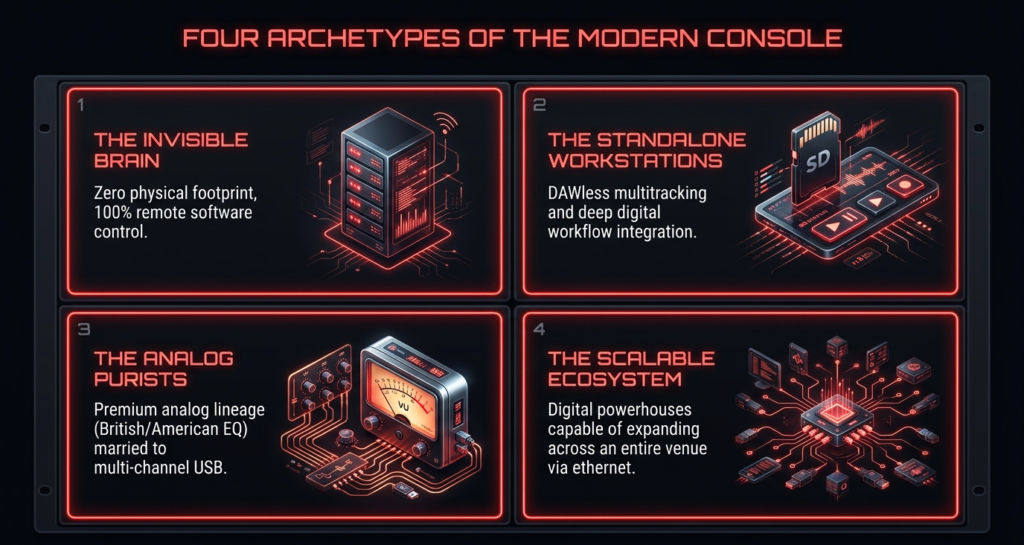
What actually matters in a multitrack USB mixer?
Here’s what genuinely matters after months or years of ownership.
| Spec people care about | Real world impact |
|---|---|
| Sample rate 96kHz | Minimal difference for most users |
| Channel count marketing | Often misleading |
| Built in FX count | Rarely used in serious recording |
| Preamp brand | Noticeable only in clean gain staging |
| Routing flexibility | Critical for real workflow |
| SD card recording | Huge reliability advantage |
USB channel count
Can it actually send every channel independently?
Or only stereo?
Manufacturers sometimes market mixers very aggressively here.
Always verify actual USB routing.
Driver stability
This matters more than preamps for many users.
A slightly worse preamp with stable drivers beats amazing preamps with crashes.
Every single time.
Reddit threads about mixers often become driver complaint threads within minutes 😅
Routing flexibility
Can you:
- Create custom monitor mixes?
- Send audio to OBS?
- Route DAW playback easily?
- Isolate livestream audio?
- Record pre fader or post fader?
Some mixers make this incredibly easy.
Others become routing puzzles.
Standalone recording
This feature is criminally underrated.
Mixers like:
- Tascam Model series
- Zoom LiveTrak series
- Mackie Onyx series
- Presonus AR series
can record directly to SD cards.
That gives:
- Backup recordings
- Computer free sessions
- Faster podcast workflows
- Safer live event recording
Honestly, once you use standalone recording, it’s hard to go back.
Latency performance
Bad latency ruins recording sessions fast.
Especially for:
- Vocalists
- Drummers
- Guitarists using amp sims
Low latency monitoring keeps performances natural.
Expandability
Will the mixer still fit your setup two years later?
This matters a lot.
Many creators outgrow beginner mixers surprisingly quickly.
Especially after adding:
- More microphones
- Hardware synths
- External compressors
- Streaming workflows
- Extra musicians
Buying slightly above your current needs often saves money.
So Which Multitrack USB Mixer Should You Actually Buy?
Here’s my honest recommendation after researching all these systems deeply.
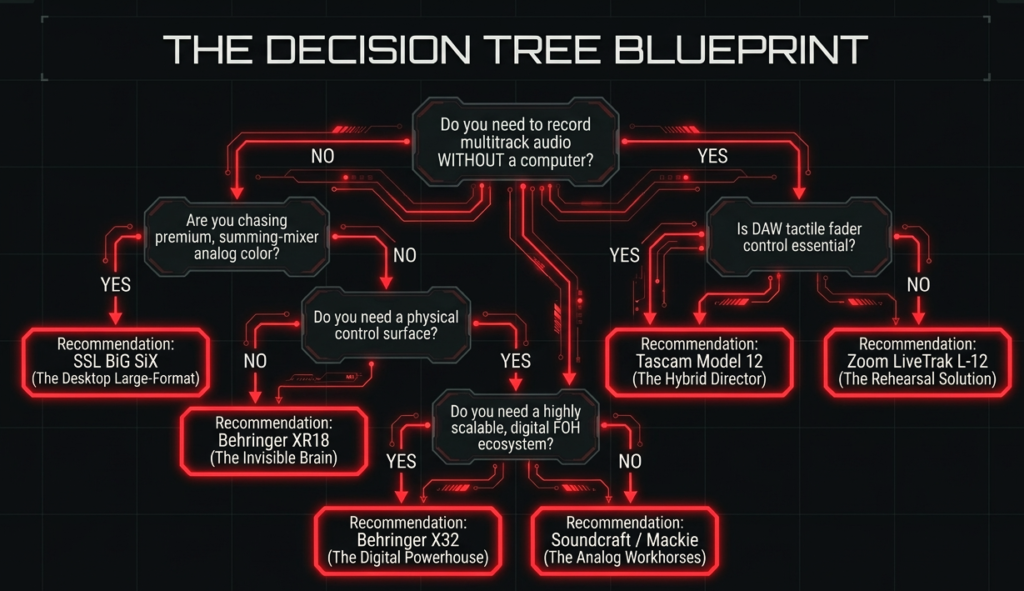
Buy the Tascam Model series if you want
- Analog style workflow
- Fast recording
- SD card backup
- Physical control
- Low stress setup
Buy the Zoom LiveTrak mixers if you want
- Podcasting
- Multiple headphone mixes
- Rehearsal recording
- Fast learning curve
Buy the X32 or XR18 if you want
- Deep routing
- Live sound flexibility
- Expandability
- Professional monitor systems
Buy the Mackie Onyx series if you want
- Streaming workflows
- Creator friendly design
- Fast setup
- Easy loopback integration
Buy the SSL BiG SiX if you want
- Premium analog sound
- Hybrid studio workflows
- External hardware integration
- High end mixing experience
Buy the ZEDi 10FX if you want
- Compact recording
- Portable setups
- Singer songwriter workflows
- Simple operation
A multitrack USB mixer solves a very specific problem.
You want to record every microphone and instrument separately into your DAW while still having the speed and feel of a real mixer.
That sounds simple.
But honestly, most mixers fail at this 😅
A lot of so called “USB mixers” only send a stereo mix to your computer. You plug in 8 microphones and still end up with only 2 recorded tracks. That becomes a nightmare later when you want to fix vocals, edit drums, or rebalance instruments.
I learned this the hard way years ago while helping a local band record a live rehearsal.
The mixer had “USB Recording” written everywhere on the box. We thought we were getting isolated drum tracks.
Nope.
Everything got baked into one stereo file. Kick drum too loud forever. Guitar too quiet forever. Session ruined!
That experience completely changed how I evaluate mixers with multitrack USB.
So this guide focuses on real world workflow first.
Not marketing specs.
Not meaningless buzzwords.
Not fake “channel count” tricks.
I spent weeks digging through Gearspace threads, Reddit discussions, user manuals, driver reports, livestream setups, church rigs, podcast workflows, and long term owner feedback to find what actually matters after the honeymoon phase ends.
And one thing became obvious very quickly.
The “best” mixer depends entirely on your workflow.
Some people need:
- Fast podcast production
- Live band recording
- Hybrid analog mixing
- Remote control from an iPad
- SD card backup recording
- Stream friendly routing
- Tiny portable rigs
- Studio quality summing
- Zero latency monitoring
Different mixers solve different problems.
That’s exactly why this guide exists.
By the end, you’ll know:
- Which mixer fits your setup
- Which mixers are overrated
- Which ones become frustrating long term
- Which ones actually save time during recording
- Which ones feel enjoyable to use daily
And honestly, that last part matters way more than people admit.
A technically powerful mixer that slows down your workflow becomes exhausting very fast.
FAQ
What is a multitrack USB mixer?
A mixer that sends individual channels separately into your DAW through USB.
Can you record every channel separately into a DAW?
Yes.
If the mixer supports true multitrack USB recording.
Do multitrack mixers replace audio interfaces?
Often yes.
Many modern mixers function as full audio interfaces.
Which mixer is best for live band recording?
The X32 Compact, Zoom L20, and Tascam Model 24 work extremely well.
Which multitrack mixer is best for podcasting?
The Zoom LiveTrak L12 remains one of the best podcast mixers available.
What’s the difference between stereo USB and multitrack USB?
Stereo USB sends only left and right outputs.
Multitrack USB sends individual channels separately.
Are digital mixers better than analog mixers?
Depends on workflow.
Digital mixers offer flexibility.
Analog mixers offer simplicity and tactile speed.
Is the Behringer X32 still worth buying in 2026?
Absolutely.
The ecosystem remains incredibly strong.
Which mixer has the easiest workflow for beginners?
The Zoom L12 and Presonus AR series feel very approachable.
Can you use these mixers for livestreaming?
Yes.
Many support OBS friendly routing and loopback workflows.
Do you need special drivers for multitrack recording?
Usually yes on Windows.
Mac systems often work more easily through Core Audio.
Which mixer has the best preamps?
The SSL BiG SiX probably wins overall sound quality here.
Are standalone SD recordings reliable?
Very.
They often save sessions during computer failures.
What’s the best compact multitrack mixer for travel?
The Zoom LiveTrak L6 and Allen and Heath ZEDi 10FX are excellent portable choices.
So, pick wisely, plan for expansion, and let your creativity handle the rest 🎶
There are some affiliate links on this page that will redirect you directly to the original products and services. Also by buying through those links you will be supporting us. So thank you ^.^
Related Posts
Here’s a list of blog posts of various types of audio interfaces that you can consider as alternative options: