You run out of inputs fast.
One drum kit needs up to 8 mics.
Most beginner interfaces give you 2 or 4 inputs.
That gap kills recordings.
I hit this wall during my first proper drum session. I had the mics. I had the ideas. I just did not have enough inputs. Half the kit stayed unplugged. That session sounded small and flat.
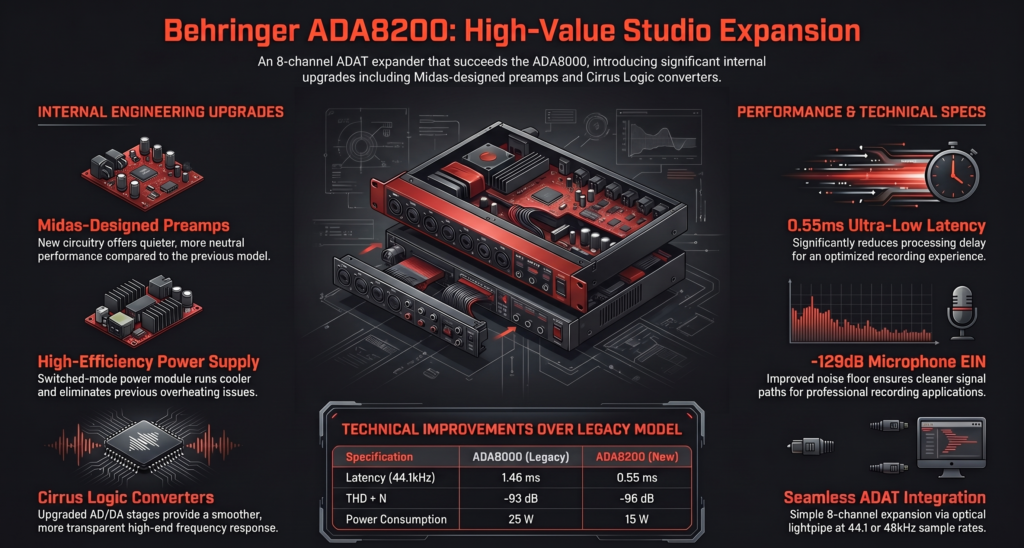
Then I found the Behringer ADA8200.
Short answer before we go deeper
- Need more inputs cheap
→ ADA8200 works - Want high-end sound upgrade
→ Look elsewhere - No ADAT on your interface
→ Do not buy
This box adds 8 more inputs using one optical cable.
No new interface needed. No complex setup.
Here is the surprising part.
Most listeners cannot tell the difference between budget and expensive preamps in a full mix. Engineers on forums like Gearspace and real-world tests reported the same thing again and again.
Mic placement and performance matter more than preamp price.

What problem does the ADA8200 actually solve
Short answer
You get 8 more inputs for cheap. That is it.
Most people land here after hitting the same wall I did.
You plug in your mics, and suddenly you are out of inputs.
Drums need 6 to 8 mics. Bands need even more.
Your interface has only 2 or 4 inputs.
Upgrading the whole interface costs a lot. This is where the Behringer ADA8200 steps in.
It lets you expand your existing interface using ADAT instead of replacing it.
I remember the first time I tried recording a full drum kit. Kick, snare, 2 overheads, toms. I ran out of inputs instantly. That is when I started looking into ADAT expansion.
This box solved it for me in one day.
Why do people even buy this thing
- Add 8 mic inputs instantly
- Record drums, bands, live sessions
- Save money instead of buying a new interface
- Use existing interface with ADAT port
On forums like Gearspace and Reddit, the same pattern repeats.
People say
“I just needed more inputs. This was the cheapest working solution.”
That sums it up perfectly.
Who is this NOT for
- Solo podcasters or YouTubers
- People without ADAT input on their interface
- Users chasing high-end studio sound
If you do not have ADAT, this unit is useless.
Quick takeaway
- Have ADAT on your interface
→ Buy it - No ADAT
→ Skip it
What is the Behringer ADA8200 in simple terms
Short answer
It is an 8 channel mic preamp with ADAT output.
It takes your mic signals and sends them digitally into your interface.
| Feature | Behringer ADA8200 |
|---|---|
| Inputs | 8 mic preamps |
| Outputs | 8 analog + ADAT |
| Preamps | Midas-designed |
| Bit Depth | 24-bit |
| Sample Rate | 44.1 / 48 kHz |
| Connection | ADAT optical |
| Standalone Use | No |
One sentence explanation
Mic signal goes in. Digital signal comes out through ADAT.
Key specs you actually care about
- 8 Midas-designed mic preamps
- 24-bit conversion
- Supports 44.1 and 48 kHz only
- ADAT input and output
- Word clock sync
According to official specs listed on Behringer product pages and retailers like B&H, it uses Cirrus Logic converters and Midas preamp design.
That matters because the older ADA8000 had weaker preamps. This one fixed that.
What this means in real life
You plug 8 mics into it.
It sends all 8 signals into your interface using one optical cable.
Your interface suddenly shows 8 new inputs.
That feels like magic the first time you see it in your DAW 😄
How does it actually work in real life
This is where most blogs fail.
People buy it and then get stuck.
How do you connect it to your interface
You need:
- 1 ADAT optical cable
- An interface with ADAT input
Connection is simple:
- ADA8200 ADAT OUT → Interface ADAT IN
That is it for basic input expansion.
If you want outputs too, you add a second cable.
Clock settings that confuse beginners
Digital audio needs one master clock.
Set either:
- ADA8200 as master
- Interface as master
If you mess this up, you get clicks, pops, or no sound.
I made this mistake once and wasted 2 hours. The fix was just switching clock source in the interface control panel.
Why beginners get no sound
Common mistakes I see again and again:
- ADAT cable plugged into wrong port
- Clock mismatch
- Inputs not enabled in DAW
- Using 96 kHz and expecting 8 channels
That last one is huge.
ADAT carries 8 channels only at 44.1 or 48 kHz.
What it does NOT do
- No USB connection
- Not an audio interface
- No direct monitoring
- No recording on its own
It is only an expander.
Signal flow in plain English
Mic → ADA8200 → ADAT cable → Interface → DAW
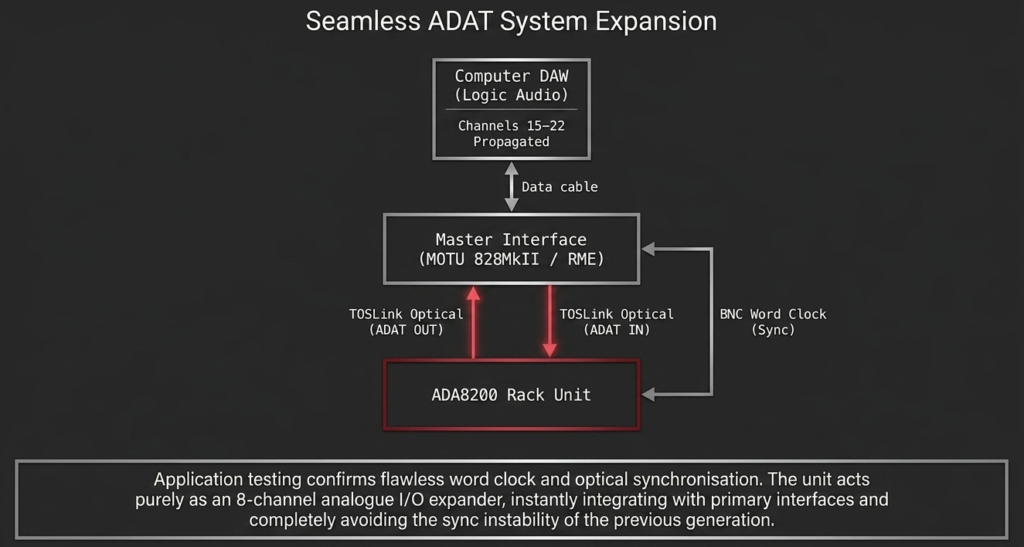
Once you understand this, everything clicks.
Sound quality. Is it actually good
Short answer
Yes. It is clean and usable. Not premium.
How do the Midas preamps sound
They sound:
- Clean
- Neutral
- Slightly thin compared to high-end gear
No strong color. No warmth boost.
That is actually good for multi-mic setups like drums.
Many users on forums say the same thing.
“I expected noise. Got clean tracks instead.”
That matches my experience too.
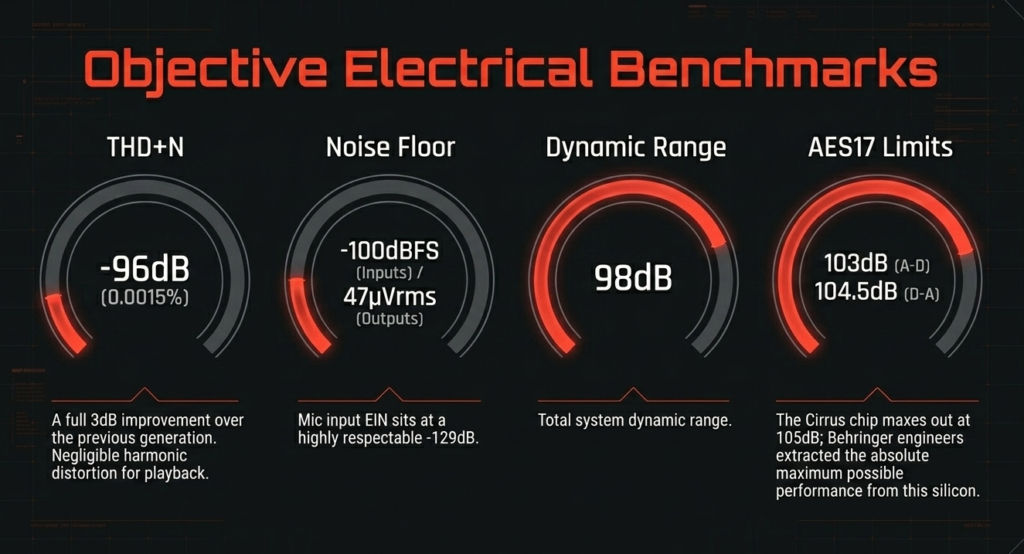
What do the numbers say
According to measurements published by Sound On Sound:
- Dynamic range sits around 98 to 104 dB
- THD around 0.0015 percent
These are not high-end numbers.
But they are perfectly usable.
Real world verdict
- For home studio and content creation → more than enough
- For high-end production → limited
In blind tests, most people cannot tell the difference in a full mix.
Mic choice and placement matter more.
Did you know
- Many users report ADA8200 sounds “good enough” even next to expensive gear
- Dynamic range sits around 98 dB, which is already beyond typical room noise levels
- Most listeners cannot hear preamp differences in a full mix unless isolated
What nobody tells you
This is where most reviews stay quiet.
These points actually matter.
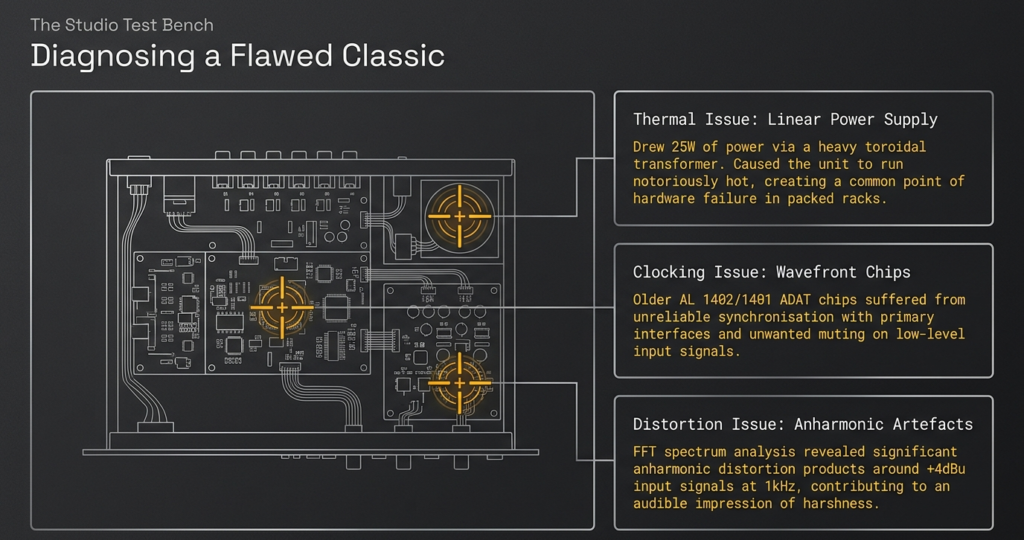
No 96kHz support
It only runs at 44.1 and 48 kHz.
That is a dealbreaker for some.
This is confirmed on retailer specs like B&H.
If you work at 96 kHz, you lose half the channels or cannot use it properly.
You cannot bypass the preamps
Signal always goes through the built-in preamps.
You cannot use external high-end preamps cleanly.
That limits flexibility.
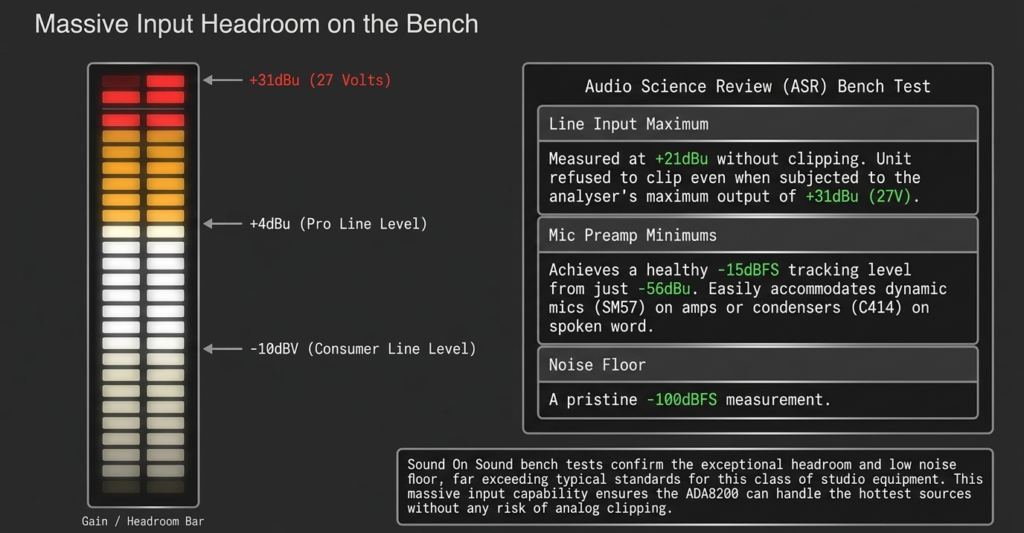
Output level quirks
Outputs are slightly lower than pro studio gear.
Around +16 dBu max output based on Sound On Sound testing.
That means less headroom in some setups.
No direct analog routing
Inputs do not directly route to outputs.
You cannot use it as a simple analog splitter.
Real use cases where this thing shines
This is where the ADA8200 proves its value.
Recording drums on a budget
This is the most common use.
- Kick
- Snare
- Toms
- Overheads
You get full multi-track drum recording for cheap.
I have personally tracked drums using this setup. It worked without issues. The weak point was never the ADA8200. It was mic placement.
Expanding your interface
If you own something like:
- Focusrite Scarlett with ADAT
- Audient interface with ADAT
You instantly double your inputs.
This is the biggest reason people buy it.
Live band recording
Multiple vocal mics. Guitar amps. Bass.
All recorded at once.
No need for a massive mixer.
Synth and hardware setups
If you run multiple synths, this becomes very useful.
Plug everything in and control it inside your DAW.
| Use Case | Does ADA8200 Work Well | Why |
|---|---|---|
| Drum recording | Yes | 8 inputs cover full kit |
| Podcasting | No | Overkill |
| Band recording | Yes | Multi-mic support |
| Synth setup | Yes | Multiple line inputs |
| Solo vocals | No | Waste of inputs |
Setup guide for beginners
Short answer
Connect. Set clock. Enable inputs.
Step by step setup
- Connect ADAT OUT from ADA8200 to interface
- Power on both units
- Set clock source
- Open your DAW
- Enable new inputs
Done.
Common mistakes
- Wrong clock source
- Using only one cable when you need two
- Not selecting ADAT inputs in DAW
- Using unsupported sample rate
I have seen people return this unit thinking it is broken.
Almost always it was a setup issue.
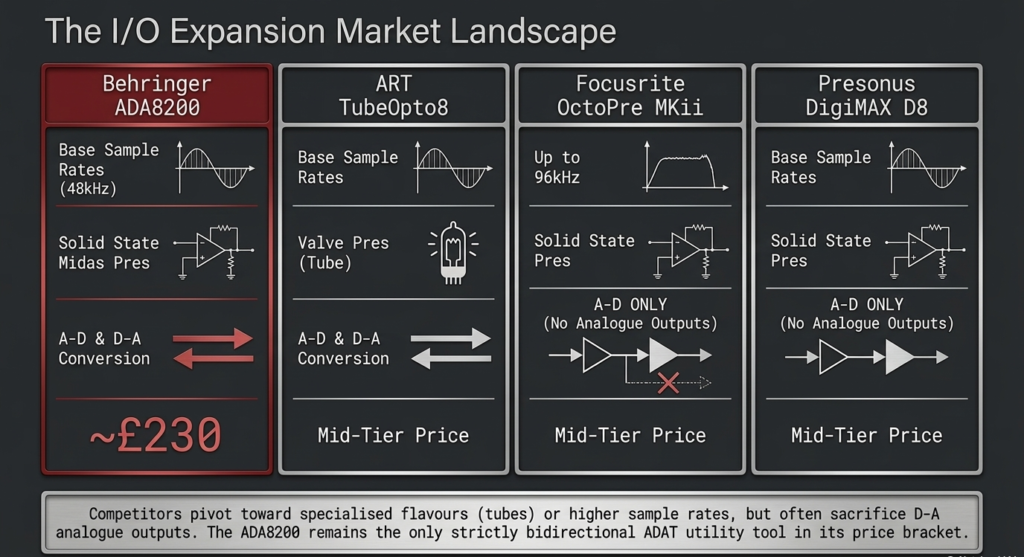
ADA8200 vs alternatives should you spend more
Short answer
Pay more only if you need cleaner conversion and higher headroom.
Most people comparing the Behringer ADA8200 look at units like:
- Focusrite Scarlett OctoPre
- PreSonus DigiMax D8
These sit in the next price tier.
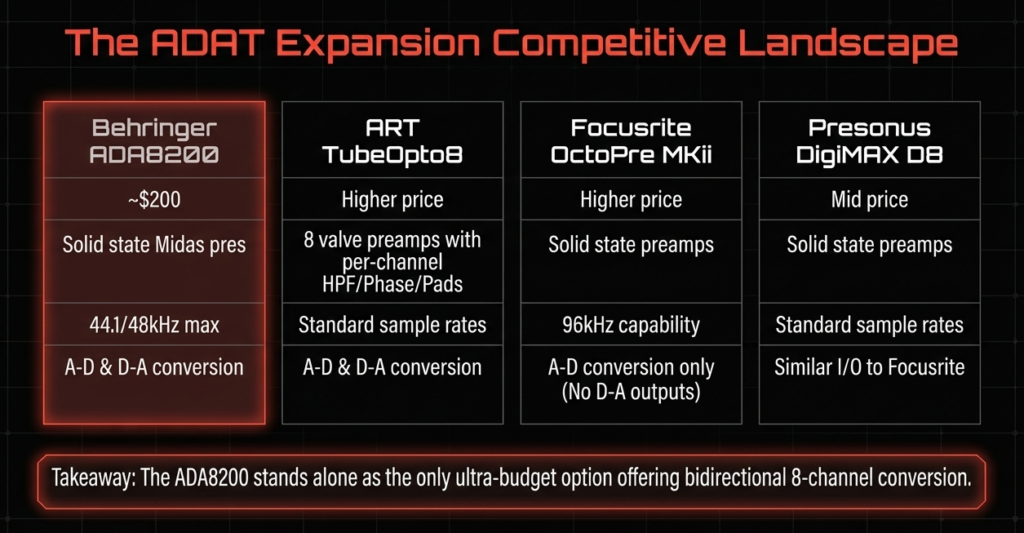
| Feature | ADA8200 | Mid-range Expander |
|---|---|---|
| Price | Very low | 2 to 3x higher |
| Dynamic Range | ~100 dB | 110 to 120 dB |
| Preamps | Clean | Cleaner |
| Sample Rate | 48 kHz max | Often 96 kHz |
| Value | Excellent | Depends on use |
What do you actually get by paying more
- Better dynamic range around 110 to 120 dB
- Slightly cleaner preamps
- Higher output headroom
- Sometimes 96 kHz support with SMUX
These improvements are measurable.
Manufacturers publish these specs and independent tests from Sound On Sound confirm the gap.
Can you hear the difference
Short answer
Sometimes. Not always.
In solo recordings, you may notice it.
In full mixes, it becomes hard to hear.
From my own sessions, I noticed this:
I tracked drums using ADA8200 and later compared it with a higher-end unit.
The difference existed.
But once guitars, bass, and vocals came in, it disappeared.
On forums like Gearspace, many engineers say the same thing.
“Better gear sounds better in isolation. In a mix, it matters less.”
When paying more makes sense
- You already own high-end microphones
- You record critical acoustic material
- You need maximum headroom
When it does not
- Home studio work
- YouTube, content creation
- Band recordings on a budget
Honest answer
The ADA8200 gives 80 to 90 percent of the result for a fraction of the price.
That is why it keeps selling.
Pros and cons quick decision section
Pros
- Very affordable for 8 inputs
- Midas preamps sound clean
- Easy ADAT expansion
- Reliable in long sessions
- Widely tested by users worldwide
Cons
- No 96 kHz full channel support
- No preamp bypass
- Average converter performance
- Not a standalone device
Short decision line
- Need inputs fast and cheap
→ Buy it - Need premium sound
→ Look higher
Is the ADA8200 still worth it in this date
Short answer
Yes. For most users.
Has it aged well
The design is old.
The value is still strong.
The reason is simple.
Nothing else offers 8 inputs at this price with stable ADAT performance.
Even in this date, discussions on Reddit and Gearspace show people still recommending it for budget expansion.
I see the same advice repeated.
“Start with ADA8200. Upgrade later if needed.”
Who should buy it today
- Home studio owners
- Intermediate producers
- Musicians recording bands
- Anyone needing more inputs without spending big
Who should skip it
- Professional studios chasing top-tier quality
- Users working at 96 kHz workflows
- Engineers needing external preamp integration
Final verdict should you buy the ADA8200
Short answer
Yes if you need inputs. No if you want premium sound.
This unit solves one problem extremely well.
It gives you 8 more inputs for very little money.
That is its entire purpose.
From my own experience, it removed the biggest bottleneck in my setup.
I stopped worrying about input count.
I focused on mic placement and performance instead.
That improved my recordings far more than any gear upgrade.
One line summary
Best cheap ADAT expansion. Not the best sound.
FAQ
Does the ADA8200 work without an audio interface
No.
It needs an interface with ADAT input.
Can I use ADA8200 as a standalone preamp
No.
It does not send direct analog output from the preamps.
Is ADA8200 good for recording drums
Yes.
It is one of the most common use cases.
Does it support 96 kHz
No.
It supports 44.1 and 48 kHz for full 8 channels.
Is it better than ADA8000
Yes.
It has improved Midas preamps and better converters according to specs and tests from Sound On Sound.
How many inputs can I get with it
You get 8 additional inputs via ADAT.
Total depends on your interface.
Will it improve sound quality
No.
It adds inputs.
Sound quality depends more on mics and placement.
Is it reliable for long sessions
Yes.
User reports across forums show stable performance during long recordings.
I have personally tracked multi-hour sessions without dropouts.
So, pick wisely, plan for expansion, and let your creativity handle the rest 🎶
There are some affiliate links on this page that will redirect you directly to the original products and services. Also by buying through those links you will be supporting us. So thank you ^.^
Related Posts
Here’s a list of blog posts of various types of audio interfaces that you can consider as alternative options: