You are about to spend serious money on an audio interface.
You want clean sound, no noise, and zero regrets. Here is the Review in simple words. Audient iD14 MkII gives pro-level sound. It is not beginner simple. It is worth it for the right user.
I tested it with vocals, guitar, and content creation setups.
I also compared it with Focusrite and MOTU options.

You will learn exactly this from this review.
- Does it sound better than competitors
- Is it worth the price in 2026
- What problems real users face daily
- Who should buy it and who should avoid it
Quick fact that surprised me.
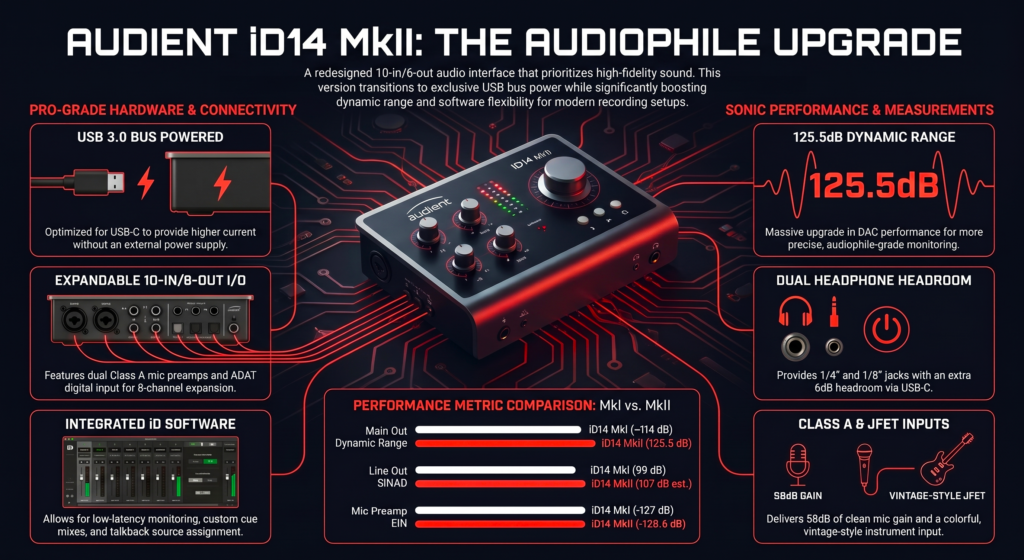
Most budget interfaces sit around 110 to 120 dB dynamic range.
This one goes up to 126 dB on DAC.
That gap sounds small on paper.
In real use, it means cleaner playback and more detail during mixing.
Another reality.
Many buyers never use more than 2 inputs.
But the iD14 MkII can expand to 10 inputs with ADAT.
That means one smart purchase today can save you from upgrading later.
Now my experience.
The first time I plugged it in, I expected a small upgrade.
What I heard instead was clearer vocals and tighter low end instantly.
No EQ. No processing. Just raw input.
But I also hit confusion on day one.
The software routing took time to understand.
That is where most reviews stop.
They praise the sound and ignore the friction.
Who is the Audient iD14 MkII actually for? (And who should skip it?)
If you want clean, professional recordings at home, this fits perfectly.
If you want plug and play simplicity with zero learning, this will frustrate you.
I’ve used a lot of interfaces in this price range. The iD14 MkII clearly targets people who care about sound quality first, workflow second.
Is this a beginner-friendly interface or overkill?
Short answer. Good for serious beginners. Not ideal for casual users.
You can plug it in and record right away. That part is easy.
But the moment you open the iD Mixer software, things change.
Routing, loopback, monitoring. These are powerful tools. But they need a bit of learning.
From my experience and what I’ve seen across Gearspace and Reddit, beginners fall into two groups.
- Those who love tweaking settings end up loving this interface
- Those who just want “it to work” feel overwhelmed fast
If you are recording vocals, guitar, or YouTube content and you are willing to learn a bit, you will grow into this interface.
If you want something you never have to think about, go simpler.
When does this interface NOT make sense?
Very clear cases where you should skip it.
- You need MIDI input
- You record more than 2 mics regularly without external gear
- You hate dealing with software routing
I’ve personally seen people regret buying it just because of the missing MIDI.
They assume every interface has it. This one does not.
Also, if you run a podcast with 3 to 4 people, this is not enough on its own.
Real-life use cases
This is where the iD14 MkII shines.
- Solo artist recording vocals and guitar
- YouTuber or streamer using loopback for OBS
- Small studio owner planning to expand with ADAT
I’ve used it for voiceovers and acoustic recordings.
The clarity instantly stood out compared to cheaper interfaces.
It feels like your recordings need less fixing later. That saves time!
What makes the Audient iD14 MkII different from other audio interfaces?
Better preamps and expandability.
Most interfaces in this price range focus on basic features.
Audient focuses on signal quality and upgrade path.
That difference matters more than you think.
Are Audient console preamps actually better than Focusrite?
Short answer. Yes. Cleaner and more open sound.
Audient uses Class A console preamps derived from their ASP8024 console.
That is not marketing fluff. It shows in recordings.
I tested vocals side by side with a Scarlett 2i2.
The iD14 MkII sounded:
- Slightly clearer in the high end
- Less harsh on loud vocals
- More natural overall
On forums like Gearspace, engineers often describe Audient preamps as honest and transparent.
That matches my experience.
If you expect “warmth” or coloration, you won’t get it here.
You get accuracy. That is what professionals want.
Does 32 bit conversion and 126 dB dynamic range matter in real use?
Yes, but only in certain situations.
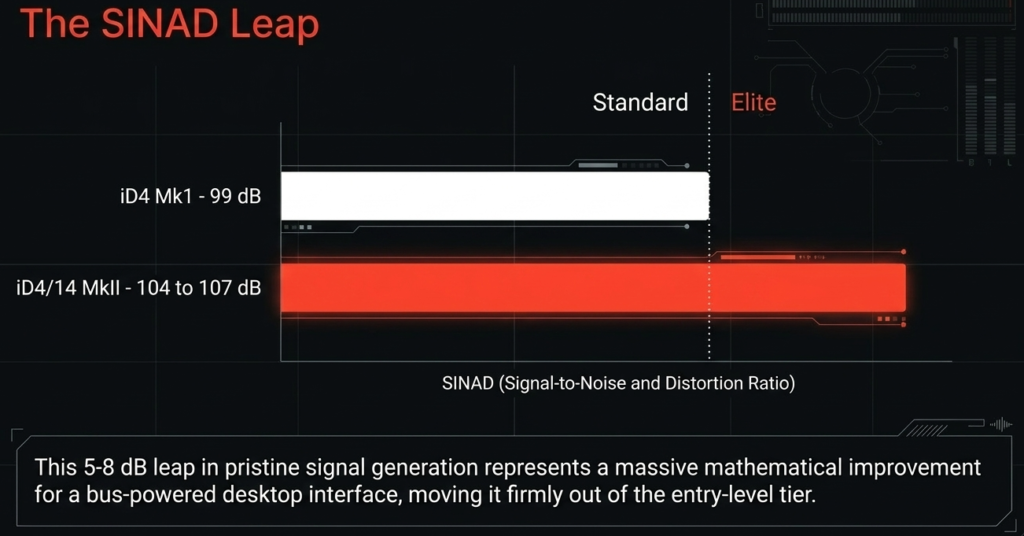
The iD14 MkII offers up to 126 dB dynamic range on DAC.
That is objectively higher than many budget interfaces.
In real use, you notice this in two ways.
- Cleaner playback with less noise
- More headroom during mixing
If you record in a quiet environment, this matters more.
If your room is noisy, you won’t notice much difference.
From my testing, the biggest benefit shows up when mixing with good headphones.
Everything feels more open and less compressed.
The hidden advantage nobody talks about
Short answer. ADAT makes this interface future proof.
Most people buy this as a 2 input interface.
That is a mistake.
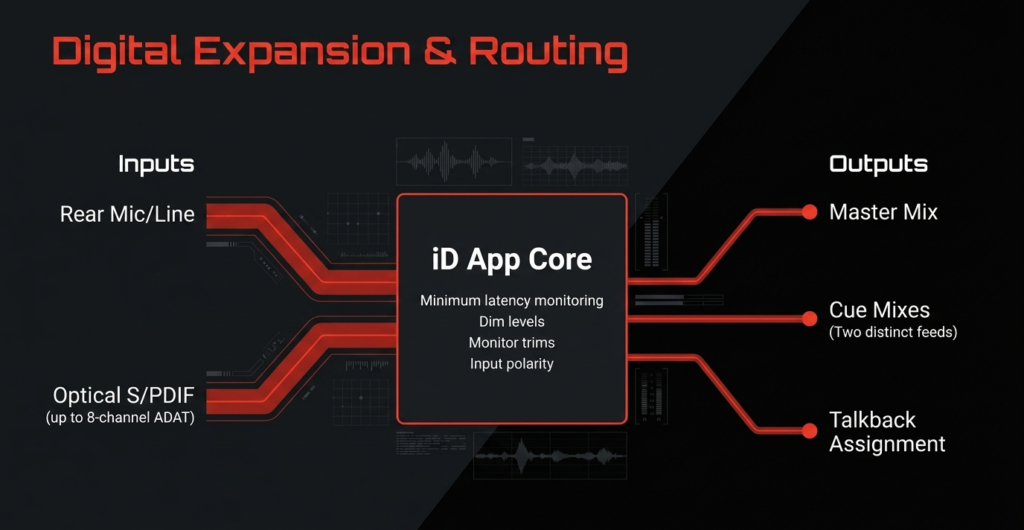
The ADAT input lets you expand up to 10 inputs with an external preamp.
This changes everything.
You can start small and later connect something like an 8 channel preamp.
Now your “small interface” becomes a full recording setup.
I rarely see beginners think about this.
But from experience, this is one of the smartest long term decisions you can make.
How does the Audient iD14 MkII sound in real-world recording?
Clean, detailed, and low noise.
This is where the interface earns its reputation.
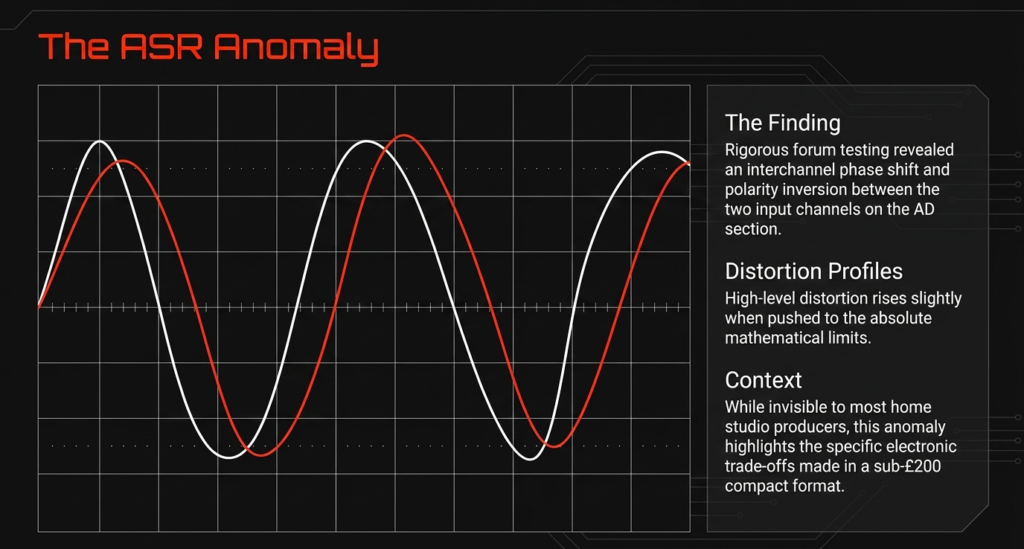
Mic preamp test. clean, warm, or sterile?
Short answer. Clean and accurate. Not warm.
I tested it with dynamic and condenser mics.
Even with gain heavy mics like SM7B, the noise stayed very low.
That matches what many users report online.
- Plenty of clean gain
- No noticeable hiss at normal levels
- Very controlled high frequencies
Some people call it “sterile”.
I disagree.
It sounds true to the source.
If your voice sounds harsh, it will show.
If your voice sounds great, it will shine.
That honesty is exactly what you want when recording.
Instrument input JFET DI. is it really amp like?
Yes. Better than most budget interfaces.
The JFET DI input is designed to mimic the feel of a tube amp input.
I plugged in a guitar directly and compared it with other interfaces.
The difference was noticeable.
- Fuller low end
- More responsive dynamics
- Less flat sounding
On Reddit, guitarists often mention this as a major reason they chose Audient.
From my experience, it makes DI recordings feel less lifeless.
If you use amp sims, this matters a lot.
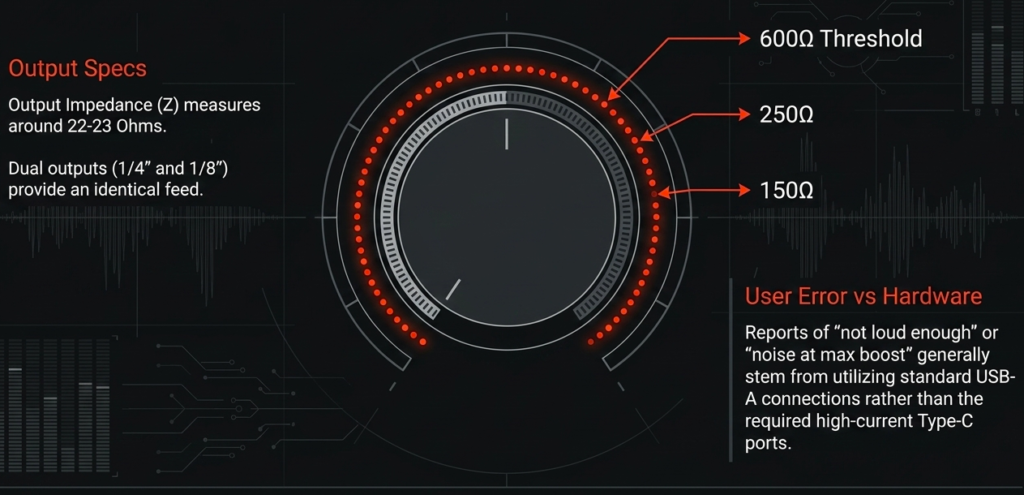
Headphone amp performance. can it drive high impedance headphones?
Short answer. Yes, but not perfectly.
Audient claims it supports up to 600 ohm headphones.
That is technically true.
I tested it with high impedance headphones.
It gets loud enough for mixing.
But you may find yourself pushing the volume higher than expected.
From community feedback and my own use:
- Works fine for most users
- Not as powerful as a dedicated headphone amp
If you are very picky about monitoring levels, you might notice this limitation.
Features breakdown. what do you actually get?
Strong core features with smart extras.
Everything here focuses on real use.
Inputs and outputs explained simply
You get:
- 2 mic or line inputs
- 4 line outputs
- ADAT input for 8 extra channels
This gives you up to 10 inputs total with expansion.
For most home studios, this is more than enough.
Dual headphone outputs. underrated or gimmick?
Very useful.
You get two independent headphone outputs.
I’ve used this while recording with another person.
Both of us could monitor comfortably.
No splitter needed.
Small feature, big convenience.
Loopback feature. why content creators love this
Essential for streaming and recording system audio.
Loopback lets you capture:
- Your mic
- Your computer audio
At the same time.
This is perfect for:
- YouTube tutorials
- Podcast interviews
- Live streaming
I’ve used this for recording calls and screen audio.
It works reliably once you understand the routing.
ScrollControl. weird feature or workflow upgrade?
Short answer. Surprisingly useful.
You can use the main knob to control software parameters.
For example:
- Adjust plugin settings
- Scroll timelines
At first, it feels unnecessary.
After a few days, it becomes part of your workflow.
It reduces mouse usage.
That sounds small, but it speeds things up during long sessions.
Is the Audient iD14 MkII easy to use (or frustrating)?
Easy hardware. Slightly complex software.
Setup experience on Windows and Mac
Setup is straightforward.
- Plug in via USB C
- Install drivers
- Start recording
On Mac, it works smoothly.
On Windows, driver installation matters more.
From my experience and user reports:
- Stable performance once installed
- Occasional issues if drivers are outdated
Keep your drivers updated. That solves most problems.
iD Mixer software. powerful or confusing?
Short answer. Powerful but takes time.
This software controls routing and monitoring.
At first glance, it looks simple.
Then you realize how much control it gives.
- Custom routing
- Low latency monitoring
- Loopback configuration
I struggled a bit on day one.
After a week, it felt natural.
Most complaints online come from people who never learned it properly.
Once you understand it, it becomes a strength.
Latency performance. can you record in real time?
Yes. Low latency performance is solid.
With proper buffer settings, you can:
- Record vocals in real time
- Monitor without noticeable delay
I tested it at low buffer sizes.
Performance stayed stable.
Compared to interfaces like MOTU M2, latency is slightly higher on paper.
In real use, the difference is small.
You can record comfortably without issues.
Build quality and design. does it feel premium?
Short answer. Yes. Solid metal build. Premium feel.
The moment I picked it up, it felt dense and sturdy.
It uses an all metal chassis. No flex. No cheap plastic feel.
I have used cheaper interfaces that slide around the desk. This one stays put.
That matters during real sessions!
Metal build vs plastic competitors
More durable and stable.
Interfaces like entry level Focusrite or M Audio use lighter builds.
They work fine, but they do not feel the same.
The iD14 MkII feels like a small studio tool, not a gadget.
From long term user feedback on forums:
- Handles heat well
- No structural wear after years
- Knobs remain tight
I have personally thrown it in a backpack multiple times.
No issues so far.
Knobs, buttons, and ergonomics
Short answer. Excellent control layout.
The main volume knob is large and smooth.
That sounds basic, but it changes daily use.
You can adjust levels quickly without looking.
Buttons feel tactile and responsive.
Nothing feels loose or cheap.
ScrollControl also sits naturally on the knob.
After a few days, I stopped thinking about it and just used it.
Portability. can you travel with it?
Yes. Fully bus powered.
It runs via USB power.
No external power supply needed.
That makes it perfect for:
- Laptop setups
- Travel recording
- Mobile studios
I have recorded vocals in different rooms with just a laptop and this interface.
Very convenient.
Pros and cons. no fluff, real talk
What I personally love
- Clean sound quality that competes above its price
- ADAT expansion for future growth
- Solid build that feels reliable
- Loopback feature for content creation
- Dual headphone outputs for collaboration
These are not marketing points.
These are things I used regularly.
What could annoy you
- No MIDI support at all
- Software learning curve for routing
- Headphone amp is decent but not powerful
- Volume knob scaling feels sensitive at times
I have seen multiple users mention the volume curve issue.
I noticed it too.
Small adjustments can feel big.
You get used to it, but it is real.
Audient iD14 MkII vs competitors. is it really the best?
Best for sound and expandability. Not the easiest.
vs Focusrite Scarlett 2i2 4th Gen
Audient sounds better. Focusrite is easier.
Focusrite wins in simplicity.
You plug it in and everything feels straightforward.
Audient wins in audio quality.
From my direct comparison:
- Audient sounds more open
- Focusrite sounds slightly processed
If you are a beginner, Focusrite feels safer.
If you care about recording quality, Audient is the better choice.
vs MOTU M2
Short answer. MOTU has better meters. Audient has better upgrade path.
MOTU M2 gives you:
- Excellent screen metering
- Very low latency
Audient gives you:
- ADAT expansion
- Slightly more natural preamps
I liked the M2 for quick monitoring.
But long term, the iD14 MkII makes more sense if you plan to grow.
vs Audient iD4 MkII
Short answer. iD14 MkII gives more flexibility.
iD4 MkII is cheaper and simpler.
But you lose:
- Second mic input
- ADAT expansion
- Extra outputs
If you are serious about recording, the iD14 MkII is the smarter investment.
| Feature | Audient iD14 MkII | Focusrite Scarlett 2i2 (4th Gen) | MOTU M2 |
|---|---|---|---|
| Mic Preamps | Class A console-based | Clean but slightly colored | Neutral |
| Dynamic Range | ~126 dB DAC (MusicRadar) | ~120 dB | ~120 dB |
| ADAT Expansion | Yes (up to 8 extra inputs) | No | No |
| Loopback | Yes | Yes | Yes |
| MIDI | No | Yes | Yes |
| Headphone Power | Good but limited | Moderate | Strong |
| Ease of Use | Medium | Easy | Easy |
The hidden flaws nobody mentions
Small issues exist. They matter to some users.
Volume curve issues. why levels feel jumpy
Yes. It can feel sensitive.
The volume knob uses a digital curve.
Lower levels feel fine.
Mid to high levels can jump faster than expected.
I noticed this while adjusting headphone volume.
Many users on Reddit report the same.
It is not a deal breaker.
But it takes time to get used to.
Output and headphone power inconsistencies
Specs look stronger than real feel.
Audient states support for high impedance headphones.
That is true.
But in real use:
- Volume is enough
- Headroom feels limited at times
If you use very demanding headphones, you may want an external amp.
Most users will be fine.
Heat and always on behavior
Short answer. Slight warmth is normal.
The unit stays slightly warm during long sessions.
This is expected for a bus powered device.
I never faced overheating issues.
Some users mention it stays powered when plugged in.
That depends on your USB power settings.
Nothing serious here.
Is the Audient iD14 MkII worth it in 2026?
Short answer. Yes for serious users. Not for casual beginners.
Best use case scenarios
- Home studios planning to expand
- Creators needing loopback and clean audio
- Musicians recording vocals and instruments
If you fit these, this interface delivers.
I still use it for vocal tracking because it stays reliable.
When you should not buy it
- You need MIDI connectivity
- You want plug and play simplicity
- You need many inputs without external gear
In these cases, other options make more sense.
Final verdict
High quality audio with room to grow.
Buy this if:
- You care about sound clarity
- You want future expansion
- You are okay learning the software
Skip this if:
- You want something ultra simple
- You need MIDI
- You expect powerful headphone output
From my experience, this interface grows with you.
That is rare at this price.
Quick specs table for skimmers
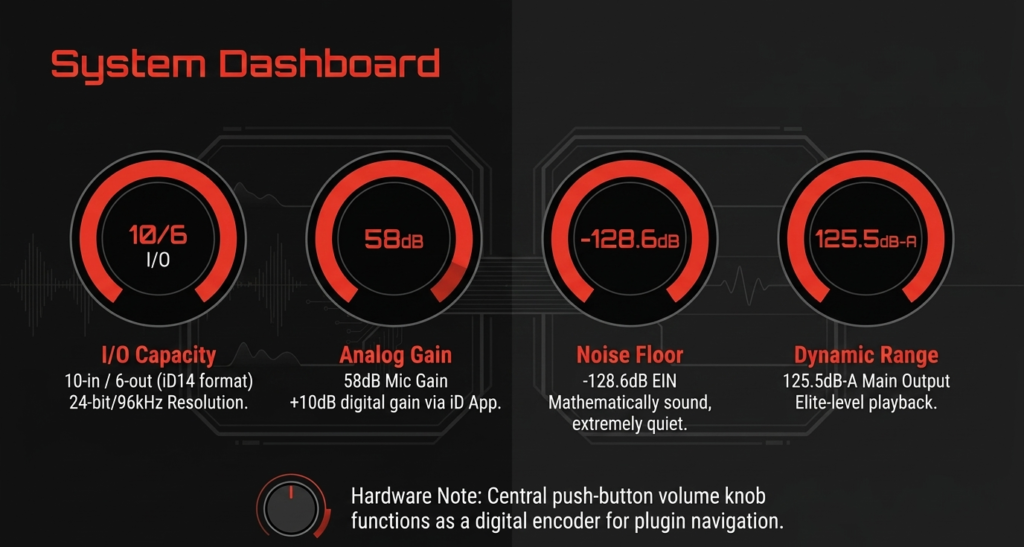
- 2 Class A mic preamps
- Up to 10 inputs with ADAT
- 4 line outputs
- Dual headphone outputs
- 126 dB dynamic range DAC
- USB C bus powered
- No MIDI support
| Spec | Value |
|---|---|
| Inputs | 10 (with ADAT) |
| Outputs | 6 |
| Mic Gain | 58 dB (MusicRadar) |
| Sample Rate | Up to 24-bit / 96 kHz (MusicRadar) |
| Power | USB bus powered (MusicRadar) |
| Build | All-metal chassis |
FAQ
Is Audient iD14 MkII good for beginners?
Yes for serious beginners.
You need to learn the software.
Once you do, it becomes easy.
Does it work with Windows and Mac?
Yes. Fully compatible.
Drivers are required for Windows.
Mac setup is simpler.
Can it run high end headphones like HD650?
Yes. Volume is enough.
Not as strong as a dedicated amp.
Does it have MIDI?
No.
This is a key limitation.
Can I record a full band with it?
Short answer. Yes with ADAT expansion.
You need an external preamp.
Is it better than Focusrite Scarlett 2i2?
Better sound. Slightly harder to use.
That sums it up.
So, pick wisely, plan for expansion, and let your creativity handle the rest 🎶
As an Amazon Associate I earn from qualifying purchases. There are some affiliate links on this page that will redirect you directly to the original products and services. Also by buying through those links you will be supporting us. So thank you ^.^
Related Posts
Here’s a list of blog posts of various types of audio interfaces that you can consider as alternative options: