Every mixer review starts with the same question. How many mic inputs does it have?
The Behringer X32 Core has zero! 😄
Here is the wild part. This 7.9 pound box can route from up to 96 remote inputs, and it still has no mic input of its own.
Direct answer first. The Behringer X32 Core is a one rack space digital mixer with 40 input channels and 25 buses. You add mic preamps through S16 stage boxes and you mix from an iPad or a computer.
That design suits some rigs perfectly and fails others completely.
By the end of this Behringer X32 Core review, you will know which group you belong to, what extra gear you must buy, and what to pick instead if the Core is wrong for you.
One more fact you should know upfront 🚨 Behringer tags the X32 Core as Legacy on its own product page.
Sound On Sound reviewer Paul White called it “the most compact and cost-effective way to harness the X32 engine” for setups built on remote I/O and remote control. You can read his full Core and Rack review on their site.
This guide draws on Behringer’s documentation, the Sound On Sound review, retailer specs, and owner reports. It does not rest on bench testing, so I name the source every time I share someone’s real world experience.

What Is the Behringer X32 Core?
The Behringer X32 Core is a 1U rack mixer that packs the mix engine of the X32 console into one rack space.
It has no faders, no big screen, and almost no analog jacks. All the action happens over the network.
Think of it as the brain without the body! You supply the ears through S16 stage boxes and the hands through an iPad, a laptop, or a control surface.
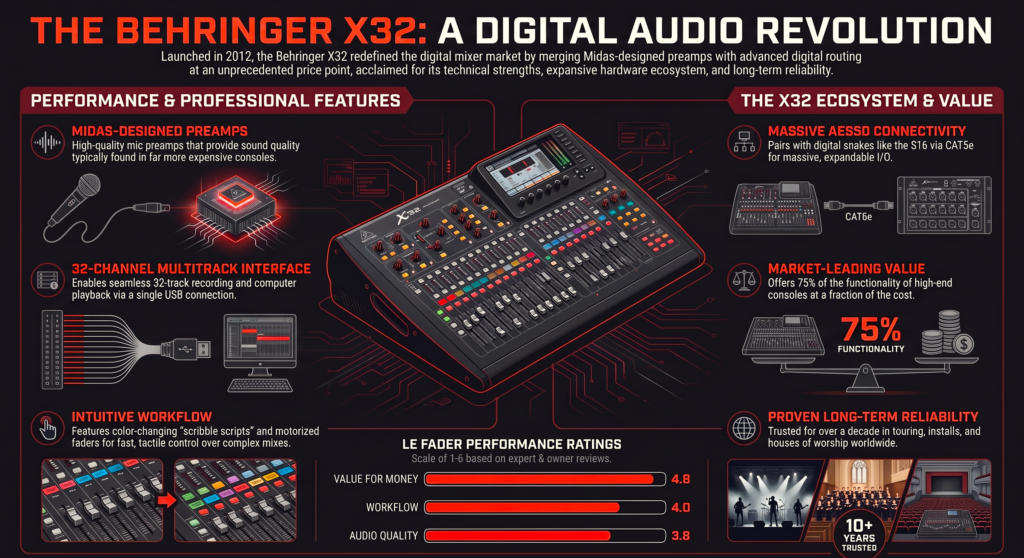
| Feature | Behringer X32 Core |
|---|---|
| Form factor | 1U rackmount, 7.9 lb (3.6 kg) |
| Input channels | 40 (32 main plus 8 aux), plus 8 FX returns |
| Buses | 25 (main LCR, 6 matrix, 16 mix) |
| Networking | 2 AES50 SuperMAC ports, up to 96 remote inputs and 48 outputs |
| Local analog I/O | 2 balanced TRS monitor outputs, 1 XLR talkback input, 1 stereo headphone jack |
| Mic preamps on the mixer | None |
| Computer recording | 32 x 32 USB 2.0 through the expansion card |
| Front USB port | Stereo recording, scene storage, firmware updates |
| Effects | 8 true stereo FX slots |
| Groups | 8 DCA groups, 6 mute groups |
| Personal monitoring | Ultranet output for P16 mixers |
| Sample rates | 44.1 kHz and 48 kHz |
Source data comes from the Behringer X32 Core brochure and the Sound On Sound review. Behringer marks the brochure specs as preliminary, so double check details before you buy.
Is the Behringer X32 Core discontinued?
Behringer’s product page uses the Legacy tag, and Adorama lists the mixer as no longer available.
Amazon still carries a listing, so stock depends on the seller. Check the return policy before you pay.
If you buy used, confirm that the USB card still sits in the expansion slot. The mixer needs that card for computer recording.
Does the Behringer X32 Core Have Mic Preamps?
No! The Behringer X32 Core has zero mic preamps.
Sound On Sound describes the analog side as two monitor outputs, a talkback mic input, and a headphone jack. Everything else arrives over the two AES50 ports.
That single fact decides whether this mixer fits your life.
What do you plug into the X32 Core?
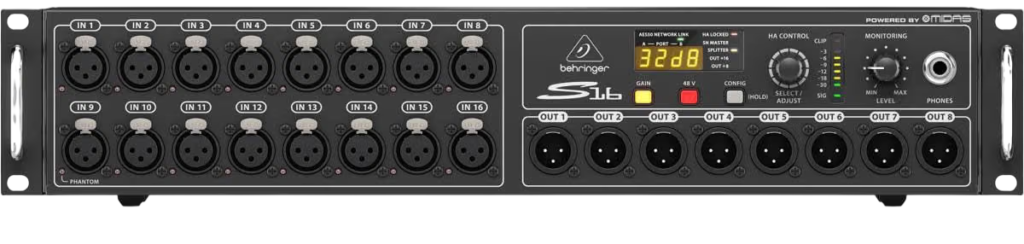
The obvious partner is the Behringer S16. It gives you 16 remote controllable Midas designed mic preamps and 8 balanced outputs over one Cat 5e cable.
Behringer says the cable run can reach 330 feet (100 meters). It also says you can cascade three S16 boxes on one cable link for 48 channels each way.
Sound On Sound flagged the added I/O cost as the main downside of the Core. That math still matters, so price the stage boxes before you price the mixer.
Why more stage boxes do not mean more live channels
Here is the part most spec sheets bury.
The routing page can pick from up to 96 remote inputs. The mix engine still runs 40 input channels at a time.
Extra S16 boxes give you more sources to choose from. Plan your stage plot around 32 main channels and 8 aux inputs.
How Do You Control the Behringer X32 Core Without Faders?
You control it over the network. That is the whole design!
Behringer offers X32-Edit for Windows, Mac, and Linux, X32-Mix for iPad, and X32-Q for iPhone and Android. All of them are free, and you can run several at once.
That means a singer can adjust their own monitor mix from a phone while you mix from a laptop 🎤
Behringer product specialist John DiNicola walks through the Core in this Sweetwater demo.
What can you do from the front panel?
Very little, and that is deliberate.
Sound On Sound found the Core’s front panel spartan. A tiny screen and a few encoders handle basics such as mute and level.
Behringer added two configurable encoders and four assignable buttons. An engineer can preset those controls and hide the complexity from everyone else.
The Sound On Sound verdict is direct. Treat iPad or computer control as essential, unless your install runs on preset scenes.
Do you need a router?
Yes. Behringer’s remote control runs over Ethernet.
Sound On Sound cabled a wireless router to the mixer, then pointed the iPad at that network. Plan on packing a router with your rack.
Can you add physical faders?
Yes! Sweetwater’s X32 Rack page notes that firmware version 3 added complete X-Touch integration over Ethernet. It singles out Rack and Core users as the ones who benefit most.
An X-Touch adds a hardware control surface, and you keep the tiny rack footprint.
How good is the iPad app?
One reviewer of the X32-Mix app mixes a children’s church choir. They call the remote ability amazing and add that response can lag at times.
My take is to mix the main show from a wired laptop and keep Wi-Fi for personal monitor mixes.
What Does the Behringer X32 Core Sound Like?
The Core adds no preamp color, because it has no preamps. Your tone comes from the S16 and your mics.
Behringer lists 24 bit converters and 40 bit floating point processing on the mix engine. The spec sheet also lists 1.1 milliseconds of networked latency from stage box in to stage box out.
One catch for studio folks ⚠️ Behringer lists 44.1 kHz and 48 kHz operation, so plan your sessions at those rates.
A verified zZounds buyer who records live shows with a Core and two S16 boxes praised it as solidly built, nearly noise free, and cool running.
Who Should Buy the Behringer X32 Core?
Three setups make sense. Everything else belongs to a different mixer.
You record live shows on location
This is where real owners show up.
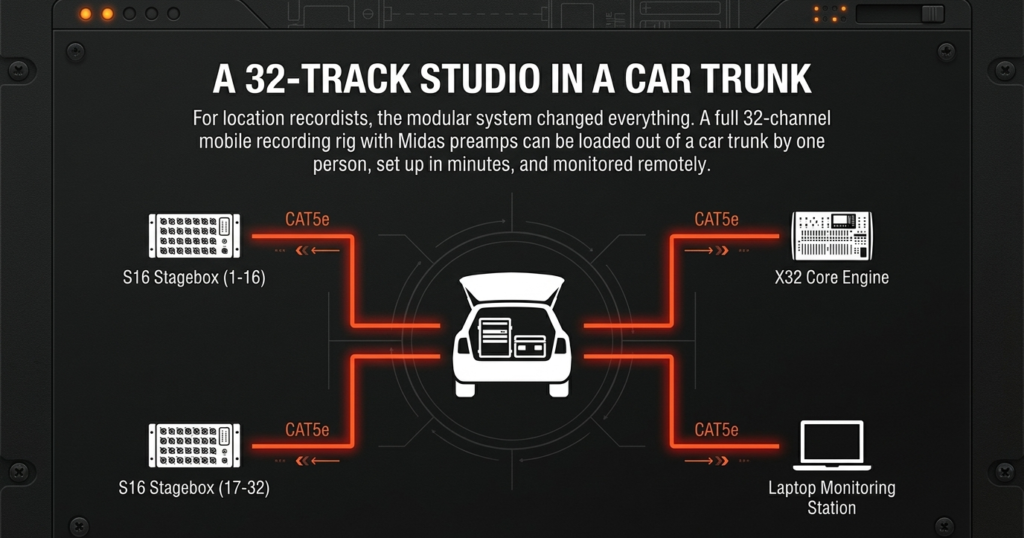
The zZounds reviewer, a hobbyist recording engineer, bought a Core and two S16 boxes for 32 track live recordings.
He carried the whole rig out of a car trunk by himself and finished setup before the musicians arrived. He had everything packed away within 15 minutes after the show.
Cat 5e cable let him sit away from the room while the computer and monitoring stayed at the Core. That story shows the Core at its best 🎛️
Want more mixers that record every channel? Read our guide to the best mixer with multitrack USB.
You already own stage boxes or need a tidy install
A 2015 Gearspace thread shows the logic. A venue tech wanted iPad mixing and planned to add an X32 Core with a Dante card, then keep the venue’s Soundcraft stage box as preamps and analog outputs.
Another member asked why not skip the Core and buy an X32 Rack instead. That question is worth asking, and I answer it below.
Audinate lists the X32 Core among its Dante enabled products, which fits that plan.
Installs also benefit from the locked down front panel. Volunteers touch only the controls you leave exposed!
You want a studio control room brain
Behringer pitches the Core as the nucleus of a control room, paired with S16 boxes and P16 personal monitor systems in each tracking room.
It lists 32 x 32 USB recording, zero latency monitoring independent of the DAW, and total recall of your settings.
Buy the Behringer X32 Core if you
- Already own or plan to buy S16 stage boxes
- Mix from an iPad or a laptop
- Need a single rack space and a light 7.9 lb unit
- Want 32 channel USB recording with a network snake
Skip the Behringer X32 Core if you
- Need a mic input on the mixer itself
- Want faders under your hands
- Record sessions at 96 kHz
- Dislike hunting for Legacy gear
Behringer X32 Core vs X32 Rack, Which One Should You Buy?
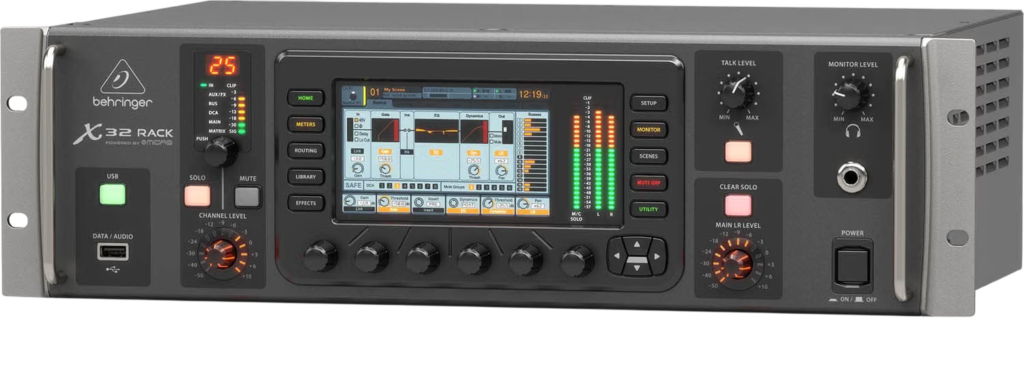
Pick the Rack if you want any local mic input. Pick the Core if every mic lives on a stage box.
Both share the same mix engine. The difference sits in the jacks and the screen.
| Feature | X32 Core | X32 Rack | WING Rack |
|---|---|---|---|
| Mic preamps on the mixer | 0 | 16 Midas designed | 24 Midas PRO |
| Front panel display | Tiny color screen | 5 inch, 800 x 480 | 10.1 inch touchscreen |
| Local outputs | 2 TRS monitor outs | 8 XLR outs plus 6 aux outs | 8 Midas PRO outs |
| AES50 ports | 2 | 2 | 3 |
| USB audio | 32 x 32 through the card | 32 x 32 through the card | 48 x 48 built in |
Table data comes from Behringer, Sound On Sound, and B&H listings.
Read our full Behringer X32 Rack review for the local input details. The Behringer X32 Producer review covers the version with faders.
What about the Behringer WING Rack?
The WING Rack packs 24 Midas PRO preamps and up to 144 I/O signals over three AES50 ports.
Sweetwater says its AES50 networks work with Midas M32 and Behringer X32 mixers. Your S16 boxes keep their value if you move up 👍
What if you only need a small setup?
The Behringer X Air XR18 offers 18 channels, 12 buses, 16 programmable Midas preamps, and an integrated Wi-Fi module for tablets.
Compare more options in our list of the best digital mixing boards.
What Are the Downsides of the Behringer X32 Core?
Here are the honest drawbacks.
- No mic inputs on the mixer, so every input costs extra hardware
- Tiny front panel that needs a tablet or computer
- No ADAT jacks on the mixer itself
- Legacy status and patchy stock
- 44.1 kHz and 48 kHz only
Sound On Sound wished for ADAT ports so a couple of ADA8200 units could patch in cheaply. Our Behringer ADA8200 review shows why that idea appeals.
The Core’s expansion slot takes optional interface cards. Check that a card exists for your format before you plan around ADAT.
Is the Behringer X32 Core Worth It?
Yes, for a narrow job.
The Behringer X32 Core rewards people who already think in stage boxes, tablets, and Cat 5e cable. It delivers the full X32 mix engine in one rack space.
If you want a mixer you can plug a mic into tonight, buy the Rack or a compact XR18.
My pick for most readers is the X32 Rack, because 16 preamps and a real screen remove the biggest headaches.
Did You Know 🤯
The X32 Core weighs just 7.9 pounds (3.6 kg) and can route from up to 96 remote inputs and 48 outputs over two Cat 5e connections.
Planning a rig around stage boxes and a rack mixer? Map the whole chain first, and let the tool flag phantom power, gain headroom, and connector problems before you spend.
Behringer X32 Core FAQ
Does the Behringer X32 Core have built-in mic preamps?
No.
Add S16 stage boxes or another AES50 source.
Can you mix the X32 Core without an iPad or computer?
Barely.
The front panel handles basics such as mute and level. Preset installs can live with that.
Can the X32 Core record to a computer?
Yes.
It offers 32 x 32 USB 2.0 through the expansion card. The front USB port also records stereo files.
How many S16 boxes work with the X32 Core?
Up to six.
That gives 96 inputs and 48 outputs to choose from, and 40 input channels run at once.
Does the X32 Core support Dante?
Yes, with an optional card.
Audinate lists the Core as Dante enabled.
Can you add faders to the X32 Core?
Yes.
Use a Behringer X-Touch over Ethernet. Sweetwater says firmware version 3 added that integration.
What sample rates does the X32 Core support?
44.1 kHz and 48 kHz.
Plan 96 kHz sessions on another interface.
Is the Behringer X32 Core still available?
Sometimes.
Behringer tags it Legacy and Adorama lists it as unavailable. Amazon and used marketplaces may still have stock.
So pick your stage boxes first, pick your control method second, and let the Core handle the brain work 🎶
So, pick wisely, plan for expansion, and let your creativity handle the rest 🎶
There are some affiliate links on this page that will redirect you directly to the original products and services. Also by buying through those links you will be supporting us. So thank you ^.^
Related Posts
Here is a list of mixer and interface posts you can consider as alternatives.