Search “Zoom PodTrak P4 review” and you will find dozens of posts. Most of them review a recorder Zoom stopped making 🎙️
Affiliate links below. As an Amazon Associate I earn from qualifying purchases.
Direct answer first. The Zoom PodTrak P4 has been replaced by the PodTrak P4next. B&H lists the P4next as the direct replacement for the original P4.
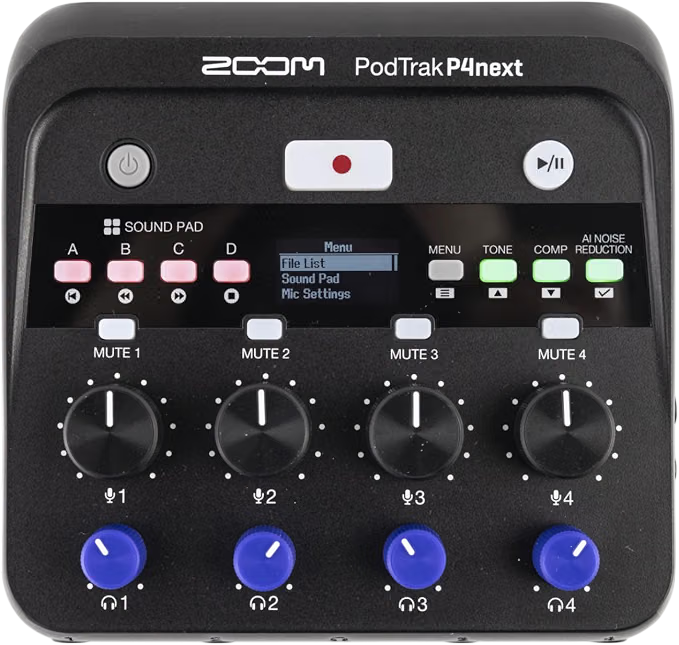
The P4next is a battery powered podcast recorder with 4 XLR inputs, up to 70 dB of gain, 4 independent headphone outputs, and AI noise reduction built into the hardware.
Buy it if you record a panel podcast in person, on location, with no laptop needed. Skip it if you want faders, a touchscreen, or Bluetooth built in with no extra adapter.
Here is the stat that hooked me. Zoom’s own spec sheet lists 11 simultaneous recording tracks from a box that weighs 300 grams and runs on 2 AA batteries.
By the end of this Zoom PodTrak P4next review, you will know what changed from the original P4, what the AI features actually do, and who this recorder fits.
This guide draws on Zoom’s official documentation, independent reviews, retailer owner reviews, and forum comments. It does not rest on bench testing, so I name the source whenever I share someone’s experience.
What Is the Zoom PodTrak P4next?
The Zoom PodTrak P4next is a standalone podcast recorder and USB audio interface built for up to four people in one room.
Zoom’s own product page calls it the next chapter of the PodTrak series, with AI noise reduction, tone shaping, and a compressor built into the hardware itself.
| Feature | Zoom PodTrak P4next |
|---|---|
| Mic inputs | 4 XLR jacks with switchable 48V phantom power |
| Input gain | Up to 70 dB |
| Headphone outputs | 4 stereo mini jacks, individual volume control |
| Onboard effects | Tone, Comp, AI Noise Reduction |
| Recording format | 48 kHz, 24 bit WAV, stereo or mono |
| Max simultaneous tracks | 11 recording, 2 playback |
| Recording media | microSDHC and microSDXC cards up to 2 TB |
| USB audio interface | 12 in, 2 out, 48 kHz, 24 bit |
| Equivalent input noise | -125 dBu or less (IHF-A) at 70 dB gain |
| Remote guest inputs | TRRS smartphone jack, USB, optional BTA-2 Bluetooth adapter |
| Power | 2 AA batteries, USB bus power, or a 12W or higher USB adapter |
| Display | 128 x 64 OLED |
| Size and weight | 125.9 x 120 x 40 mm, 300 g with batteries |
Specs come from Zoom’s official PodTrak P4next product page.
Can you still buy the original P4?
Sometimes, on marketplaces and used listings. B&H’s own comparison page labels the P4next as the replacement for Zoom PodTrak P4.
Adorama lists several original P4 units as no longer available. If you find new stock, it is old inventory rather than a current production unit.
What Changed From the Original P4 to the P4next?
Three things changed, and reviewers who owned both agree on the direction.
- AI Noise Reduction, Tone, and Comp are new. The original P4 had none of these built in
- Preamps got cleaner. A B&H reviewer who used both units calls the P4next preamps a noticeable upgrade over the original P4
- Battery power dropped slightly. The same reviewer got well over an hour on alkalines and more than two hours on lithium with the P4next. Chamberlain Music lists up to 3 hours on alkalines for the original P4
One thing stayed the same. Sound pads, four headphone outs, and mix minus all carried over from the original design.
How Do the AI Noise Reduction and Tone Features Work?
Three buttons, three effects, no computer needed.
Zoom says AI Noise Reduction learns the room and removes hums, buzzes, and street noise while keeping voices clear. Tone adds EQ and de-essing for warmth. Comp smooths sudden shouts, laughter, and whispers.
All three run in the hardware, so nothing needs a plugin or a laptop.
This video review from a filmmaker walks through the noise reduction and tone controls in a real recording session 👇
Do the AI effects actually sound good?
Owners say yes for the job it is built for. A B&H buyer used $50 pencil condenser mics and noticed no real noise once levels were set sensibly.
His verdict was direct. With settings nailed, he did not need to edit the tracks in post!
How Good Are the Mic Preamps?
Strong for the price. Zoom lists 70 dB of gain and an equivalent input noise of -125 dBu or less.
Older reviews of the original P4 back this up too. Hot Rod Cameras says the preamps handle demanding mics like the Shure SM7B with headroom to spare.
One catch. Podcast Hero’s review of the original P4 notes that phantom power switches per channel, but the P4next’s own spec page lists 48V as a single shared setting across all four inputs. Check the current model’s manual before you mix condensers and ribbons on the same session.
Pairing it with a dynamic mic? Our Shure SM7B review covers the mic side of that combo.
How Do You Bring In Remote Guests?
Three ways, and you can combine them.
- TRRS jack. Connect a phone call directly with a TRRS cable
- USB. Plug into a computer running Zoom, Skype, or your conferencing app of choice
- Bluetooth. Add the optional BTA-2 adapter to connect a phone wirelessly
Zoom’s spec page says you can run up to five participants at once. Three sit in the room on XLR mics, and two join remotely through USB, Bluetooth, or TRRS.
What is mix minus?
It stops your remote guest from hearing themselves come back through your speakers.
Podcast Hero explains it well. Without mix minus, a remote guest calling in hears an annoying echo of their own voice. The P4next handles this automatically, and Zoom lists it as built in on every remote connection type.
What Can You Record and How Long Does It Last?
Up to 11 tracks at once. Zoom’s spec sheet breaks this down as 4 mic channels, 4 sound pad channels, and a stereo mix, all at 48 kHz and 24 bit.
Filmtools notes that the earlier P4 recorded 10 tracks at once, so the P4next added one more channel to that count.
Everything saves to a microSDHC or microSDXC card up to 2 TB. Zoom keeps a page of confirmed compatible cards, so check that list before you buy one.
How long do the batteries last?
It depends heavily on your mics. Zoom’s own numbers, tested with phantom power off for dynamic mics, show 3.5 hours on alkalines and 8.5 hours on lithium.
Turn phantom power on for four condenser mics, and alkalines drop to about 20 minutes. Zoom recommends lithium or NiMH rechargeable batteries for condenser setups.
My take is simple. Dynamic mics and alkalines for a quick location shoot. Condensers and lithium batteries for anything longer 🔋
Can the P4next Work as a USB Audio Interface?
Yes. Connect it over USB-C and it becomes a plug and play interface for Mac, Windows, iOS, or Android.
Zoom lists 12 in, 2 out at 48 kHz and 24 bit, with full multitrack capability so each mic lands on its own channel in your DAW.
That means you can record to the SD card and stream live at the same time. Sweetwater confirms this covers podcasting, livestreaming, and video production without extra gear.
Want more channels for a bigger show? Our best mixers for podcasting guide covers larger options.
Who Should Buy the Zoom PodTrak P4next?
Three groups get the most from it.
You record a panel podcast on location
Four mic inputs, four headphone outs, and battery power mean no computer and no mixer needed. Everything you need fits in one small box.
B&H’s reviewer set out to find exactly this. A portable four channel mic recorder that could send usable audio directly into a camera for fast turnaround shoots, and he says it delivered.
You interview remote guests
TRRS, USB, and optional Bluetooth cover almost any guest situation. Automatic mix minus means you skip the tangle of cables an old school mixer setup would need.
Podcast Hero calls out this exact pain point from experience. Setting up mix minus manually with a regular mixer and aux sends used to take real effort.
You also shoot video
The P4next records at 48 kHz, the standard sample rate for video work, and Zoom markets it directly at podcasters producing video versions of their episodes.
Buy the Zoom PodTrak P4next if you
- Record up to 4 people in one room
- Need a portable recorder with no laptop
- Bring in remote guests by phone or USB
- Want AI noise cleanup with no editing software
Skip the Zoom PodTrak P4next if you
- Need more than 4 mic inputs
- Want a touchscreen or motorized faders
- Need Bluetooth with no extra adapter
- Record long condenser mic sessions on battery power
What Are the Best Alternatives to the Zoom PodTrak P4next?
Three options cover the main reasons to look elsewhere.
Zoom PodTrak P2
Sole Source AV describes the P2 as the two person version, built around USB mic inputs instead of XLR, with the same AI noise reduction, tone, and comp.
Pick it if you only ever record solo or with one co-host and want something smaller and cheaper.
RODECaster Pro II
Our RODECaster alternative guide breaks down the Pro II and cheaper options if you want a touchscreen and onboard faders instead of knobs.
A USB audio interface plus a mixer app
If you always record at a desk with a laptop present, a multi input interface can work out cheaper. Our best 4 XLR input audio interface guide covers that route.
The tradeoff is real. You give up the standalone SD recording and battery power that make the P4next useful on location 👍
What Are the Downsides of the Zoom PodTrak P4next?
Here are the honest drawbacks.
- Only 4 mic inputs, with no path to expand
- Bluetooth needs a separate BTA-2 adapter, sold on its own
- Condenser mics drain batteries fast, down to about 20 minutes on alkalines
- Small 128 x 64 OLED screen with no touch control
- The original P4 is gone, so used units are your only non-current option
Adorama’s used listings for the original P4 carry a mix of five star reviews from 2020 to 2022, praising it as a strong entry level bundle. I found no dedicated long term owner reviews of the P4next yet, since it launched recently.
Is the Zoom PodTrak P4next Worth It?
Yes, for a panel show that moves.
The Zoom PodTrak P4next rewards people who record up to four hosts somewhere other than a fixed desk. Battery power, automatic mix minus, and hardware level noise cleanup remove the biggest headaches of location podcasting.
If you always sit at the same desk with a laptop open, a USB audio interface may serve you just as well for less money!
Did You Know 🤯
Running 4 condenser mics with phantom power on drops the P4next’s alkaline battery life to about 20 minutes, according to Zoom’s own spec sheet.
Planning a panel setup with mics, headphones, and a recorder? Map the whole chain first, and let the tool flag phantom power, gain headroom, and connector problems before you spend.
Zoom PodTrak P4next FAQ
Is the Zoom PodTrak P4 still available?
Not as a new current product.
B&H lists the P4next as its direct replacement. Used and old stock units still turn up on some marketplaces.
How many mics can you plug into the P4next?
4.
Each XLR input has its own volume knob and 70 dB of gain.
Does the P4next have Bluetooth built in?
No.
You need the optional Zoom BTA-2 adapter to connect a phone wirelessly.
Can you record video and audio together?
Yes.
Connect the P4next to your phone and it records directly onto your phone’s video, according to Zoom.
What SD cards work with the P4next?
microSDHC and microSDXC up to 2 TB.
Check Zoom’s confirmed compatible card list before buying one.
Does the P4next have phantom power?
Yes.
48V phantom power is available, listed as a shared setting across the inputs on Zoom’s spec sheet.
What is the P4next warranty?
12 months.
Adorama lists a limited 1 year manufacturer warranty on the P4next.
So count your hosts first, pick your recorder second, and hit record 🎶
As an Amazon Associate I earn from qualifying purchases. There are some affiliate links on this page that will redirect you directly to the original products and services. Also by buying through those links you will be supporting us. So thank you ^.^
Related Posts
Here is a list of podcast recorder and mixer posts you can consider as alternatives.