I am a retired musician, and dynamic mics used to mean one thing to me. Live vocals through a PA, nothing more. The Rode PodMic changed that opinion fast 🎙️
Affiliate links below. As an Amazon Associate I earn from qualifying purchases.
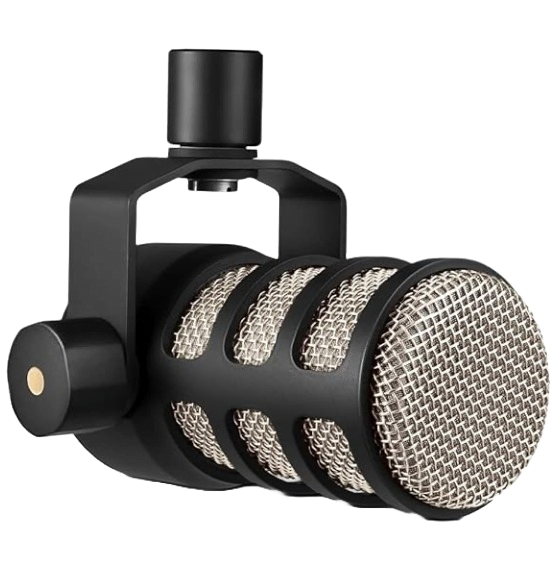
Direct answer first. The Rode PodMic is a dynamic, cardioid, end address broadcast microphone built specifically for spoken word. It needs an XLR interface or mixer, has no phantom power requirement, and ships in a 937 gram all metal body with a built in pop filter and shock mount.
Rode also sells a newer PodMic USB with a USB-C output, onboard DSP, and a headphone jack, at roughly double the price of the original.
Buy the original PodMic if you already own an interface or mixer. Buy the PodMic USB if you want to skip that purchase entirely.
Here is the stat that hooked me. Rode voices this mic with a boost as high as 13 dB around 8 to 9 kHz, tuned specifically to add air to the spoken voice, according to a detailed frequency response breakdown from The Greatest Song.
By the end of this Rode PodMic review, you will know why some owners call it too quiet, which mic pairs with it best, and whether the USB version is worth the extra cost.
This guide draws on Rode’s official documentation, independent reviews, retailer owner reviews, and forum comments. It does not rest on bench testing, so I name the source whenever I share someone’s experience.
Quick Verdict
| Sound | Warm, forward, tuned specifically for speech. Not neutral, not built for music. |
| Build | All metal, 937 g, feels like it will outlast the desk it sits on. |
| Gain needed | High. Owners with weaker interfaces report needing a Cloudlifter or FetHead. |
| Value | Strong at $99. The PodMic USB roughly doubles the price for a preamp and DSP built in. |
| Best for | Podcasters and streamers who already own an audio interface, mixer, or RODECaster. |
Buy it if you want a broadcast style dynamic mic and already have somewhere to plug it in. Skip it if you want plug and play with no other gear, in which case look at the PodMic USB instead.
What Is the Rode PodMic?
The Rode PodMic is a broadcast style dynamic microphone released in 2018, built to compete with far more expensive radio mics at a fraction of the price.
Tom’s Guide calls it a mic that has shown up on professional radio broadcasts and expert podcasts for years, and says it still sounds phenomenal today.
| Feature | Rode PodMic |
|---|---|
| Acoustic principle | Dynamic |
| Polar pattern | Cardioid |
| Frequency range | 20 Hz to 20 kHz |
| Sensitivity | -57.0 dB re 1 Volt/Pascal (1.60 mV @ 94 dB SPL) |
| Output impedance | 320 Ω |
| Output connection | XLR only |
| Phantom power | Not required |
| Weight | 937 g |
| Dimensions | 172 x 109 x 62 mm |
| Included accessories | Internal pop filter, internal shock mount, integrated swing mount |
Specs come from Rode’s published sheet, matched against zZounds and Thomsun Music listings.
Is the PodMic still current, or has it been replaced?
Still current. Unlike some gear where the original gets discontinued, Rode sells the original XLR only PodMic and the newer PodMic USB side by side.
AI Creator Picks frames the choice simply. Buy the original if you already own an interface, because a PodMic USB would make you pay for a second preamp and DSP stage you will never use.
How Does the Rode PodMic Sound?
Warm, forward, and deliberately shaped for the human voice.
The Greatest Song’s breakdown of the frequency curve is the most detailed I found. It describes a high pass filter around 50 to 70 Hz to cut rumble, a warmth peak near 100 to 150 Hz, a clarity bump around 800 Hz, a presence peak at 5 to 6 kHz, and an air boost from 9 to 13 kHz.
That reviewer calls the result bright and modern, but notes the hyped curve limits the mic to spoken word, since it will not give you the natural, versatile sound of a higher end dynamic mic on other sources.
Gear4music’s tester agrees on the practical result. Consistent and neutral enough that it will not get fatiguing for an audience to listen to long term.
This side by side sound test compares the PodMic against the PodMic USB, so you can hear the tonal difference yourself 👇
Can you use it for music?
Not really. Gear4music’s reviewer tested it on instruments directly and would not use it for music.
My own take as a musician lines up with that. The mic is voiced for one job, spoken word, and it does that job well. Save your ribbon or large diaphragm condenser for tracking instruments.
Why Do Some Owners Say the PodMic Is Too Quiet?
Because dynamic mics need more clean gain than condensers, and the PodMic is no exception.
Gear4music’s review states it directly. The PodMic requires a fair amount of gain, and a high quality preamp or interface with sufficient headroom is needed to get the best out of it.
A Gearspace poster ran into exactly this. Chaining a PodMic through a PreSonus AudioBox into a MacBook, they got no usable volume unless the interface gain was maxed out, which brought in a loud electrical hiss.
An eBay buyer reported the same pattern from a different angle. The mic can be quiet and temperamental depending on what you run it through, with the least control coming from a basic digital recorder.
The pattern across every complaint I found is the same. It is not the mic that is broken, it is the preamp on the other end that is too weak.
Do you need a Cloudlifter or FetHead?
If your interface has a weaker preamp, yes.
An Adorama reviewer running a PodMic through a Focusrite Scarlett 2i2 needed the interface gain almost fully up before adding a Cloudlifter. After adding it, they turned the gain way down and got clear, low noise vocals.
Cloud Microphones lists the CL-1 at up to +25 dB of clean gain, and Shure lists the FetHead at up to +27 dB. Both sit inline between the mic and your interface.
Rule of thumb from these reports. If you are already running your interface gain past 75 percent and still riding low levels, a booster is worth the roughly $150 it costs, and it solves the noise problem at its actual source.
PodMic vs PodMic USB, Which One Should You Buy?
Pick the original if you have an interface. Pick the USB version if you do not, and never want to buy one.
| Feature | PodMic | PodMic USB |
|---|---|---|
| Outputs | XLR only | XLR and USB-C, simultaneously |
| Onboard preamp | None, needs external gain | Revolution Preamp built in |
| Onboard DSP | None | APHEX noise gate, compressor, exciter |
| Headphone monitoring | None | 3.5mm, zero latency |
| Sensitivity | -57.0 dB | -57 dB (±3 dB) |
| Output impedance | 320 Ω | 460 Ω (XLR) |
| Equivalent noise (A-weighted) | Not published | 26 dBA analog, 19 dBA digital |
| List price | $99 | $199.99 |
Numbers come from Rode’s PodMic USB datasheet via Full Compass, and the original PodMic’s published spec sheet.
What does the onboard DSP actually do?
Rode’s own listing breaks it into four pieces. A noise gate silences keyboard clatter between phrases, a compressor evens out your level, an Aural Exciter and Big Bottom add air and warmth, and a high pass filter rolls off rumble.
TechRadar’s reviewer liked the ease but flagged the tradeoff. The mid range forward voicing may not suit anyone who prefers a brighter, more pronounced high end for spoken word.
My take, from years of adjusting live vocal chains, is this. DSP on the way in is convenient for streaming, but it is less forgiving if you later wish you had recorded a flat file. Keep the processing gentle if you plan to edit afterward 👍
Who Should Buy the Rode PodMic?
Two groups get the most from it.
You already own an interface or a RODECaster
Rode built and voiced the PodMic specifically to pair with the RODECaster Pro, and Sweetwater’s own listing repeats that optimization.
An Adorama buyer using it with a RODECaster reported no pop filter or extra room treatment needed at all, thanks to how well the built in processing handled the signal.
You record a multi host podcast
At $99 per mic, it is far easier to outfit three or four hosts on matching mics than with pricier options. Multiple Adorama reviewers bought two or three at once for exactly this reason.
Need the interface to go with it? Our best 4 XLR input audio interface guide covers boxes built for that kind of setup.
Buy the Rode PodMic if you
- Already own an interface, mixer, or RODECaster
- Want a broadcast style voice on a budget
- Are outfitting more than one host
- Only record spoken word, not music
Skip the Rode PodMic if you
- Have no interface and do not want to buy one
- Track instruments or music
- Run a weak preamp and cannot add a booster
What Are the Best Alternatives to the Rode PodMic?
Three mics cover the main reasons to look elsewhere.
Shure SM7B
Tom’s Guide points to the SM7B as the step up choice, and our full SM7B review covers why it needs even more gain than the PodMic.
Shure MV7
Tom’s Guide also names the Shure MV7+ as the pick for anyone who wants USB and XLR with an on-mic LED touch panel, similar territory to the PodMic USB.
Electro-Voice RE20
The RE20 is the classic broadcast mic the PodMic borrows its look and philosophy from, at several times the price. Owners in the pairing tests I found use it as the benchmark for a smooth, controlled low end 👍
What Are the Downsides of the Rode PodMic?
Here are the honest drawbacks.
- Needs real gain, and a weak interface will hiss before it gets loud enough
- No USB output on the original, so you need other gear day one
- Voiced only for speech, weak on instruments
- No cable or stand included, per multiple Adorama buyers
- Hyped top end that some reviewers find less natural than pricier dynamics
Adorama’s own FAQ confirms the mic ships alone, with buyers noting the box contains just the microphone and a stand adapter, nothing else.
Is the Rode PodMic Worth It?
Yes, if you already have somewhere to plug it in.
The Rode PodMic rewards podcasters and streamers who own an interface, mixer, or RODECaster and want a broadcast voice at a fraction of the price of an RE20 or SM7B.
If you have nothing else and never want to buy an interface, spend the extra money on the PodMic USB instead!
Did You Know 🤯
Rode voices the PodMic with an air boost as high as 13 dB around 8 to 9 kHz, according to a published frequency curve breakdown, specifically to add brightness to the spoken voice.
Planning a multi host podcast desk with mics, an interface, and headphones? Map the whole chain first, and let the tool flag phantom power, gain headroom, and connector problems before you spend.
Rode PodMic FAQ
Does the Rode PodMic need phantom power?
No.
It is a dynamic mic and needs no 48V power, so it works with almost any XLR input.
What is the PodMic’s frequency range?
20 Hz to 20 kHz.
It is shaped, not flat, with boosts aimed at the spoken voice.
Can the PodMic plug straight into a laptop?
No.
The original has XLR only. For direct laptop use, buy the PodMic USB instead.
Is the PodMic optimized for the RODECaster?
Yes.
Rode designed and voiced it specifically for the RODECaster Pro, though it works with any quality interface.
What is the PodMic’s warranty?
Extended to 2 years.
Register the microphone to unlock Rode’s extended coverage, per ADS MusicStore’s listing.
Does the PodMic come with a stand or cable?
No.
The box contains only the mic and a stand adapter. Buy an XLR cable and boom arm separately.
So check your gain chain first, pick your PodMic second, and start recording 🎶
As an Amazon Associate I earn from qualifying purchases. There are some affiliate links on this page that will redirect you directly to the original products and services. Also by buying through those links you will be supporting us. So thank you ^.^
Related Posts
Here is a list of microphone and podcasting posts you can consider as alternatives.