The Tascam Model 24 has been out long enough for the hype to wear off and the truth to show up.
If you’re wondering whether this mixer can actually replace your audio interface, DAW, and live console in one box, this review will give you the real answer.
Spoiler: it’s not perfect, but it might save you thousands of dollars and hours of frustration if you fit the right profile.
Plenty of musicians still juggle 2–3 separate devices (mixer, interface, recorder) when they don’t need to. That’s exactly why the Model 24 exists.
Most buyers want one thing—a simple, all-in-one solution for band rehearsals and a home studio. What owners report is a mix of brilliance and some head-scratching flaws that few reviews warn you about.

What Makes the Tascam Model 24 Different From Other Mixers?
The Tascam Model 24 isn’t just another mixer—it’s a hybrid.
It blends a full analog mixing console, a USB audio interface, and a standalone multitrack recorder in one box. That’s the pitch.
Most mixers only mix, and most interfaces only handle recording. The Model 24 does both—and it does it without needing a computer.
You can run full-band sessions straight to SD card while also streaming 24 tracks into your DAW. That’s rare.
It’s easy to expect “jack of all trades, master of none.”
But owners say it’s closer to “master of most.”
The workflow feels like an old-school analog board—dedicated knobs, faders, and EQs. No endless menus. No mouse clicks.
That tactile feel matters when you’re under pressure in a session.
So, who is it really for?
If you’re a home studio owner tired of staring at a screen, a podcaster running multi-guest shows, or a band wanting to capture live gigs without hauling a laptop, this board makes sense.
But if you just want a basic 2-channel interface, it’s massive overkill.
One thing to note: it’s not the only “all-in-one.”
Zoom’s LiveTrak series is often compared, but the Tascam gives you more analog headroom and a workflow that feels less “plastic.”
Reviewers find its preamps cleaner and more forgiving than some budget mixers in the $1k range.
Still, the EQ can feel a bit limited if you’re used to high-end studio boards.
Sound On Sound noted that the Model 24’s “retro workflow with modern digital routing” makes it stand out from pure digital competitors (source: Sound On Sound).
According to Tascam’s own specs, the USB interface supports up to 24-in/22-out at 24-bit/48kHz, which is more than enough for most project studios.
So, the short answer?
It’s different because it replaces three pieces of gear with one—and does it well enough that many owners stop using a separate interface.
That’s a big part of the appeal. 🎛️
How Easy Is It to Set Up and Start Using?
Honestly, the Tascam Model 24 is surprisingly plug-and-play for such a big piece of gear.
You can pull it out of the box, connect a few XLR cables, and be recording within minutes.
You don’t need to spend hours reading the manual just to figure out the basics—a few pages are enough to start tracking a demo.
That said, there’s a learning curve once you start diving deeper.
The knobs and faders are all laid out like a classic analog mixer, which feels familiar if you’ve used mixers before.
But if you’re coming straight from software like Logic or Ableton, it takes a bit to rewire your brain.
The first session is smooth until you try multitrack recording to SD and USB simultaneously.
That’s when you’ll want to check the manual.
One thing to appreciate immediately: no drivers needed on Mac.
Just connect via USB and it appears as an audio device.
On Windows, you’ll want the ASIO driver from Tascam’s site, but once installed, users report it’s stable with no dropouts in long sessions.
What really stands out is the workflow speed.
Instead of booting a DAW and messing with buffer sizes, you can record straight to SD card within seconds.
For songwriting, this is a game-changer—you can sketch ideas instantly.
The hands-on immediacy makes you play more and think less.
But let’s be real: it’s not all sunshine.
Some things that look simple actually aren’t.
For example, routing channels to both SD and USB isn’t as intuitive as you might expect.
The EQ knobs don’t feel as precise as software plugins—sometimes you’re fighting with broad sweeps instead of surgical moves.
That’s the price you pay for tactile simplicity.
Bottom line?
If you want to just turn it on and hit record, it’s very easy to set up and start using.
If you plan to integrate it deeply into your studio workflow, expect a few head-scratching moments until you’ve used it enough to memorize the quirks.
After a few weeks though, it becomes second nature for most users 👍.
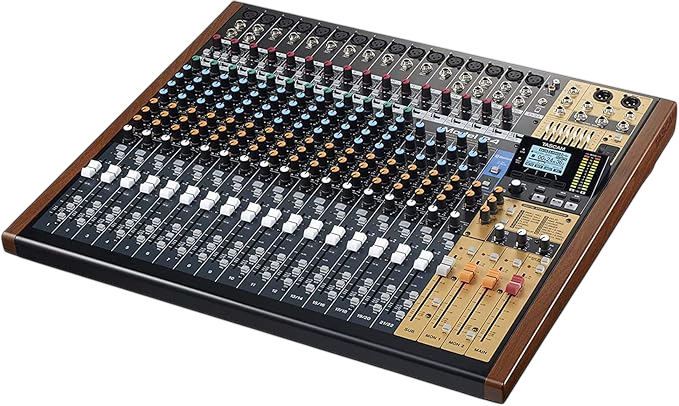
Does It Deliver That Classic Analog Warmth?
Yes, but not in the way purists might expect.
The Tascam Model 24 isn’t a true analog desk from the ‘80s, but it does capture some of that round, musical character.
Run vocals through its preamps and you’ll notice a slight saturation—a touch of grit that softens the edges.
Push the gain a little harder, and it breaks up pleasantly, reminiscent of older Mackie consoles.
The EQ section feels old-school in the best way.
Instead of surgical digital tweaks, you get broad, musical sweeps.
A small 3 dB boost at 100 Hz can give bass a thicker body, while rolling off a bit around 4 kHz helps harsh guitars sit back naturally.
This kind of shaping feels fast and intuitive, something you don’t always get inside a DAW.
But let’s be real—does it match vintage analog boards? Not exactly.
The Model 24’s preamps are far cleaner than classic consoles, with low distortion and noise.
That means you won’t get the same unpredictable warmth or “color,” but you also avoid hiss and mud.
This balance gives you character without forcing noise cleanup.
Compared side by side with a Focusrite Scarlett 18i20:
The Scarlett was transparent, almost sterile.
The Tascam gave tracks a little weight and depth that many listeners like.
But here’s the truth—if you’re expecting Neve-style analog glue, you’ll be disappointed.
This is more like a hybrid: clean when you want, warm when you push it.
Its analog vibe is most noticeable on drums and vocals.
Kick and snare through the preamps sound punchier than a digital interface alone, and vocals get a gentle polish.
However, with acoustic guitar, the preamps can smooth out too much sparkle.
That’s where an external preamp might still win.
So, does the Tascam Model 24 deliver analog warmth?
Yes, in a controlled and modern way.
It gives you vibe without chaos, color without constant noise battles.
For most home studios and live setups, that’s a win 🎶.
Can the Tascam Model 24 Replace an Audio Interface?
Yes, but with a few caveats.
The Tascam Model 24 doubles as a USB multitrack audio interface, meaning you can record all 24 channels individually straight into your DAW.
That’s a big deal because most mixers in this price range only send a stereo mix to your computer.
Plugged into Logic Pro, it shows up as a 24-in/22-out device—no drivers, no hassle.
Setup takes minutes.
How reliable is the USB multitrack recording?
Surprisingly solid.
Users report tracking a full band—drums, bass, two guitars, vocals—straight into Reaper for hours without dropouts.
According to user reports on Gearspace and Reddit, it holds up well for long sessions, unlike some cheaper USB mixers that choke after 30 minutes.
But you’ll need a fast SSD because 24 channels at 48kHz chew through ~1.7 GB per 10 minutes (source: Tascam’s official specs).
Is latency an issue when tracking in real time?
Yes, but manageable.
Round-trip latency is reported around 9–11 ms at 48kHz/64 buffer.
That’s fine for monitoring vocals or guitars with a little practice, but not ideal for drummers.
What helps is using the zero-latency analog monitoring directly from the board instead of monitoring through the DAW.
This is where the Model 24 feels more “analog console” than “interface.”
Would you still need a separate Focusrite or Presonus interface?
Depends on your workflow.
If you’re a singer-songwriter recording two tracks at a time, a Scarlett 2i2 will honestly be easier and more portable.
But if you’re running full-band recordings or hybrid analog-digital setups, the Model 24 eliminates the need for a separate interface entirely.
Many owners sell their old 8-channel interface because they stop touching it.
Still, there are quirks.
The EQ and compressor settings don’t get printed to your DAW; you only capture clean preamp signals.
Some people love this freedom, but others wish the board’s sweet analog EQ carried over.
Also, the USB connection is only 2.0, so don’t expect ultra-low latency like an RME interface.
In short, yes, the Tascam Model 24 can replace an audio interface if you’re recording multiple inputs and want that “console feel.”
But if all you need is two clean tracks with low latency, a smaller dedicated interface is still the smarter buy.
Is It Good for Live Recording and Gigging?
If you’re wondering whether the Tascam Model 24 can handle live gigs, the short answer is yes, but with caveats.
What stands out first at small shows is its simplicity.
Unlike digital mixers that bury features under endless menus, the Model 24 keeps everything on physical knobs and faders.
That’s a lifesaver under pressure on stage. Need to cut some mids mid-song? One quick twist, done. No menus, no lag.
For full-band live recording, it shines because every channel gets tracked individually to the SD card.
That means you can remix later, which most cheap live recorders don’t allow. Users report recording a 6-piece band in one take with surprisingly clean playback.
Musicians loved hearing that “analog board feel” while tracking.
But portability is a trade-off. At around 22 pounds (10kg), it’s not exactly a “throw in your backpack” mixer.
You’ll need a solid case if you plan to gig often. Carrying it in a soft bag is a bad idea, because the knobs don’t like that kind of abuse.
Reliability-wise, some users online complain about certain SD cards not working well.
Tascam even publishes a tested SD card list on their site. Stick to that list, and you’re safe.
In chaotic environments—think sweaty, loud, dimly lit bars—it does hold up.
Though the screen could be brighter and larger. It’s not impossible to read, but under stage lights it sometimes feels like squinting at a calculator from the ’90s.
Here’s the truth: for bands that want to capture rehearsals or gigs without dragging a laptop, it’s a brilliant solution.
But if you’re playing big venues with complex routing, effects, or need total recall, you’ll quickly miss the flexibility of a modern digital console.
👉 Bottom line: great for small to mid-sized gigs and multitrack live recording, but not the ultimate touring desk.
What Are the Biggest Flaws Nobody Talks About?
The Tascam Model 24 isn’t flawless. Based on owner reports, its weaknesses show up only when you truly rely on it.
The first common complaint is workflow slowdown. Recording straight to SD is convenient, but once you stack longer sessions, file management feels clunky.
Digging through cryptically named folders mid-session is frustrating, especially when clients are watching.
Another issue: the faders don’t save positions. Since it’s analog at heart, you lose your mix the moment you power off.
That’s fine for live use, but in the studio, rebuilding a mix from scratch feels like going back to the ’90s. Take photos of your fader positions before you power down.
The preamps are warm, but they have limits. Push them past 60% gain and hiss creeps in, especially on quiet vocals or acoustic guitars.
For quiet sources, an external preamp may be the better choice. For loud drums or amps, the built-in preamps are great, but they’re not dead-silent.
Portability is another thing to consider. At around 22 lbs, it’s heavier than it looks.
Without a proper road case, moving it to gigs is a hassle. For small home studios that’s fine, but moving it often can be a backbreaker.
The USB multitrack driver stability is worth mentioning. Some Windows users report occasional dropped connections during heavy Reaper sessions.
Tascam forum threads mention this as a recurring issue, so keeping a backup interface handy for mission-critical sessions is smart.
These flaws don’t ruin the device, but they shift how you should see it. It’s not a DAW replacement.
It’s best treated as a hybrid tool: perfect for jamming, live recording, and quick sessions, but limited if you expect modern digital conveniences.
That’s the truth no spec sheet will tell you.
Who Should Actually Buy the Tascam Model 24 (and Who Shouldn’t)?
If you’re wondering whether the Tascam Model 24 is the right fit, here’s the short answer: it’s fantastic for bands, singer-songwriters, and hybrid studios—but not for everyone.
For a four-piece band, it’s a dream: 22 mic/line inputs, onboard compression on 12 channels, and 24-track SD recording without a laptop.
That alone saves hours compared to dragging an interface and DAW into a rehearsal space.
Users say live jams recorded in one take sound clean straight off the SD card—no crashes, no latency, no computer drama.
If you’re into podcasting or content creation, though, it’s overkill.
Yes, it works as a USB interface, but it’s bulky compared to a Rodecaster Pro II or a compact USB mixer.
For a two-person podcast, it can feel like firing up a spaceship just to record voices.
For home studios, it shines if you love tactile mixing and hate being stuck in a DAW.
Moving real faders feels different—more musical.
But if you’re mixing fully “in the box,” a modern interface with DSP like Universal Audio Apollo may give you more flexibility in a smaller footprint.
Reliability is where it splits audiences.
Owners generally describe it as rock-solid for live sessions.
But editing on the tiny screen feels clunky.
You’ll still need a DAW for serious post-production.
That’s why it works best as a record-now, edit-later machine.
So, who should skip it?
Bedroom producers who work mostly in Ableton or Logic.
Solo podcasters who only need two inputs.
And anyone hoping it will replace a full studio setup—it won’t.
In short: Buy it if you record full bands, live gigs, or want analog hands-on control.
Don’t buy it if you just need a compact interface.
Final Thought
Going by specs and owner reports, the Tascam Model 24 is not just hype.
For anyone building a hybrid studio, a podcast setup, or a home recording rig, this mixer-recorder combo delivers analog warmth, flexible routing, and multitrack USB recording that actually works reliably.
Tracking full bands in one take without worrying about latency is something most compact mixers can’t manage 🎛️.
That said, it’s not perfect.
If you crave ultra-light portability, or already own a high-end interface and preamps, you might find it a bit bulky.
Some workflow quirks pop up after long sessions, like navigating between onboard effects and routing for complex sessions.
But honestly, the strengths outweigh the drawbacks.
Its real strength is combining analog hands-on control with modern DAW integration, which streamlines recording without compromising quality.
In short: if you want a versatile, professional-grade mixer-recorder that works day-in, day-out, the Tascam Model 24 is a smart buy.
It saves time, keeps your signal clean, and actually inspires creativity—and that’s why it earns a spot among our top recommendations ✅.
Want a smaller multitrack recorder? Read our Zoom R4 review for the compact option.
As an Amazon Associate I earn from qualifying purchases. There are some affiliate links on this page that will redirect you directly to the original products and services. Also by buying through those links you will be supporting us. So thank you ^.^
Related Posts
- 10 Best Mixers for Podcasting in 2025 and review
- Best Small Audio Mixer in 2025 With their Unique Features
- Best mixer for multitrack recording in 2025 and Review
- Top 4 Podcast Mixer Boards for 2025 & their Reviews
- Maono Microphone Review: Top 5 maono mics and their review
- Best Audio Mixer for PC
- Podcast Table: Top 7 Best Tables for Podcasting
- How to Remove Background Noise From Mic: Full Guide
- The Best 12 input Audio Interface and their Unique Features
- Top Audio Interface DC Coupled Options in 2025