USB mics are convenient marriages. Audio interfaces are long-term investments.
Most guides treat this decision like a snapshot of your wallet right now. They are wrong!
You need to run this decision through the “Future-You Test”. I have spent thousands of dollars on gear I outgrew in weeks because I didn’t ask the right questions. I don’t want you to burn cash like I did.
In this guide, we aren’t just comparing specs. We are looking at your workflow to see if a USB mic is a smart shortcut or a dead-end trap.
Did you know that 70% of new podcasters who start with a solo USB setup quit within the first year, often citing “technical difficulty” when trying to add a guest?
My first attempt at a professional interview nearly crashed my whole system because of my cheap USB mic setup. I wasted $100 and a great opportunity!
The Cheat Sheet (TL;DR)
- Get a USB Mic if: You are a solo creator, you stream games, or you need a portable setup.
- Get an Audio Interface if: You plan to have guests, play instruments, or want to upgrade your microphone later without rebuying everything.
What is the Actual Difference? (It’s Not Just the Cable)
Let’s strip away the marketing fluff. Both devices do the exact same job. They take your voice (analog electricity) and turn it into ones and zeros (digital data) so your computer can understand it.
The real difference is where that conversion happens.
Where does the “Brain” live?
Every digital audio system needs a “brain” called an Analog-to-Digital Converter (ADC).
| Feature | USB Microphone (The All-in-One) | Audio Interface (The Modular System) |
| ADC Location | Inside the microphone body (Cramped chip) | Dedicated external box (Better cooling/power) |
| Preamp Power | Relies on 5V from USB port (Limited Gain) | Dedicated power circuit (High, Clean Gain) |
| Latency Check | Software-dependent (Potential lag) | Near zero via Direct Monitoring hardware |
| I/O Ports | 1 Mic, 1 Headphone Jack | 2+ Mics, Instrument Input (Hi-Z), Studio Monitor Outs |
- USB Microphone: The brain is tiny. Manufacturers stuff it inside the microphone body along with the capsule. It is efficient but cramped.
- Audio Interface: The brain is a dedicated external box on your desk. It has its own power supply, better circuitry, and room to breathe.
Think of it this way. A USB mic is like an all-in-one desktop computer. It is simple, but you cannot swap out the parts. An audio interface is like a custom-built PC tower. You can upgrade the graphics card (the mic) later while keeping the same motherboard (the interface).
Why does “Gain” matter more than “Quality”?
Here is a secret audio companies won’t tell you. Modern USB mics sound fantastic. The “quality gap” is basically gone for 90% of users! The real problem is Gain.
Gain is the muscle that boosts your mic signal.
I remember buying a cheap generic USB mic back in 2016. The audio quality was actually decent, but the signal was weak. When I turned up the volume in post-production, I heard a nasty hissssss in the background. That is the noise floor.
USB mics rely on the 5 volts from your computer port. That is often not enough “juice” to drive professional, power-hungry dynamic microphones cleanly. An audio interface plugs into the wall or uses high-quality internal preamps to give you 50dB to 70dB of clean gain. If you want a quiet, demanding mic like the Shure SM7B, a standard USB mic setup simply won’t work.
Scenario A: When is a USB Microphone the Perfect “Forever” Tool?
Don’t let the audiophiles bully you. For many creators, a USB mic isn’t just a starter tool. It is the best tool.
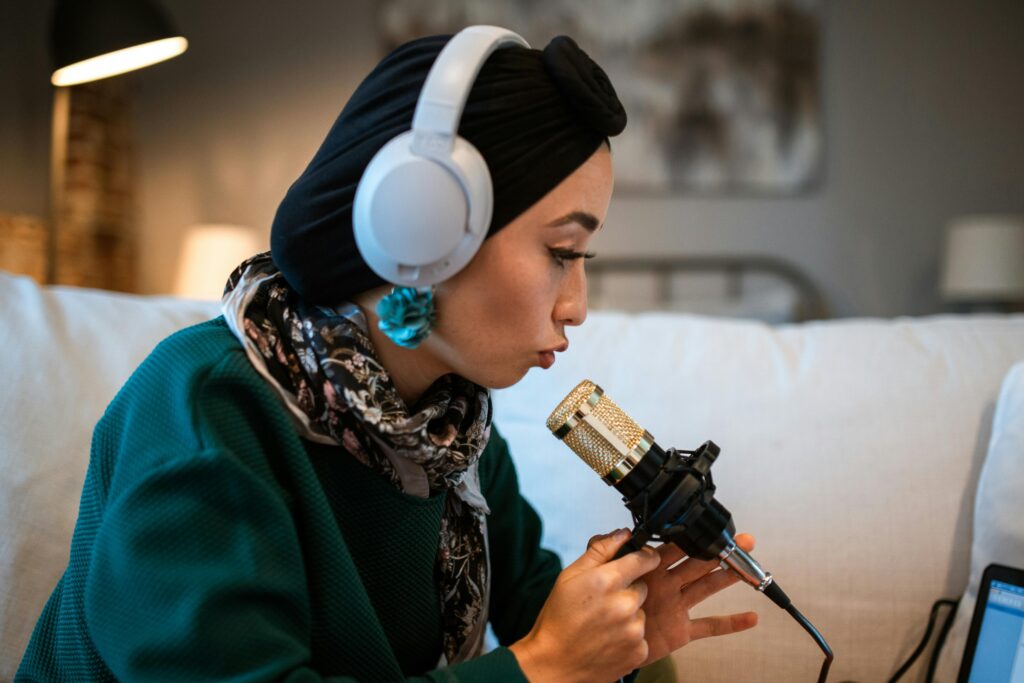
Are you a solo creator with zero plans for guests?
If you are a streamer, a YouTuber doing voiceovers, or a remote worker, you are alone in the room.
Search Intent Answer: If you only ever record one voice at a time, a high-end USB mic gives you pro sound with zero clutter.
I have a friend who runs a massive YouTube channel with 500k subscribers. He still uses a Blue Yeti. Why? Because he hates cables. He wants to plug one thing in and hit record. If your desk space is premium real estate, a bulky interface box with XLR cables snake-charming across your table is annoying.
Do you need software more than hardware?
This is where USB mics actually beat interfaces.
In 2024, hardware is boring. Software is king. Brands like Elgato (with the Wave:3) and Rode (with the X series) realized that streamers don’t need better preamps; they need better mixing.
When you buy an Elgato Wave:3, you aren’t really paying for the mic. You are paying for the Wave Link software. It lets you separate your game audio, Discord chat, and Spotify music into different virtual channels.
Unique Insight: Most audio interfaces cannot do this easily. To get virtual mixing with a traditional XLR interface, you often have to mess with confusing third-party routing tools. If you are a live streamer, a modern USB mic with built-in mixing software is a massive workflow win! 🌊
The “Traveler” Argument
I once tried to pack a Scarlett 2i2 interface and an XLR mic for a conference trip. TSA pulled my bag apart because of the wires and metal boxes. It was a hassle.
Now, if I travel? I throw a Samson Q2U in my bag. It plugs directly into my laptop. Done. If your “studio” changes location every week (coffee shops, hotels, closets), the portability of USB wins every single time.
Scenario B: The “Scalability Trap” (Why You Should Buy an Interface)
This is the section where I save you money. The biggest mistake beginners make is ignoring the “Scalability Trap.”
“Did you know! According to industry studies, an audio signal recorded at a higher sample rate of 24-bit/48kHz offers over 16 million possible volume levels, compared to just 65,000 for standard 16-bit audio? Most dedicated Audio Interfaces default to 24-bit, giving you massive headroom for editing that many older USB mics simply don’t offer.” (Source: General Audio Engineering Standards)
The “Two-Mic” Nightmare: Can I use two USB mics at once?
Direct Answer: Technically yes, but practically NO.
I tried this. Oh boy, did I try this. I invited a guest for a podcast and plugged two Blue Yetis into my MacBook.
Here is what happens. Computers are designed to have one audio input source. When you plug in two USB mics, the computer gets confused.
You have to create an “Aggregate Device” in your settings to trick the computer into seeing them as one big microphone.
- The Glitch: Digital devices have internal clocks. If those clocks aren’t perfectly synced (which they won’t be with two cheap USB mics), your audio will drift. By minute 20, your guest’s voice will be half a second behind their lips.
- The Crash: Recording software hates this hack. My GarageBand crashed three times during that interview. It was embarrassing!
The Verdict: If you plan to have a buddy on your couch for a podcast, you absolutely need an audio interface.
An interface like the Focusrite Scarlett 2i2 or RodeCaster is built to handle two, four, or even eight microphones perfectly in sync.
| Action | USB Mic Path (e.g., Blue Yeti) | Interface Path (e.g., Scarlett 2i2 + AT2020) |
| Initial Cost | $150 (All-in-one) | $270 (Interface + Mic + Cable) |
| Upgrade Goal | Adding a second person (XLR Mic) | Upgrading to a pro mic (e.g., SM7B) |
| Cost to Upgrade | $270 (Must buy new Interface + Mic) | $250 (Only buy the new mic) |
| Total Sunk Cost | $150 (The original USB mic is retired) | $0 (The interface is retained and reused) |
Do you play an instrument? (The Latency Issue)
Have you ever spoken into a mic and heard your voice come back in your headphones a split second later? That is latency. It makes it impossible to speak or sing.
- USB Mics: Most have “Direct Monitoring” (a headphone jack on the mic) to fix this for your voice. But…
- The Problem: If you want to play guitar and sing at the same time, a USB mic can’t help you record the guitar. You would need to plug the guitar into the computer separately. Now you are back to the “two devices” nightmare.
An audio interface has inputs for your microphone AND your guitar. You can hear both in your headphones instantly with zero delay. If you are a musician, skip the USB mic. It is a dead end for you. 🎸
The “Sunk Cost” Reality
This is simple math.
- Path A: You buy a $150 USB mic. Two years later, you want a better mic. You have to throw away the USB mic (and the $150). You start from zero.
- Path B: You buy a $150 Interface bundle. Two years later, you want a better mic. You keep the interface (the brain) and just buy a new XLR mic.
Buying an interface separates the “brain” from the “ear.” It protects your investment. I still use a Focusrite interface I bought eight years ago.
I have upgraded my mic three times since then. That interface was the best $100 I ever spent.

The New “Cheat Code”: Why Not Both? (Hybrid Microphones)
I wish this technology existed when I started.
Seriously!
For years, we argued about USB versus XLR like it was a political debate.
But recently, companies like Shure and Rode stopped the fighting and released Hybrid Microphones.
“Did you know! The Shure MV7+ hybrid microphone features internal Digital Signal Processing (DSP) that includes a real-time denoiser and digital ‘popper stopper.’ This means you get noise reduction applied before the sound even hits your computer. This level of internal processing is almost never found in budget-friendly pure XLR setups!” (Source: Shure MV7+ product analysis)
What are USB/XLR Hybrid Mics?
These microphones have both ports on the bottom.
You get a USB-C port for your computer and an XLR port for professional gear.
Top contenders include the Shure MV7+, the Rode PodMic USB, and the budget-friendly Samson Q2U.
Why is this the safest financial decision?
This is the ultimate “have your cake and eat it too” scenario.
You can buy a hybrid mic today and plug it straight into your laptop via USB.
It works instantly.
Then, six months later, you decide to upgrade to an audio interface to record a second person.
Guess what?
You don’t have to throw away your microphone!
simply unplug the USB cable, plug in an XLR cable, and boom.
You now have a fully professional studio setup.
This bridge effectively kills the “waste money” risk I talked about earlier.
If you are paralyzed by indecision, buy a hybrid mic.
It is the only option that keeps every door open for your future self! 🚪
The Showdown: A Feature-by-Feature Comparison
Let’s break this down into a raw fight.
I have tested dozens of units from both categories, and here is how they stack up in the real world.
Sound Quality
Verdict: Tie for beginners, Interface wins for pros.
For 95% of people listening on Spotify or YouTube, a high-end USB mic sounds identical to an XLR setup.
However!
If you buy a cheap $40 USB mic, it will sound like a tin can.
An interface setup almost always guarantees a cleaner signal path with less electrical noise.
Ease of Use
Verdict: USB wins effortlessly.
You plug it in.
Select it in settings.
You talk.
An interface requires drivers, cable management, and gain knob fiddling.
My mom could set up a USB mic in 30 seconds, but she would likely return an audio interface thinking it was broken.
Price vs. Value
Verdict: USB is cheaper upfront; Interface is cheaper long-term.
A good USB mic is $100 to $150 total.
A good Interface ($150) plus a Mic ($100) plus a Cable ($20) starts at $270.
But remember the scalability trap!
Upgrading the interface setup later is cheaper because you only replace one component at a time. 💰
Cable Management
Verdict: USB wins.
One thin wire versus a power cable, a thick XLR cable, and a USB data cable?
The winner is obvious if you hate clutter.

Making the Decision: The 3-Question Checklist
Still stuck?
Don’t overthink it.
Answer these three questions honestly to find your path.
Question 1: Will I ever record a second person in this room?
Yes = Interface. No = USB.
This is the hard line in the sand.
If you want a co-host sitting next to you, do not buy a USB mic.
You will regret the technical headaches immediately.
Question 2: Do I need to mix game audio, Discord, and music live?
Yes = Advanced USB Mic OR Interface.
If you stream on Twitch, look for USB mics with digital mixers included, like the Elgato Wave:3.
They handle software routing better than most basic audio interfaces do.
Question 3: Am I willing to learn what “Gain Staging” is?
No = Get a USB mic.
Audio interfaces require you to understand signal levels.
If you set the gain too high, you clip (distort).
If you set it too low, you get hiss.
USB mics often have “Auto-Level” or “Clip-Guard” features that do this work for you.
Frequently Asked Questions (FAQ)
Can I plug a USB microphone into an audio interface?
No, you absolutely cannot.
An audio interface expects an analog electrical signal.
A USB mic sends out digital data.
You cannot plug a computer into another computer’s microphone jack!
Does an audio interface make your mic sound better?
Technically, yes.
Interfaces usually have superior preamps (amplifiers) compared to the tiny chips inside USB mics.
This results in a cleaner volume with less background “hiss” or static.
Can I use a USB mic for Zoom and Discord?
Yes, easily.
USB mics are recognized instantly as a standard input device by every communication app on the planet.
Audio interfaces sometimes confuse these apps and require manual setting adjustments.
Why is my USB microphone so quiet?
It lacks power.
USB mics rely on the 5 volts provided by your computer port.
If the mic capsule needs more energy than the port provides, the signal stays low.
Check your system settings to ensure the input volume is at 100%.
What is the best setup for a beginner musician?
Get an Audio Interface.
You need the specialized Hi-Z instrument input for guitars or bass.
USB mics generally cannot record an electric guitar directly.
Conclusion
Here is my final advice to you.
Date the mic, but marry the ecosystem.
If you want a quick fling with content creation to see if you like it, grab a high-quality USB mic or a Hybrid mic.
It is low risk and high reward.
But if you are building a studio to last the next decade?
If you dream of having guests, playing live music, or tweaking your sound to perfection?
Build your foundation on a solid Audio Interface.
Your future self will thank you for spending the extra money today!
I’ve learned that great recordings don’t start with fancy gear. They start with smart systems, solid drivers, and clear routing.
Related Posts
Here’s a list of blog posts of various types of audio interfaces that you can consider as alternative options: