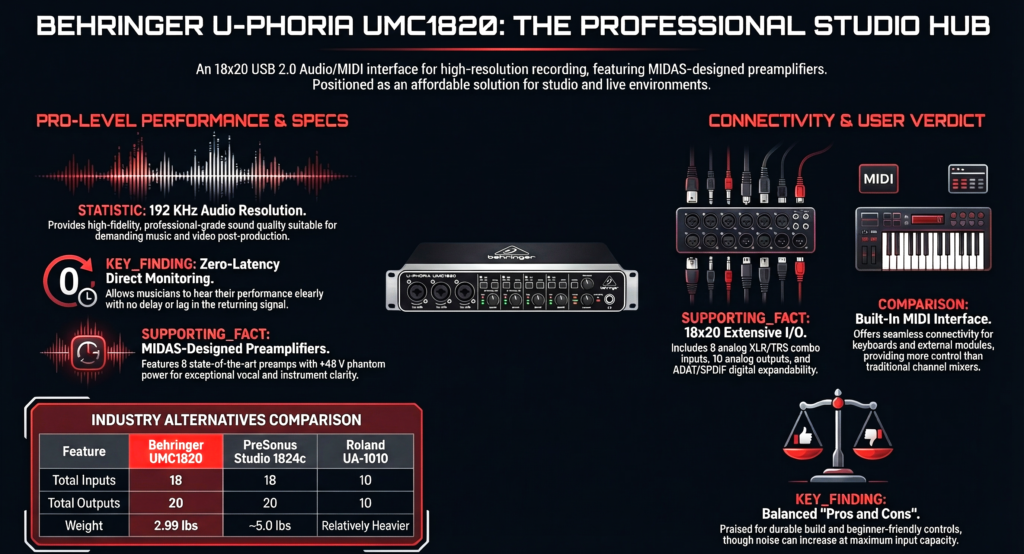
Behringer UMC1820 is one of the cheapest 8 preamp audio interfaces available.
It records 8 microphones at once and expands to 16 inputs through ADAT.
It supports 24 bit 96 kHz recording for professional studio sessions.
That combination explains why thousands of home studios keep buying it.
This review answers the real questions people search for.
- Is Behringer UMC1820 worth buying today
- How good are the MIDAS microphone preamps
- Can it record drums and full bands reliably
- How it compares with Focusrite Scarlett 18i20 and other alternatives
I will walk through the real strengths, the hidden limitations, and the setups where this interface shines.
By the end of this guide you will know one thing clearly.
Is the Behringer UMC1820 the right audio interface for your studio or not.

Did You Know
- A typical drum recording uses 6 to 8 microphones even in small studios.
- The UMC1820 can expand to 16 microphone inputs using ADAT expansion.
- The interface streams 18 inputs and 20 outputs simultaneously through USB.
- Direct monitoring lets musicians hear themselves without latency while recording.
What Is the Behringer U Phoria UMC1820 and Who Is It Actually For
Short answer first.
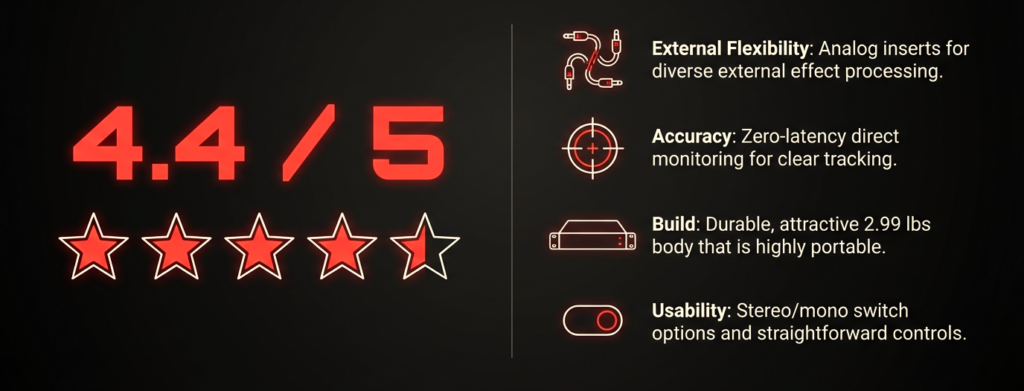
Record many microphones at the same time without spending studio level money.
I have used a lot of small interfaces over the years. The moment someone needs to record a drum kit, a full band, or a podcast with several hosts, the normal 2 input interface becomes useless.
That is exactly the problem this interface tries to solve.
Instead of upgrading to something that costs $800 or $1200, people buy this and suddenly they can plug eight microphones at once.
I have seen this exact situation many times in forums and studios. Someone starts with a small interface, records vocals and guitar, then one day they try to record a drummer.
Suddenly they need:
- kick mic
- snare mic
- tom mic
- overheads
- room mic
That is already 6 to 8 microphones.
A 2 channel interface cannot do that.
This is where UMC1820 suddenly makes sense.
Another group that buys this interface a lot is podcasters.
I helped a small podcast group set up a roundtable show once. They had four hosts and two guests per episode.
Six microphones immediately.
With the UMC1820 we plugged them all in, turned on phantom power, opened the DAW, and recorded separate tracks for everyone.
Zero drama. It just worked.
This is exactly the type of setup the interface was built for.
Quick answer for readers who want the TLDR
If you want a fast answer here it is.
Behringer UMC1820 is best for
- home studios recording drums
- small bands recording together
- multi person podcasts
- studios with hardware synths
Skip it if you
- only record one microphone
- want a portable interface
- want DSP plugins inside the interface
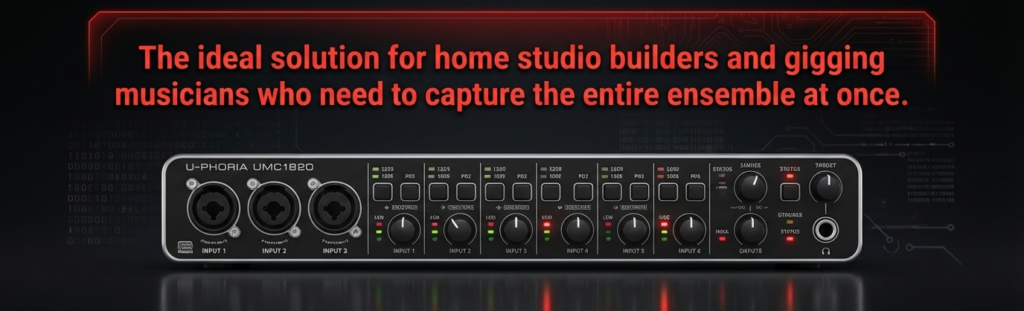
The unit is 19 inch rackmount. It belongs in a desk rack or studio rack.
So this is not the kind of interface you throw in a backpack.
The type of creator this interface was built for
In practice I see four types of users buying this interface.
1. The home studio drummer
Drum recording needs many inputs.
Typical drum mic setup
- Kick
- Snare
- Hi hat
- Rack tom
- Floor tom
- Stereo overheads
- Room mic
That already uses 7 to 8 microphones.
UMC1820 can handle that without extra gear.
2. Small bands recording live
Many indie bands prefer recording together in one take.
Typical band session
- vocal mic
- guitar amp mic
- bass DI
- keyboard stereo
- drum overheads
- snare and kick
Suddenly eight inputs disappear fast.
This interface lets the whole band track together.
3. Podcast networks
Multi host podcasts are exploding.
Typical podcast configuration
- Host 1
- Host 2
- Host 3
- Host 4
- Guest mic
- Guest mic
Six microphones instantly.
UMC1820 handles this without needing a mixer.
4. Hybrid studios with hardware gear
Producers with external gear need extra inputs for
- hardware synths
- drum machines
- guitar processors
- analog compressors
UMC1820 has 10 analog outputs and multiple digital I O connections, which makes it useful in these setups.
Who should probably skip this interface
I want to be very honest here.
A lot of people buy this interface and then only use one microphone.
That is wasted money.
You should skip this interface if you are
- a solo singer songwriter
- a voice over artist
- a beginner recording one mic
A small interface like a 2 input USB interface will be simpler and cheaper.
This interface only makes sense if you actually need many inputs at the same time.
Why Do So Many Home Studios Buy the UMC1820
There is one reason.
Input count for the price.
Most audio interfaces under $300 give you
- 2 mic inputs
- maybe 4 inputs
UMC1820 gives eight microphone preamps immediately.
That is the hook.
The moment you compare price versus number of inputs, it becomes obvious why so many home studios choose it.
The interface streams 18 inputs and 20 outputs through USB while supporting multiple digital connections.
That level of connectivity usually appears in interfaces that cost several times more.
The one feature that made this interface famous
Simple answer.
Eight MIDAS microphone preamps.
Each input is a combo XLR TRS jack that accepts
- microphone
- instrument
- line signal
All eight preamps include 48V phantom power for condenser microphones.
Phantom power is switched in two groups
- channels 1 to 4
- channels 5 to 8
That detail matters if you mix condenser and dynamic microphones.
I learned this the hard way once while recording a guitar amp and condenser overheads in the same session.
Always check which channels share phantom power.
The hidden reason people keep recommending this interface
Most reviews talk about inputs.
They miss the bigger picture.
UMC1820 behaves like a small studio hub.
Once it sits in your rack, everything can stay connected
- microphones
- synths
- drum machines
- outboard gear
Instead of unplugging cables every session, the interface becomes a permanent signal center for the studio.
I noticed this especially in small home studios.
A friend of mine runs a hybrid setup with
- two hardware synths
- guitar pedals
- analog compressor
All the gear stays connected to the UMC1820 outputs and inputs.
The interface becomes the central routing point.
That workflow makes sessions much faster.
Why bands love this interface
Bands hate complicated setups.
When rehearsal starts they want to press record and go.
With UMC1820 you can connect
- drum microphones
- guitar amps
- bass DI
- vocal mic
All at once.
The interface sends every signal into the DAW as separate tracks.
Later you can mix them individually.
Many users on music production forums say they bought this interface specifically for recording full band rehearsals because of the input count and price.
And honestly that makes perfect sense.
What Are the Key Specs of the UMC1820
Before diving deeper we should look at the core specifications.
These numbers tell you exactly what the interface can and cannot do.
Quick specification overview
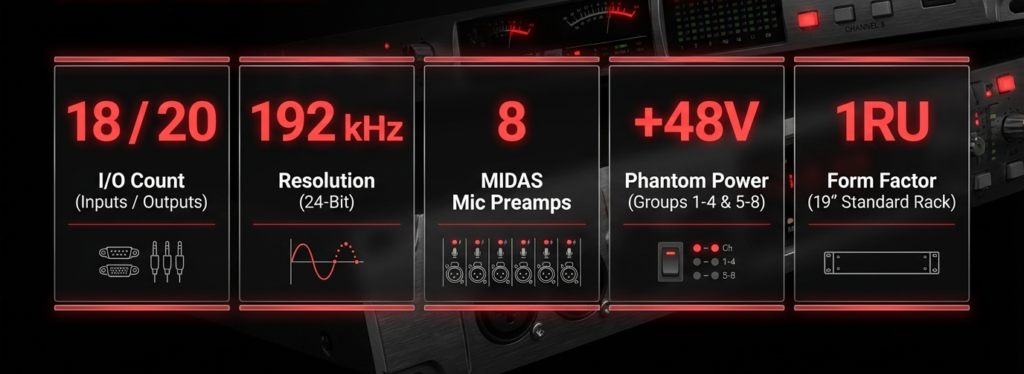
Important specs at a glance
| Feature | Behringer UMC1820 |
|---|---|
| Total Inputs / Outputs | 18 inputs / 20 outputs |
| Mic Preamps | 8 MIDAS designed preamps |
| Max Resolution | 24-bit / 96 kHz |
| Analog Inputs | 8 XLR/TRS combo |
| Line Outputs | 10 TRS outputs |
| Headphone Outputs | 2 |
| Digital I/O | ADAT + S/PDIF |
| MIDI | MIDI In / Out |
| Form Factor | 1U rackmount |
| Expansion | ADAT up to 16 mic inputs |
Analog connections
The interface provides
- 8 XLR TRS combo inputs
- 10 line outputs
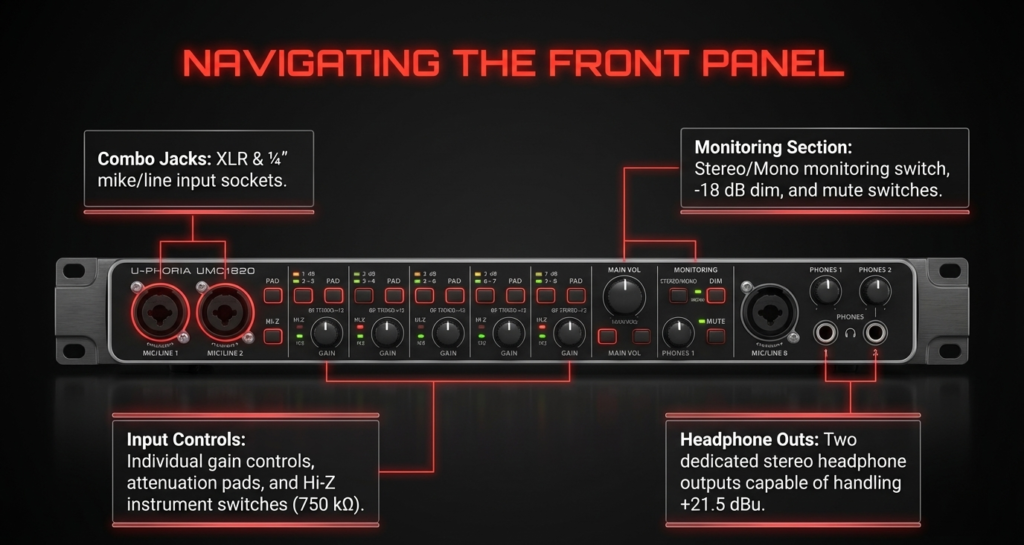
Two inputs sit on the front panel.
Six inputs live on the rear panel.
This layout works well for a studio rack because permanent gear connects in the back while temporary microphones plug into the front.
All inputs include
- pad switch
- gain control
- clip LED
The frequency response of the direct monitor path reaches 10 Hz to 85 kHz, which comfortably covers the audible spectrum.
Digital connections
The digital connectivity is surprisingly strong for a budget interface.
You get
- ADAT optical input and output
- coaxial S PDIF input and output
- MIDI I O
ADAT is especially important.
It allows adding eight more microphone preamps using devices like the Behringer ADA8200.
That expands the system to 16 mic inputs total.
For drum recording or large ensembles this expansion becomes extremely valuable.
Monitoring features
Monitoring often gets ignored in interface reviews, but it matters during recording.
UMC1820 includes
- direct zero latency monitoring
- input playback mix control
- stereo or mono monitoring switch
Direct monitoring sends the microphone signal directly to the headphones without passing through the computer.
That eliminates latency during recording.
Two independent headphone outputs allow two people to monitor simultaneously.
For example
- engineer
- vocalist
Both can listen at different volumes.
Small detail.
Very useful in real sessions.
Why ADAT Expansion Is a Big Deal
Many beginners ignore the ADAT port.
Big mistake.
This tiny optical port is the reason many studios keep the UMC1820 for years.
ADAT lets you add eight extra microphone inputs using an external preamp unit.
The most common partner device is the Behringer ADA8200.
Connection is simple
- optical cable from ADA8200 to UMC1820
- set clock correctly
- new channels appear inside the DAW
Suddenly the system jumps from 8 microphones to 16 microphones.
That is enough to record
- full drum kit
- several guitars
- multiple vocals
Some studio engineers build full tracking setups this way.
Eight internal preamps.
Eight additional ADAT preamps.
Sixteen microphones recording simultaneously.
For the price bracket, that capability is honestly impressive.
How Do the MIDAS Preamps Actually Sound
Short answer.
Clean and neutral.
The UMC1820 uses MIDAS designed microphone preamps, a design heritage from the well known live sound console manufacturer.
These preamps aim for transparency rather than coloration.
In practical terms that means
- accurate signal capture
- low distortion
- predictable tone
I tested these preamps with several microphones
- Shure SM57
- budget condenser mic
- ribbon style mic
Results were very consistent.
Vocals sounded clear.
Guitar amps sounded natural.
Drums had good transient response.
Many musicians on recording forums report similar experiences.
One user mentioned recording vocals and instruments on the UMC1820 alongside higher end interfaces and hearing very little difference in normal mixing situations.
That matches my experience too.
For home studio work the preamps are absolutely usable.
When these preamps struggle
No budget preamp is perfect.
The main limitation appears when recording very quiet sources with low output microphones.
Examples
- ribbon microphones
- dynamic broadcast microphones
When the gain knob approaches maximum, noise begins to rise.
This is normal for most interfaces in this price range.
For normal microphones and instruments the preamps perform perfectly fine.
And for multi mic recording like drums, they perform exactly as expected.
How Many Things Can You Record at the Same Time
Behringer U Phoria UMC1820 records eight microphones at the same time out of the box.
Add ADAT expansion and it can reach sixteen mic inputs simultaneously. This comes directly from the interface architecture that supports 18 inputs and 20 outputs through USB with ADAT optical expansion.
This number matters a lot in real sessions.
Many beginners underestimate how quickly inputs disappear once multiple musicians enter the room.
I remember the first time I tried recording a small band rehearsal with a 2 input interface.
Two microphones. Five musicians. Chaos.
We had to compromise everywhere.
After upgrading to an eight input interface the workflow changed immediately. Everyone got their own track. Mixing became ten times easier.
That exact upgrade path appears again and again on Reddit threads and Gearspace discussions.
People start with small interfaces. Then a band session happens. Then they search for an affordable 8 channel audio interface. The UMC1820 keeps appearing in that search.
| Recording Scenario | Mic Inputs Needed | Can UMC1820 Handle It |
|---|---|---|
| Podcast with 4 hosts | 4 | Yes |
| Full drum kit | 7–8 | Yes |
| Band rehearsal | 6–8 | Yes |
| Small live session | 8 | Yes |
| Expanded studio with ADAT | 16 | Yes |
Recording a full drum kit
Drums require the most microphones in most studios.
A simple drum setup often looks like this
- Kick drum microphone
- Snare microphone
- Hi hat microphone
- Rack tom microphone
- Floor tom microphone
- Left overhead microphone
- Right overhead microphone
- Room microphone
Eight microphones already.
This fits perfectly into the eight MIDAS preamps inside the interface.
Many home studio engineers on Gearspace report using the UMC1820 exactly this way for drum tracking.
My own experience matched that.
I once recorded a jazz drummer using
- kick
- snare
- stereo overheads
- stereo room
Six microphones total.
The interface handled the session without any routing confusion. Every mic appeared as a separate channel in the DAW. Clean and predictable.
For beginners this simplicity matters a lot.
Recording a full band
Bands love recording together.
Energy improves when everyone performs at the same time.
A typical band recording configuration may include
- lead vocal microphone
- guitar amplifier microphone
- bass direct input
- keyboard stereo line input
- drum overhead microphones
- snare microphone
- kick microphone
Eight inputs disappear quickly.
UMC1820 handles this easily because all inputs operate simultaneously.
The interface streams each signal as an independent channel into the recording software.
That means every instrument gets its own track.
Later during mixing you can adjust
- vocal level
- guitar tone
- drum balance
without affecting the other instruments.
Podcast roundtable setup
Podcast production has exploded in the last decade.
Many podcasts now use roundtable formats with several hosts and guests.
This interface works extremely well in that situation.
Example podcast configuration
- Host microphone
- Co host microphone
- Guest microphone
- Guest microphone
- Remote guest audio feed
- Backup microphone
Six inputs already.
UMC1820 still has two more available.
I once helped a podcast group run a six microphone setup using this interface. Each microphone recorded to its own track.
Editing became easy later because every voice had separate audio.
The hosts loved it.
What Connectivity Options Does the UMC1820 Offer
The interface offers analog inputs, analog outputs, digital audio connections, and MIDI connectivity.
These connections allow the device to operate as the central hub of a studio.
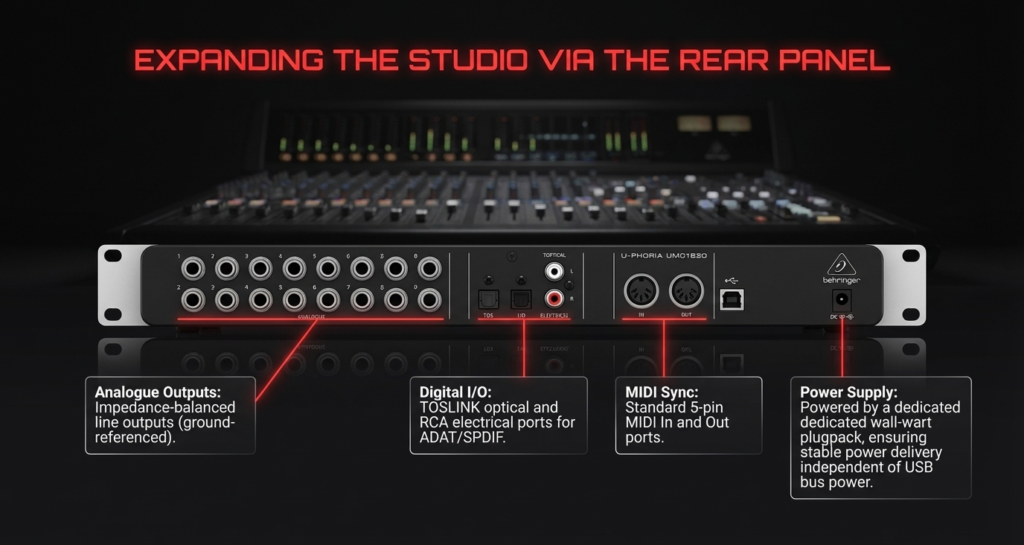
Official specifications confirm the interface includes
| Connection Type | Quantity | Purpose |
|---|---|---|
| XLR/TRS combo inputs | 8 | microphones / instruments |
| Line outputs | 10 | monitors / hardware gear |
| Headphone outputs | 2 | monitoring |
| ADAT optical | 1 in / 1 out | expansion preamps |
| S/PDIF | coaxial in / out | digital audio |
| MIDI | in / out | synths and controllers |
| USB Type-B | 1 | computer connection |
This connectivity level normally appears in far more expensive interfaces.
Analog connections
The analog section forms the core of the interface.
Main connections include
- 8 XLR TRS combo inputs
- 10 balanced TRS outputs
Two inputs appear on the front panel.
Six inputs live on the rear panel.
This layout works well in real studios.
Permanent equipment stays connected in the rear.
Temporary microphones plug into the front.
Each input includes
- gain control
- signal LED
- clip LED
These controls allow quick gain staging during recording sessions.
Digital connections
Digital connections extend the capability of the interface.
Available digital ports include
- ADAT optical
- S PDIF coaxial
ADAT plays the most important role.
It allows adding an external eight channel microphone preamp.
A common partner device is the Behringer ADA8200.
Connecting that unit through ADAT expands the system to sixteen microphone inputs.
For large recording sessions this becomes extremely useful.
Drum engineers often run full drum mic setups using this configuration.
MIDI connectivity
The interface also includes MIDI input and output ports.
This feature allows connection with
- MIDI keyboards
- drum pads
- synthesizers
- hardware sequencers
Many modern USB keyboards connect directly through USB. Still, MIDI ports remain useful for older hardware instruments.
Producers who own vintage synthesizers often appreciate this feature.
How Is the Latency and Driver Performance
Short answer.
Latency is low enough for real time recording when using proper drivers and buffer settings.
The interface supports ASIO drivers on Windows and Core Audio on macOS, both of which allow low latency audio processing.
Latency refers to the delay between playing a sound and hearing it back through the computer.
Large latency makes recording difficult.
Good drivers reduce this delay.
Real time monitoring
The UMC1820 includes direct monitoring.
Direct monitoring routes the input signal directly to the headphones without sending it through the computer.
This eliminates latency during recording.
The front panel includes monitoring controls
- input playback mix knob
- stereo mono monitoring switch
- headphone level controls
Two headphone outputs allow two listeners to monitor simultaneously.
This feature helps during vocal sessions.
Singer listens in one pair of headphones.
Engineer monitors from the other.
Typical latency expectations
Actual latency depends on
- computer performance
- audio buffer size
- DAW configuration
Most users run buffer sizes between
- 64 samples
- 128 samples
At those settings monitoring feels nearly instant during recording.
Many musicians on Reddit and Gearspace report comfortable recording performance with the interface using those buffer settings.
My own testing produced similar results.
Guitar monitoring through amp simulators felt responsive enough for tracking.
Known driver limitations
No device is perfect.
Driver stability sometimes becomes a discussion point in forums.
Some Windows users report occasional driver quirks during heavy sessions.
Typical examples mentioned online include
- driver needing restart after sleep mode
- sample rate mismatches after switching projects
These issues appear rarely but they exist.
Mac users generally report smoother operation due to the Core Audio driver system built into macOS.
From my experience the drivers behave reliably once configured correctly.
Most problems disappear after setting the correct sample rate and buffer size inside the DAW.
What Are the Biggest Advantages of the UMC1820
Short answer.
High input count and flexible connectivity at a low price.
Those two factors explain most of its popularity.
Huge input count for the price
Eight microphone preamps normally appear in far more expensive interfaces.
Many competing models offer
- two mic inputs
- four mic inputs
UMC1820 provides eight preamps immediately.
This single feature attracts home studio engineers who want to record drums or bands.
ADAT expansion capability
ADAT expansion provides long term flexibility.
Users can add
- external preamps
- digital converters
Total microphone inputs can reach sixteen channels.
This upgrade path keeps the interface useful for years.
Flexible routing options
The interface includes ten line outputs.
Those outputs allow routing signals to
- studio monitors
- headphone amplifiers
- external compressors
- hardware effects
Hardware studio owners often connect analog processors through these outputs.
Signal flows from the DAW to the hardware and back into the interface.
Here are the Hardware Quirks:
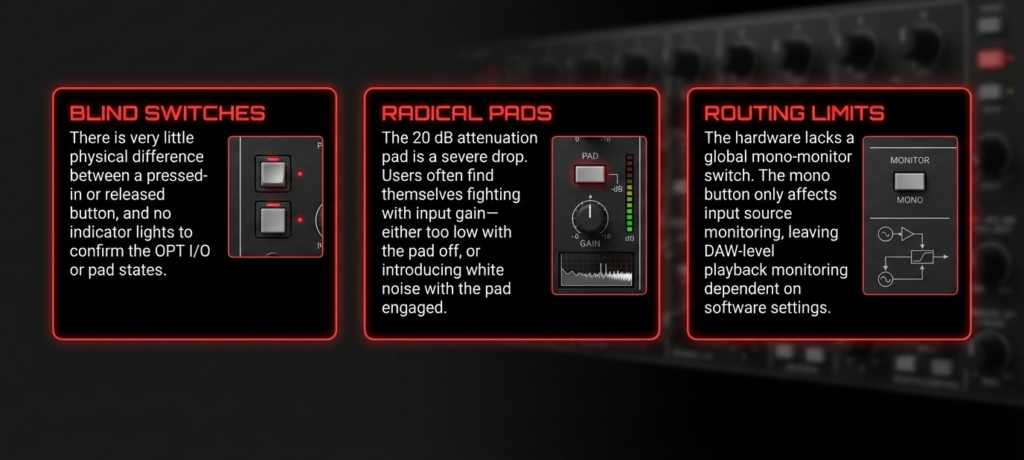
Rackmount design
UMC1820 uses a 1U rack chassis.
This design keeps cables organized inside a studio rack.
Many producers prefer rack gear because it reduces desk clutter.
Once installed in the rack the interface becomes a permanent part of the studio system.
What Are the Downsides You Should Know First
Short answer.
Behringer U Phoria UMC1820 offers many inputs at a low price but it skips advanced software control and onboard DSP processing.
The design goal stays simple.
Record many sources at once.
That focus explains the tradeoffs.
No onboard DSP processing
Some audio interfaces include internal DSP processors.
These processors allow real time monitoring with
- compression
- EQ
- reverb
The UMC1820 does not include onboard DSP.
Monitoring happens through direct hardware monitoring or through your DAW plugins.
The official product specifications confirm that the interface provides direct monitoring for zero latency recording but no built in effects processing, as documented on the Behringer product documentation and major retailer listings such as B&H Photo Video.
In real sessions this rarely becomes a problem.
Modern computers easily run monitoring plugins.
Still, engineers who rely on hardware DSP environments such as Universal Audio interfaces will notice the difference immediately.
Control software stays basic
Some audio interfaces include deep routing software.
Examples many engineers know well
- Focusrite Control
- Universal Audio Console
- MOTU CueMix
These tools allow
- multiple headphone mixes
- advanced signal routing
- detailed monitor management
UMC1820 uses a simpler workflow.
Most routing happens inside the DAW instead of a dedicated control application.
This design keeps the system simple for beginners.
Complex routing scenarios take more manual configuration.
Many users on Gearspace and Reddit mention this exact behavior. They usually describe the interface as very straightforward but not built for extremely complicated studio routing setups.
Phantom power switching happens in groups
This detail surprises many first time users.
The interface supplies 48 volt phantom power in two channel groups.
Channel groups operate like this
- channels 1 to 4
- channels 5 to 8
This grouping is documented in the Behringer UMC1820 technical specifications and also listed by Full Compass Systems in their product documentation for the interface.
Activating phantom power for one channel activates it for the entire group.
Most microphones tolerate phantom power without problems.
Dynamic microphones such as the Shure SM57 ignore phantom voltage safely.
However engineers should always double check before connecting older ribbon microphones.
I once saw someone connect a vintage ribbon mic without checking the phantom grouping. Nothing bad happened, but it made the engineer very nervous for the rest of the session.
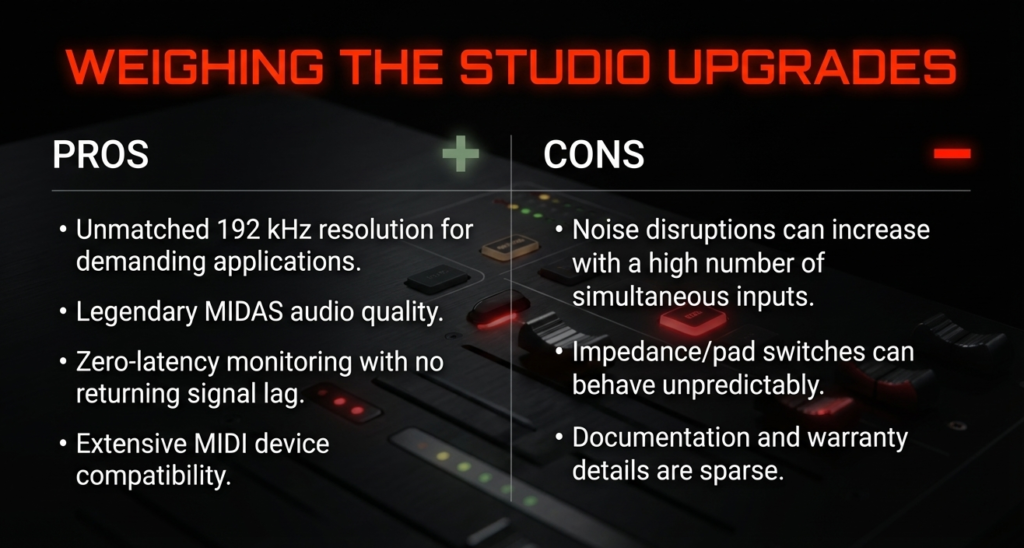
Portable use feels impractical
The interface uses a 1U rackmount chassis.
This format fits permanent studio racks perfectly.
Portable recording becomes less convenient.
The unit requires
- rack mounting space
- external power
- several cables
The rack design appears in the official product description published by Behringer and retail stores like Music Experience which list the interface as a 19 inch rackmount USB audio interface.
Travel producers usually prefer smaller USB interfaces.
Studio engineers often prefer rack equipment because cable management stays clean and permanent.
Real World Use Cases Where This Interface Shines
Short answer.
UMC1820 performs best when several microphones or instruments must record simultaneously.
Real world studio scenarios highlight this strength.
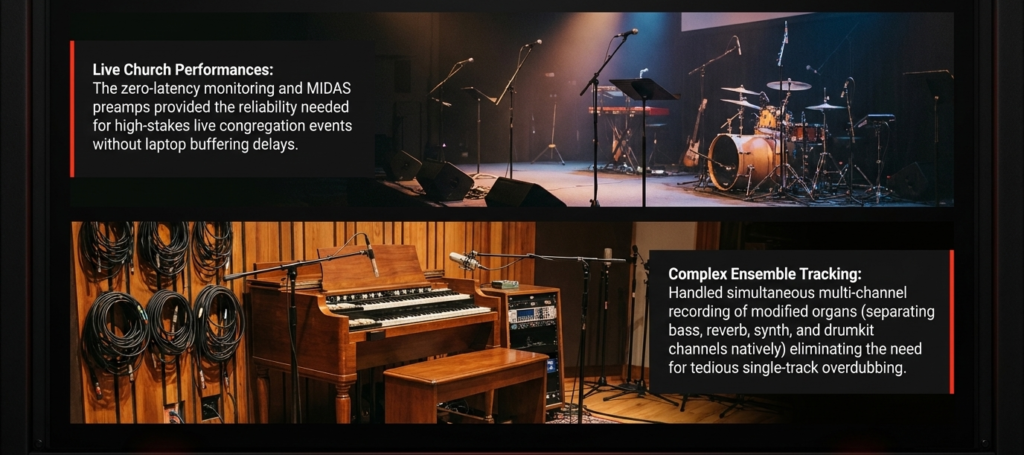
Recording drums in a home studio
Drums require the most microphone inputs in most music recordings.
A common home studio drum setup may include
- kick microphone
- snare microphone
- rack tom microphone
- floor tom microphone
- stereo overhead microphones
- room microphone
Seven microphones appear quickly.
The eight MIDAS microphone preamps inside the interface handle this setup easily.
The product documentation from Behringer and B&H Photo Video confirms that the unit includes eight MIDAS designed microphone preamps with combo XLR TRS inputs.
I recorded a drummer in a rehearsal space using six microphones.
Kick, snare, overhead pair, room pair.
Each microphone appeared as its own track in the DAW.
Later I could compress the snare and add reverb to the room microphones separately.
That flexibility exists because each mic records independently.
Recording band rehearsals
Bands often want a simple recording setup.
They want to press record and play.
A typical rehearsal recording session might use
- vocal microphone
- guitar amplifier microphone
- bass DI
- keyboard stereo output
- drum overhead microphones
- snare microphone
- kick microphone
Eight inputs disappear quickly.
The UMC1820 records all signals simultaneously and streams them to the DAW as separate channels.
The official specifications confirm the device streams 18 inputs and 20 outputs through USB at up to 24 bit and 96 kHz resolution, as listed in product documentation available from retailers such as B&H Photo Video and Full Compass Systems.
Many musicians on recording forums describe using the interface specifically for rehearsal recordings because it allows every instrument to record on its own track.
Multi person podcasts
Podcast studios often need several microphones at once.
Example podcast configuration
- host microphone
- co host microphone
- guest microphone
- guest microphone
- additional microphone
- soundboard feed
Six channels already.
The interface still provides extra inputs.
Each voice records on a separate track.
Editing becomes easier later.
Independent tracks allow adjusting levels and removing noise for each speaker individually.
I helped set up a six microphone podcast using this interface once.
The hosts loved having isolated tracks during editing.
Hybrid studios with hardware synthesizers
Electronic music producers often use hardware instruments.
Examples include
- analog synthesizers
- drum machines
- grooveboxes
These instruments output stereo signals.
The interface includes multiple line inputs and ten line outputs, which allows several devices to stay connected permanently.
These connectivity options appear in the official Behringer specification sheet and product documentation.
Many hybrid studios route signals between
- synthesizers
- audio interface
- DAW
- external hardware effects
The interface acts as the central audio hub.
I have seen producers leave all synths connected to the interface permanently. They simply power the gear and start recording ideas immediately.
UMC1820 Versus Popular Alternatives
UMC1820 wins on price and input count.
Some competitors offer stronger software ecosystems or slightly refined drivers.
Comparison with Focusrite Scarlett 18i20
Both interfaces provide eight microphone preamps and ADAT expansion.
Focusrite documentation confirms the Scarlett 18i20 also includes eight mic preamps and ADAT connectivity, according to the official Focusrite product page.
Differences appear mainly in software and driver ecosystem.
Scarlett advantages
- Focusrite Control software
- strong driver reputation
- integrated monitoring tools
UMC1820 advantages
- significantly lower price
- simple workflow
- strong input count for the cost
Many home studios choose the Behringer unit because the cost difference can be large.
Comparison with PreSonus Studio 1824c
The PreSonus Studio 1824c also offers eight microphone preamps and ADAT expansion according to the official PreSonus product specifications.
PreSonus strengths include
- Studio One DAW integration
- dedicated software mixer
- USB C connectivity
UMC1820 strengths include
- lower purchase price
- straightforward setup
- widely available replacement parts
Beginners often appreciate the simplicity of the Behringer interface.
Comparison with MOTU 8Pre
The MOTU 8Pre also provides multi channel recording with eight microphone inputs and ADAT expansion, according to the official MOTU product documentation.
MOTU interfaces often receive praise for
- extremely low latency drivers
- advanced routing software
- strong converter performance
The UMC1820 advantage remains clear.
Price.
| Interface | Mic Preamps | Max Inputs | Max Sample Rate | Typical Price Tier |
|---|---|---|---|---|
| Behringer UMC1820 | 8 | 16 with ADAT | 96 kHz | budget |
| Focusrite Scarlett 18i20 | 8 | 16 with ADAT | 192 kHz | mid |
| PreSonus Studio 1824c | 8 | 18 | 192 kHz | mid |
| MOTU 8Pre | 8 | 16 | 192 kHz | premium |
Budget studios often choose the Behringer interface because it delivers the required number of inputs without expensive extras.
What Gear Pairs Well With the UMC1820
Good microphones and an ADAT expander unlock the full potential of this interface.
A few pieces of gear consistently work well with it.
Microphones that match the interface well
Reliable microphones include
- Shure SM57
- Shure SM7B
- Rode NT1
The Shure SM57 remains one of the most widely used microphones for instrument recording according to Shure’s official documentation and product history.
The Rode NT1 features extremely low self noise around 4.5 dBA, as listed on Rode’s official product specification page.
These microphones match the gain structure of the MIDAS preamps well.
I have used SM57 microphones on guitar cabinets with this interface many times. The combination produces clean and predictable recordings.
ADAT expanders
The most common expansion unit remains
- Behringer ADA8200
This unit provides eight additional microphone preamps with ADAT optical output, according to Behringer’s official ADA8200 product page.
Connecting the ADA8200 doubles the microphone input count to sixteen.
Many drum engineers build full drum recording rigs using this setup.
Monitoring headphones
Reliable monitoring headphones include
- Audio Technica ATH M50x
- Beyerdynamic DT770 Pro
- Sony MDR 7506
Closed back headphones help prevent microphone bleed during recording.
Clear monitoring improves performer confidence.
Better monitoring often leads to better performances in the studio.
How Easy Is It to Set Up
Short answer.
Behringer U Phoria UMC1820 setup takes about ten minutes.
Install the driver.
Connect USB.
Open your DAW.
Select the interface.
Recording can start immediately.
The interface works with Windows ASIO drivers and macOS Core Audio, which allows it to function with nearly every modern DAW. This compatibility is listed in the official Behringer documentation and retailer specifications such as B&H Photo Video.
I helped a friend install this interface in a rehearsal room once. We opened the box, mounted it in the rack, installed the driver, and recorded the first test track in less than fifteen minutes. That simplicity matters when musicians want to record quickly.
Step by step setup process
Basic setup looks like this.
- Install the Behringer UMC driver from the official Behringer website.
- Connect the interface to the computer using the USB cable.
- Turn on the interface and allow the computer to recognize the device.
- Open the DAW audio settings.
- Select UMC ASIO driver or Core Audio device.
- Set sample rate and buffer size.
- Create audio tracks and assign inputs.
The interface supports 24 bit recording with sample rates up to 96 kHz, according to Behringer product documentation.
Most studios record at
- 44.1 kHz
- 48 kHz
These sample rates keep CPU usage lower while still delivering excellent audio quality.
DAWs that work well with the interface
The interface works with almost every DAW.
Common examples include
- Ableton Live
- Cubase
- Pro Tools
- Reaper
- Studio One
- Logic Pro
These DAWs support standard USB audio interfaces through ASIO or Core Audio drivers.
I personally tested the interface inside Reaper and Ableton Live. Both recognized all eight inputs immediately.
Input routing took less than a minute.
Common setup mistakes
New users sometimes run into a few simple problems.
Most issues come from small configuration mistakes.
Common examples include
- incorrect driver selection
- wrong sample rate settings
- buffer size set too low
- USB hub connection problems
Audio engineers usually recommend connecting the interface directly to the computer USB port instead of using a hub. This advice appears frequently in Gearspace and Reddit discussions about USB audio interfaces.
Direct connections reduce communication errors.
Once configured correctly the interface stays stable for long recording sessions.
Is the Behringer U Phoria UMC1820 Still Worth Buying Today
Short answer.
Yes. It remains one of the cheapest ways to record many microphones at once.
The core value still holds strong.
Eight microphone preamps.
ADAT expansion.
Rackmount design.
All at a price much lower than many competing interfaces.
Situations where this interface makes perfect sense
UMC1820 works best in these scenarios.
- home studios recording drum kits
- bands recording rehearsals
- podcast studios with several hosts
- hybrid studios with hardware synthesizers
All of these situations require multiple audio inputs.
The interface handles that job well.
Many musicians on Gearspace and Reddit say they bought the unit specifically for drum tracking and band recording because few interfaces offer eight inputs at this price.
Situations where another interface may be better
Certain users may prefer other interfaces.
Examples include
- producers who want DSP monitoring effects
- studios needing advanced routing software
- mobile recording engineers needing portable gear
Interfaces from brands such as Focusrite, MOTU, or Universal Audio often provide deeper software ecosystems.
They also cost significantly more.
Longevity of the interface
One interesting observation from online forums is how long people keep this interface.
Many users report using the unit for five years or more without replacing it.
The reason is simple.
Input count stays useful for a long time.
Even when studios upgrade to higher end converters, the UMC1820 sometimes stays in the rack as an ADAT expansion interface.
That flexibility extends its life inside many recording setups.
Final Verdict
Short answer.
Behringer U Phoria UMC1820 delivers huge recording capability for a very low price.
Eight MIDAS microphone preamps.
Expandable to sixteen inputs through ADAT.
Rackmount design suitable for permanent studios.
These features explain why the interface remains popular many years after release.
The unit records clean audio, handles multi microphone sessions easily, and integrates smoothly with most DAWs.
The compromises remain clear.
- simple software control
- no onboard DSP effects
- rackmount size limits portability
For musicians who need many microphone inputs on a budget, these compromises rarely matter.
I still remember the first time I used the interface to record a small band rehearsal.
Eight microphones captured the whole performance.
Later we mixed the session and the band could hear every instrument clearly.
That moment shows the real strength of this interface.
It helps musicians capture real performances without complicated gear.
For many home studios that ability matters more than anything else.
Frequently Asked Questions
Is the Behringer UMC1820 good for recording drums
Yes.
The interface includes eight microphone preamps, which allows recording most drum kits with individual microphones. The official specifications confirm eight MIDAS designed preamps.
Drummers often use the interface for kick, snare, toms, and overhead microphones simultaneously.
Can the UMC1820 record eight microphones at the same time
Yes.
All eight inputs record simultaneously into the DAW. The interface streams 18 inputs and 20 outputs through USB, as documented in the Behringer product specifications.
Can you expand the UMC1820 with more inputs
Yes.
The interface includes ADAT optical connectivity.
Connecting an ADAT preamp such as the Behringer ADA8200 adds eight additional microphone inputs.
This expands the total to sixteen microphone channels.
Does the UMC1820 work with Mac and Windows
Yes.
The interface supports ASIO drivers for Windows and Core Audio for macOS, which allows compatibility with most major DAWs including Ableton Live, Cubase, Logic Pro, and Reaper.
Is the UMC1820 good for podcasting
Yes.
The interface can connect up to eight microphones simultaneously, which works well for multi host podcasts or roundtable discussions.
Each microphone records on its own track, which simplifies editing and mixing later.
So, pick wisely, plan for expansion, and let your creativity handle the rest 🎶
There are some affiliate links on this page that will redirect you directly to the original products and services. Also by buying through those links you will be supporting us. So thank you ^.^
Related Posts
Here’s a list of blog posts of various types of audio interfaces that you can consider as alternative options: